Dell Unity: Cómo actualizar la información de contacto del cliente en Unisphere de Unity.
Summary: Cuando un sistema Unity inicia una call home para abrir una solicitud de servicio para un problema de soporte, envía la información de contacto del cliente junto con el mensaje de alerta. Esto simplifica el proceso para que los ingenieros de soporte técnico se comuniquen con las personas correspondientes. La información de contacto actualizada garantiza que el soporte técnico tenga la información más precisa para ponerse en contacto con el cliente en respuesta a un problema de soporte. Dell Technologies recomienda mantener actualizada la información del contacto principal en Unisphere de Unity. En este artículo, se muestra cómo hacerlo. ...
This article applies to
This article does not apply to
This article is not tied to any specific product.
Not all product versions are identified in this article.
Instructions
Para actualizar la información de contacto del cliente en Unity Unisphere, siga estos pasos.
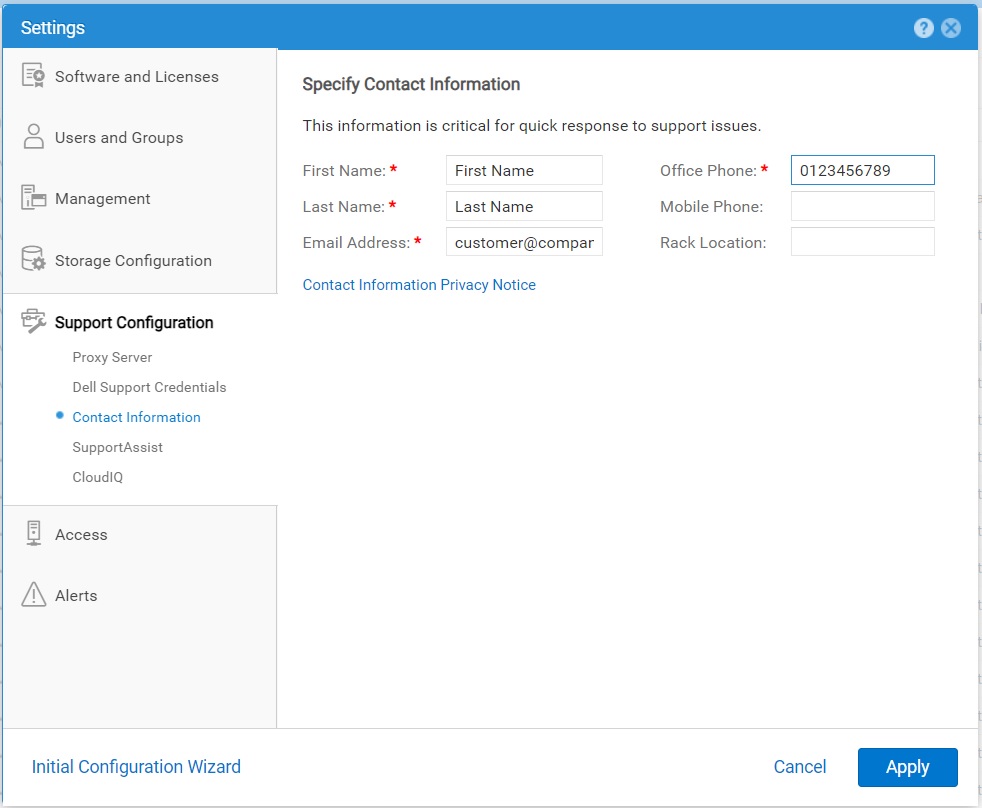
- Seleccione el icono Settings y, a continuación, seleccione Support Configuration > Contact Information.
- Especifique los detalles de contacto.
- Haga clic en Aplicar para guardar los cambios.
Affected Products
Dell EMC Unity, Dell EMC Unity 300F, Dell EMC Unity 350F, Dell EMC Unity 400, Dell EMC Unity 400F, Dell EMC Unity 450F, Dell EMC Unity 500, Dell EMC Unity 500F, Dell EMC Unity 550F, Dell EMC Unity 600Products
Dell Unity 450F DC, Dell Unity 300, Dell EMC Unity XT 380, Dell EMC Unity XT 380F, Dell EMC Unity XT 480, Dell EMC Unity XT 480F, Dell EMC Unity 600F, Dell EMC Unity 650F, Dell EMC Unity XT 680, Dell EMC Unity XT 680F, Dell EMC Unity XT 880
, Dell EMC Unity XT 880F, Dell EMC Unity Family |Dell EMC Unity All Flash, Dell EMC Unity Family, Dell EMC Unity Hybrid, Dell Unity Operating Environment (OE), Dell EMC UnityVSA Professional Edition/Unity Cloud Edition
...
Article Properties
Article Number: 000216364
Article Type: How To
Last Modified: 20 Oct 2025
Version: 3
Find answers to your questions from other Dell users
Support Services
Check if your device is covered by Support Services.