Dell Unity:Unity Unisphereでお客様の連絡先情報を更新する方法。
Summary: Unityシステムがコール ホームを開始してサポートの問題に対するサービス リクエストを開くと、お客様の連絡先情報とアラート メッセージが送信されます。これにより、テクニカル サポート エンジニアが適切な担当者に連絡するプロセスがシンプルになります。 最新の連絡先情報により、テクニカルサポートは、サポートの問題に対応してお客様に連絡するための最も正確な情報を得ることができます。 Dell Technologiesでは、Unity Unisphereで主要連絡先の情報を最新の状態に保つことをお勧めします。この文書では、その方法について説明します。 ...
This article applies to
This article does not apply to
This article is not tied to any specific product.
Not all product versions are identified in this article.
Instructions
Unity Unisphereでお客様の連絡先情報を更新するには、次の手順を実行します。
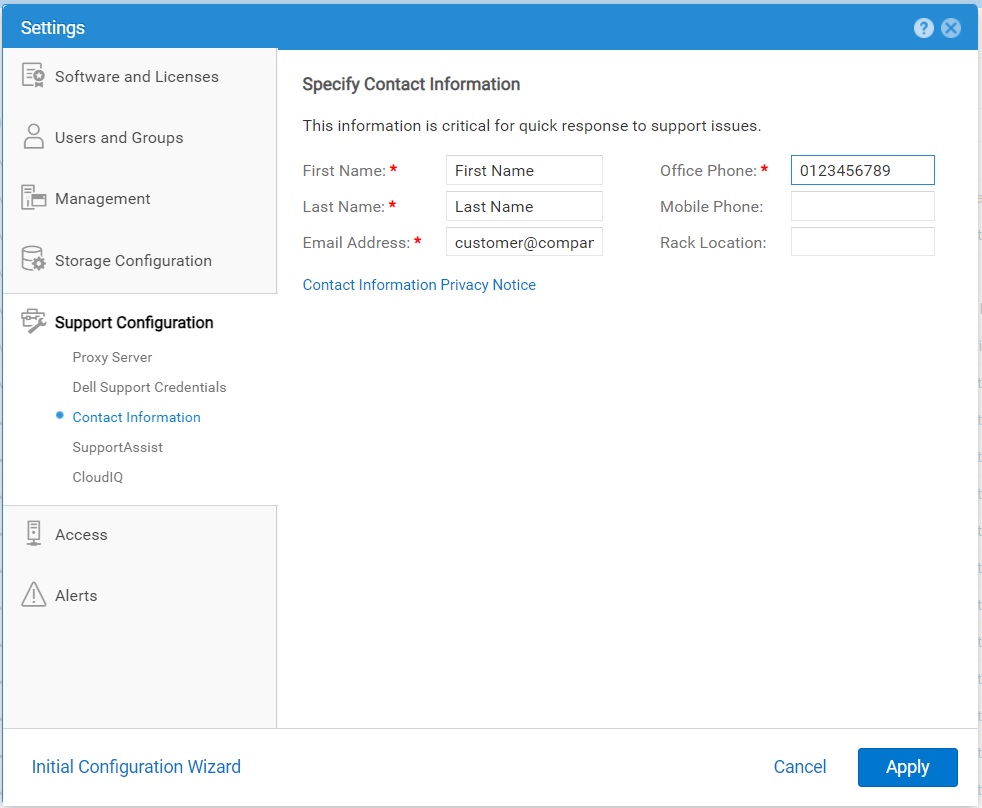
- Settings アイコンを選択し、 Support Configuration > Contact Information を選択します。
- 連絡先の詳細を指定します。
- [ 適用 ] をクリックして変更を保存します。
Affected Products
Dell EMC Unity, Dell EMC Unity 300F, Dell EMC Unity 350F, Dell EMC Unity 400, Dell EMC Unity 400F, Dell EMC Unity 450F, Dell EMC Unity 500, Dell EMC Unity 500F, Dell EMC Unity 550F, Dell EMC Unity 600Products
Dell Unity 450F DC, Dell Unity 300, Dell EMC Unity XT 380, Dell EMC Unity XT 380F, Dell EMC Unity XT 480, Dell EMC Unity XT 480F, Dell EMC Unity 600F, Dell EMC Unity 650F, Dell EMC Unity XT 680, Dell EMC Unity XT 680F, Dell EMC Unity XT 880
, Dell EMC Unity XT 880F, Dell EMC Unity Family |Dell EMC Unity All Flash, Dell EMC Unity Family, Dell EMC Unity Hybrid, Dell Unity Operating Environment (OE), Dell EMC UnityVSA Professional Edition/Unity Cloud Edition
...
Article Properties
Article Number: 000216364
Article Type: How To
Last Modified: 20 Oct 2025
Version: 3
Find answers to your questions from other Dell users
Support Services
Check if your device is covered by Support Services.