Dell Unity:如何在 Unity Unisphere 中更新客戶連絡人資訊。
Summary: 當 Unity 系統啟動 Call Home 以開啟支援問題的服務要求時,系統會傳送客戶的聯絡資訊與警示訊息。如此可簡化技術支援工程師聯絡適當人員的程式。 最新的聯絡資訊可確保技術支援部門在回應支援問題時,能與客戶連絡時提供最準確的資訊。 Dell Technologies 建議您在 Unity Unisphere 中將主要連絡人的資訊保持在最新狀態。本文將說明如何執行此操作。 ...
This article applies to
This article does not apply to
This article is not tied to any specific product.
Not all product versions are identified in this article.
Instructions
若要在 Unity Unisphere 中更新客戶連絡人資訊,請遵循這些步驟。
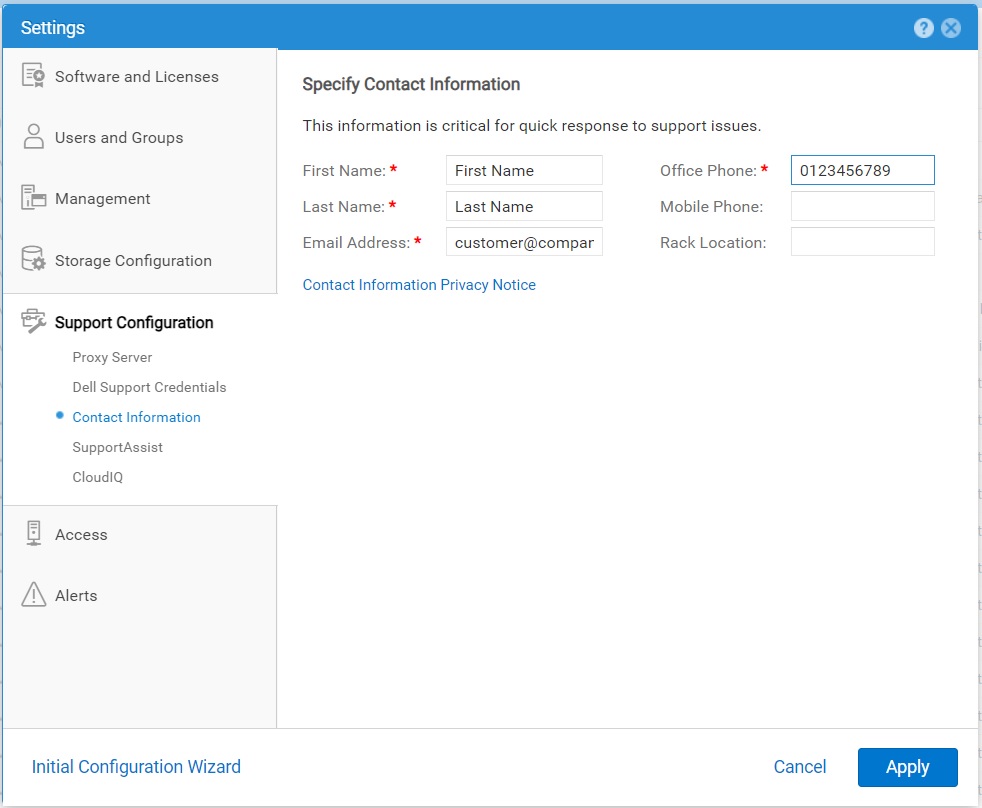
- 選取 「設定 」圖示,然後選取 「Support Configuration」>聯絡資訊。
- 指定您的聯絡詳細資料。
- 按一下 Apply (套 用) 以儲存變更。
Affected Products
Dell EMC Unity, Dell EMC Unity 300F, Dell EMC Unity 350F, Dell EMC Unity 400, Dell EMC Unity 400F, Dell EMC Unity 450F, Dell EMC Unity 500, Dell EMC Unity 500F, Dell EMC Unity 550F, Dell EMC Unity 600Products
Dell Unity 450F DC, Dell Unity 300, Dell EMC Unity XT 380, Dell EMC Unity XT 380F, Dell EMC Unity XT 480, Dell EMC Unity XT 480F, Dell EMC Unity 600F, Dell EMC Unity 650F, Dell EMC Unity XT 680, Dell EMC Unity XT 680F, Dell EMC Unity XT 880
, Dell EMC Unity XT 880F, Dell EMC Unity Family |Dell EMC Unity All Flash, Dell EMC Unity Family, Dell EMC Unity Hybrid, Dell Unity Operating Environment (OE), Dell EMC UnityVSA Professional Edition/Unity Cloud Edition
...
Article Properties
Article Number: 000216364
Article Type: How To
Last Modified: 20 Oct 2025
Version: 3
Find answers to your questions from other Dell users
Support Services
Check if your device is covered by Support Services.