How to Identify the Software Serial ID for PowerProtect Data Manager to Open a Case
Summary: Where to find the software serial number for PowerProtect Data Manager when opening a Service Request (SR).
This article applies to
This article does not apply to
This article is not tied to any specific product.
Not all product versions are identified in this article.
Instructions
Procedure:
In order to open a PowerProtect Data Manager service request, the Software Serial ID (SWID) is used to identify your system.
Follow the steps below to get the Software Serial ID for PowerProtect Data Manager:
-
Click the Gear icon and select License.
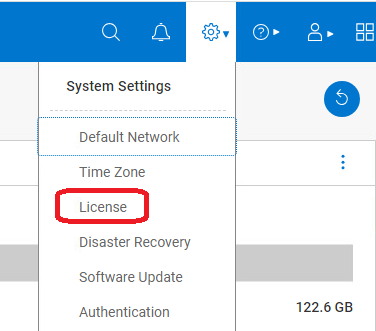
Figure 1: Select License from the System Settings dropdown. -
In the screen that opens, the SWID number is shown.
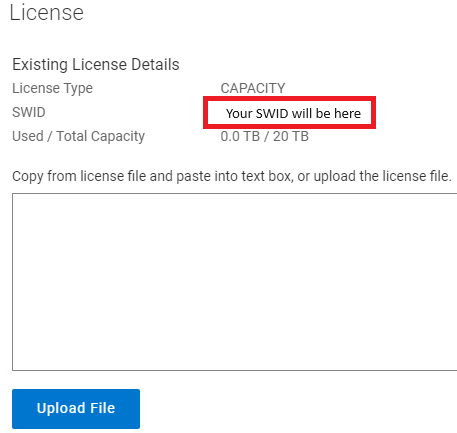
Figure 2: Screenshot of SWID
Alternately, you can also get the Software Serial ID by:
- Using a text editor such as Notepad, open your PowerProtect Data Manager license file and search for:
<SoftwareId plc="XX">
Affected Products
PowerProtect SoftwareProducts
PowerProtect Data ManagerArticle Properties
Article Number: 000218484
Article Type: How To
Last Modified: 25 Feb 2025
Version: 6
Find answers to your questions from other Dell users
Support Services
Check if your device is covered by Support Services.