설치 후 PowerStore VSI 서비스가 아직 가동되지 않았습니다.
Summary: VSI(Virtual Storage Integrator)를 설치한 후 VSI WebUI 로그인 화면에 다음 오류가 표시됩니다. "VSI 서비스가 아직 모두 가동되지 않았습니다. 몇 분 정도 기다린 다음 이 페이지를 새로 고치십시오. 문제가 15분 이상 지속되면 VSI 가상 머신을 재부팅하고 다시 시도하십시오."
This article applies to
This article does not apply to
This article is not tied to any specific product.
Not all product versions are identified in this article.
Symptoms
VSI WebUI 로그인 화면 오류: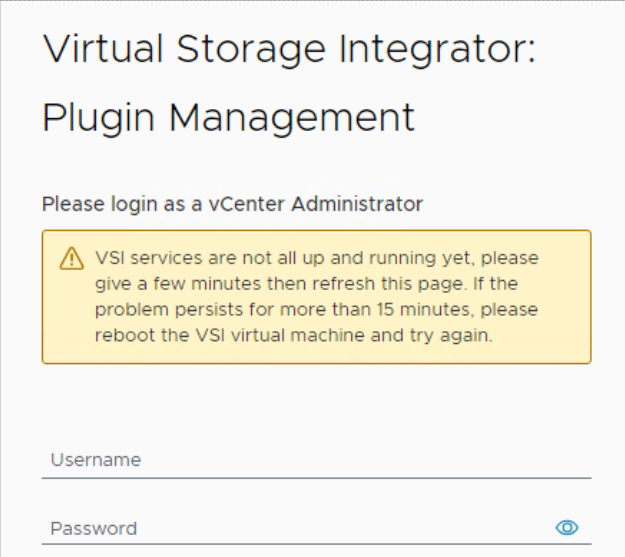
VSI 로그는 "iapi-rest-error" 로그에 다음과 같은 반복 오류 메시지를 표시합니다.
Caused by: java.util.concurrent.ExecutionException: org.redisson.client.RedisConnectionException: java.net.UnknownHostException: Failed to resolve 'redis' [A(1)] after 2 queries
비디오 docker ps VSI 가상 머신(VM)에서 실행된 명령은 Redis 컨테이너를 일정한 "재시작" 상태로 표시합니다. IAPI(Internet Application Programming Interface) 컨테이너도 다시 시작되어 가동 시간이 다른 컨테이너보다 훨씬 짧아집니다.
root@photon [ ~ ]# docker ps
CONTAINER ID   IMAGE                                                                       COMMAND                  CREATED          STATUS                          PORTS                                           NAMES
475db176af94   amaas-eos-mw1.cec.lab.emc.com:8125/externals/redis:5.0                      "/bin/bash -c 'redis…"   26 minutes ago   Restarting (1) 17 seconds ago                                                   redis
b423bae65c3e   amaas-eos-mw1.cec.lab.emc.com:8125/dellemc/vsi-proxy:10.6.0-983             "/docker-entrypoint.…"   30 minutes ago   Up 10 minutes                   80/tcp, 0.0.0.0:443->443/tcp, :::443->443/tcp   vsi-proxy
f1c4b6edc1da   amaas-eos-mw1.cec.lab.emc.com:8125/dellemc/iapi:1.16.0-1371                 "/tini -g -v -- /opt…"   3 months ago     Up 12 seconds                   0.0.0.0:32851->8001/tcp, :::32851->8001/tcp     iapi
5c042bbd9a53   amaas-eos-mw1.cec.lab.emc.com:8125/dellemc/vsi-aggregation-service:10.6.0   "docker-entrypoint.s…"   3 months ago     Up 14 minutes                   0.0.0.0:32768->8082/tcp, :::32768->8082/tcp     vsi-aggregation-service
621ee8dab64a   amaas-eos-mw1.cec.lab.emc.com:8125/dellemc/vsi-ui:10.6.0-983                "/docker-entrypoint.…"   3 months ago     Up 14 minutes                   0.0.0.0:32769->80/tcp, :::32769->80/tcp         vsi-ui
Cause
데이터베이스 암호의 암호 시작 부분에 #이 있습니다. 예: #PassWord123!.
이 문제를 방지하려면 암호 앞에 "#"을 사용하지 마십시오.
초기 암호가 설정된 위치입니다.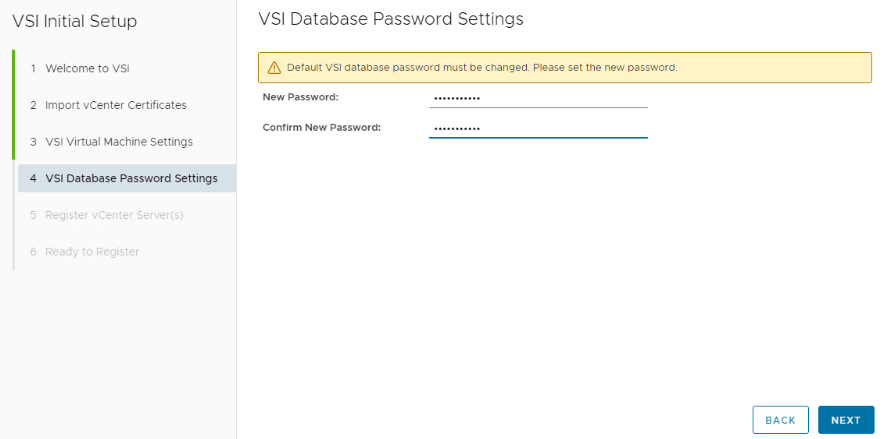
Resolution
VSI 가상 머신의 명령행 인터페이스를 통해 Redis 데이터베이스를 재설정하십시오.
VSI 가상 머신에 로그인합니다. 이 작업은 VMware를 통해 가상 콘솔을 시작하거나 SSH를 통해 VSI VM에 연결할 수 있습니다. VM에 이전에 로그인한 적이 없는 경우 사용자 이름과 비밀번호는 root입니다. 로그인 후 비밀번호를 변경해야 합니다.
다음 명령을 실행하여 Redis 암호를 재설정합니다.
root@photon [ ~ ]# /opt/files/iapi-maintenance-util/apis/redis/redis-config.sh --rollback
WARNING: The DOCKERHOST variable is not set. Defaulting to a blank string.
Stopping redis ... done
WARNING: The DOCKERHOST variable is not set. Defaulting to a blank string.
Going to remove redis
Removing redis ... done
WARNING: The DOCKERHOST variable is not set. Defaulting to a blank string.
WARNING: The create command is deprecated. Use the up command with the --no-start flag instead.
Creating redis ... done
WARNING: The DOCKERHOST variable is not set. Defaulting to a blank string.
Starting redis ... done
Successfully copied 2.56kB to iapi:/opt/iapi/conf/redisson.yaml
iapi
iapi
명령이 완료된 후 VSI 웹 UI에 로그인하면 경고가 사라집니다.
창 상단에 Redis 암호를 재설정하라는 경고가 있습니다.
"# 또는 !"가 없는 Redis 암호를 설정합니다. 비밀번호를 설정한 후 비밀번호를 시작할 때 화면을 새로 고치는 데 최대 5분이 걸릴 수 있습니다.
Additional Information
약어 정의 :
VSI - 가상 스토리지 통합자
VM - 가상 머신
IAPI - 인터넷 응용 프로그래밍 인터페이스
Affected Products
PowerStore, Virtual Storage Integrator (VSI), PowerStoreOSArticle Properties
Article Number: 000227235
Article Type: Solution
Last Modified: 29 Jul 2025
Version: 3
Find answers to your questions from other Dell users
Support Services
Check if your device is covered by Support Services.