NVIDIA RTX Desktop Managerでデスクトップを開いたままに
Summary: この記事では、NVIDIA RTXデスクトップ マネージャーで新しく作成されたデスクトップを閉じることができない問題について説明します。
This article applies to
This article does not apply to
This article is not tied to any specific product.
Not all product versions are identified in this article.
Symptoms
NVIDIA専用GPUを搭載したDellコンピューターでは、NVIDIA RTX Desktop Managerが新しく作成されたデスクトップを閉じることができない場合があります。
- NVIDIA RTX Desktop Manager を開き、[ ENABLE RTX DESKTOP MANAGER] をクリックすると、アプリケーションによって Desktop 1 がデフォルトとして作成されます。
- [ 新しいデスクトップ ]ボタンをクリックして、2番目のデスクトップを作成します。
- デスクトップ2の右上隅にある[X]アイコンをクリックしますが、閉じることができません。
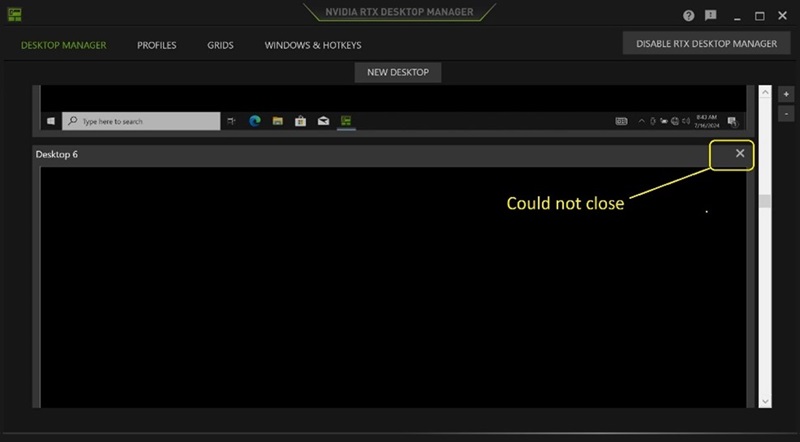
(図1 - NVIDIA RTXデスクトップ マネージャー)
影響を受けるプラットフォーム:
- Precision 7780
- Precision 7680
- Precision 7770
- Precision 7670
- Precision 7560
- Precision 7760
- Precision 7550
- Precision 7750
- Precision 7540
- Precision 7740
- Precision 7530
- Precision 7730
- Precision 7520
- Precision 7720
- Precision 5480
- Dell Precision 5490
- Latitude 3490
- Latitude 3480
- Latitude 3470
- Latitude 3550
- Latitude 3530
- Latitude 3520
Cause
なし
Resolution
PCで NVIDIAグラフィック ドライブRを バージョン552.84 以降にアップデートすると、問題が解決します。ドライバーをダウンロードしてインストールするには、「 Dellドライバーをダウンロードしてインストールする方法」を参照してください。
Affected Products
Dell Latitude 3480/3488, Latitude 3490, Latitude 3520, Latitude 3530, Latitude 3550, Latitude 3470, Precision 5480, Precision 5490, Precision 7520, Precision 7530, Precision 7540, Precision 7550, Precision 7560, Precision 7670, Precision 7680
, Precision 7720, Precision 7730, Precision 7740, Precision 7750, Precision 7760, Precision 7770, Precision 7780
...
Article Properties
Article Number: 000227614
Article Type: Solution
Last Modified: 21 May 2026
Version: 3
Find answers to your questions from other Dell users
Support Services
Check if your device is covered by Support Services.