NVIDIA RTX Desktop Manager holder skrivebordet åpent
Summary: Denne artikkelen inneholder informasjon om problemet NVIDIA RTX desktop manager nyopprettet Desktop kan ikke lukkes.
This article applies to
This article does not apply to
This article is not tied to any specific product.
Not all product versions are identified in this article.
Symptoms
Dell-datamaskiner med NVIDIA separat GPU kan oppleve at NVIDIA RTX Desktop Manager ikke kan lukke det nyopprettede skrivebordet.
- Åpne NVIDIA RTX Desktop Manager og klikk på ENABLE RTX DESKTOP MANAGER. Programmet oppretter skrivebord 1 som standard.
- Klikk på knappen Nytt skrivebord for å opprette et nytt skrivebord.
- Klikk på X-ikonet øverst til høyre på skrivebord 2 , men finn ut at det ikke kan lukkes.
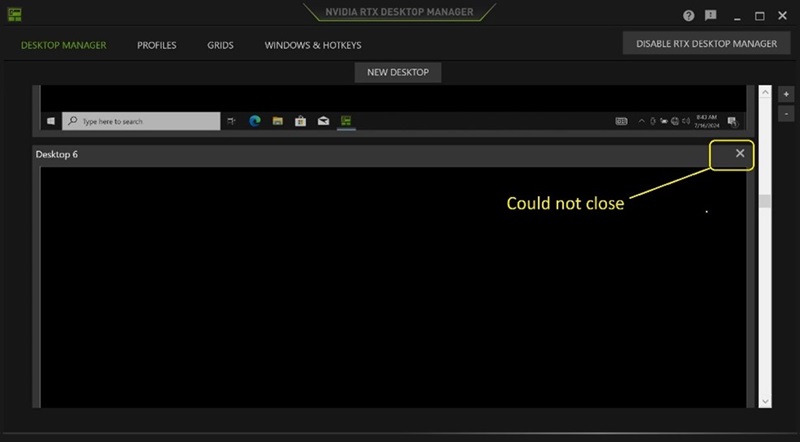
(Figur 1 – NVIDIA RTX Desktop Manager)
Berørte plattformer:
- Precision 7780
- Precision 7680
- Precision 7770
- Precision 7670
- Precision 7560
- Precision 7760
- Precision 7550
- Precision 7750
- Precision 7540
- Precision 7740
- Precision 7530
- Precision 7730
- Precision 7520
- Precision 7720
- Precision 5480
- Precision 5490
- Latitude 3490
- Latitude 3480
- Latitude 3470
- Latitude 3550
- Latitude 3530
- Latitude 3520
Cause
Ikke relevant
Resolution
Du kan løse problemet ved å oppdatere NVIDIA Graphic Drive Rtil versjon 552.84 eller nyere på datamaskinen. Hvis du vil laste ned og installere driveren, kan du se Laste ned og installere Dell-drivere.
Affected Products
Dell Latitude 3480/3488, Latitude 3490, Latitude 3520, Latitude 3530, Latitude 3550, Latitude 3470, Precision 5480, Precision 5490, Precision 7520, Precision 7530, Precision 7540, Precision 7550, Precision 7560, Precision 7670, Precision 7680
, Precision 7720, Precision 7730, Precision 7740, Precision 7750, Precision 7760, Precision 7770, Precision 7780
...
Article Properties
Article Number: 000227614
Article Type: Solution
Last Modified: 21 May 2026
Version: 3
Find answers to your questions from other Dell users
Support Services
Check if your device is covered by Support Services.