NVIDIA RTX Desktop Manager 使桌面保持打开
Summary: 本文提供有关 NVIDIA RTX 桌面管理器新创建的桌面无法关闭问题的信息。
This article applies to
This article does not apply to
This article is not tied to any specific product.
Not all product versions are identified in this article.
Symptoms
配备 NVIDIA 独立 GPU 的戴尔计算机可能会遇到 NVIDIA RTX Desktop Manager 无法关闭新创建的桌面的问题。
- 打开 NVIDIA RTX Desktop Manager,然后单击 ENABLE RTX DESKTOP MANAGER,应用程序将默认创建桌面 1 。
- 单击 按钮 New Desktop 以创建第二个桌面。
- 单击Desktop 2右上角的X图标,但发现无法关闭。
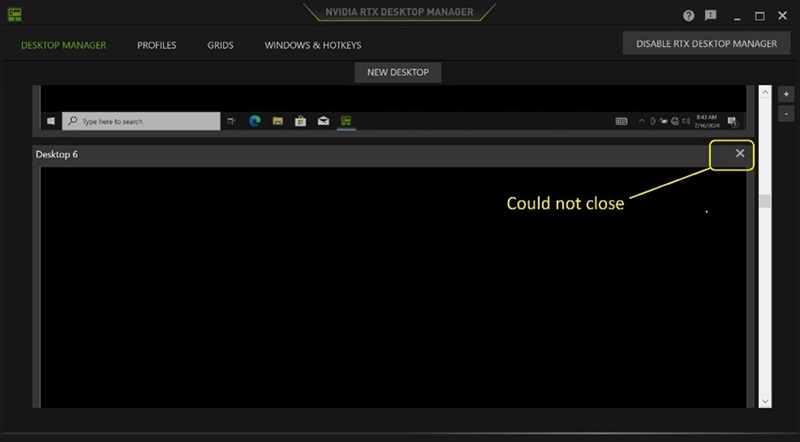
(图 1 — NVIDIA RTX Desktop Manager)
受影响的平台:
- Precision 7780
- Precision 7680
- Precision 7770
- Precision 7670
- Precision 7560
- Precision 7760
- Precision 7550
- Precision 7750
- Precision 7540
- Precision 7740
- Precision 7530
- Precision 7730
- Precision 7520
- Precision 7720
- Precision 5480
- Precision 5490
- Latitude 3490
- Latitude 3480
- Latitude 3470
- Latitude 3550
- Latitude 3530
- Latitude 3520
Cause
N/A
Resolution
将计算机上的 NVIDIA Graphic Driver 更新到 版本 552.84 或更高版本可解决此问题。要下载并安装驱动程序,请参阅 如何下载和安装戴尔驱动程序。
Affected Products
Dell Latitude 3480/3488, Latitude 3490, Latitude 3520, Latitude 3530, Latitude 3550, Latitude 3470, Precision 5480, Precision 5490, Precision 7520, Precision 7530, Precision 7540, Precision 7550, Precision 7560, Precision 7670, Precision 7680
, Precision 7720, Precision 7730, Precision 7740, Precision 7750, Precision 7760, Precision 7770, Precision 7780
...
Article Properties
Article Number: 000227614
Article Type: Solution
Last Modified: 21 May 2026
Version: 3
Find answers to your questions from other Dell users
Support Services
Check if your device is covered by Support Services.