Avamar 19.7/19.8 Unable to retrieve backup content when DD certificate authentication is failing or disabled
Resumen: Avamar 19.7/19.8 7 : Unable to retrieve backup content when DD certificate authentication is failing or disabled.
Este artículo se aplica a:
Este artículo no se aplica a:
Este artículo no está vinculado a ningún producto específico.
En este artículo no se identifican todas las versiones de los productos.
Síntomas
In Avamar 19.7/19.8 backups on Data Domain may not be listed or restored, and we see the following errors in AUI.

The view details show this additional information:
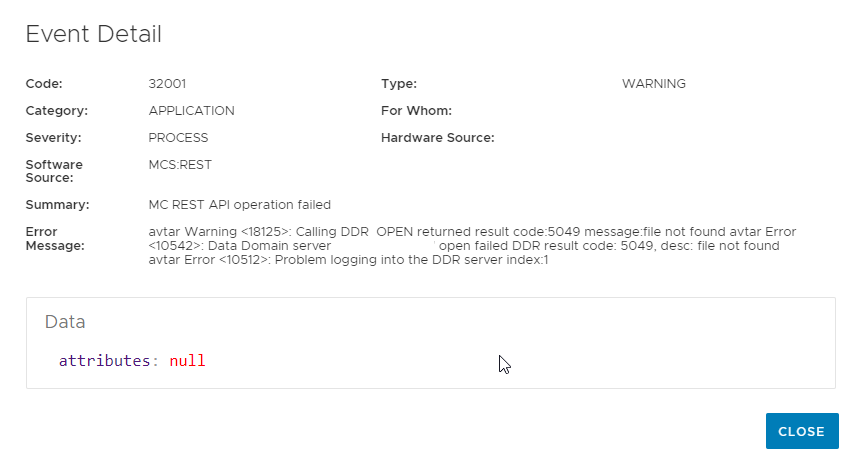

The view details show this additional information:
Causa
In Avamar 19.7/19.8, MCS attempts to log in to DD with certificate authentication by default when browsing backups on Data Domain. In some environments, this DD login may fail.
To confirm this DD login is failing, the check the following log location:
In the mcserver.log.0 we see the following error indicating that in this environment that this DDR login is failing.
To confirm this DD login is failing, the check the following log location:
/usr/local/avamar/var/mc/server_log/mcserver.log.0
In the mcserver.log.0 we see the following error indicating that in this environment that this DDR login is failing.
FINE: exec avtar 1 : exit code: '170: /usr/local/avamar/bin/avtar --showlog --noinfo --seq=1 --path=vc.example.com/vm1_Esks0jsQM6ei34MQsDyBFw workorder --id=MCUser --ap=******* --hfsaddr=ave --hfsport=27000 --conntimeout=120 --ddr-auth-enabled=true --ddr-auth-mode=2 --vardir=/usr/local/avamar/var ' elapsed time: 1310ms
[RMI TCP Connection(1385)-ave#39854] com.avamar.mc.util.MCException.logException
WARNING: java.io.IOException: avtar Warning <18125>: Calling DDR_OPEN returned result code:5049 message:file not found
avtar Error <10542>: Data Domain server "ddve.example.com" open failed DDR result code: 5049, desc: file not found
avtar Error <10512>: Problem logging into the DDR server index:1

  at com.avamar.mc.dpn.AvtarCmd.execAvtar(AvtarCmd.java:223)
  at com.avamar.mc.dpn.DPNProxyService.getVmBackupConfig(DPNProxyService.java:6033)
  at com.avamar.mc.burm.BackupRestoreManagerService.getVmBackupConfig(BackupRestoreManagerService.java:3064)
  at sun.reflect.GeneratedMethodAccessor246.invoke(Unknown Source)
Resolución
This issue is under investigation with Avamar engineering.
To resolve this backup listing issue, we can do one of the following workarounds:
Steps:
1. Run the following command on the Avamar server.
Workaround 2
3. If secure_dd_feature_on is true, then use the following steps.
5. Run this following ssh command to the DD to check if the SHA1 fingerprint is uploaded to DD.
Example of healthy output:
6. If the certificate is NOT present, do the following command to import the certificate.
This should resolve listing issue. If the issue is not resolved, implement workaround 1 and contact Dell support.
To resolve this backup listing issue, we can do one of the following workarounds:
Steps:
1. Run the following command on the Avamar server.
admin@ave197:~/>: grep secure_dd /usr/local/avamar/var/mc/server_data/prefs/mcserver.xmlExample output 1 (disabled)
<entry key="secure_dd_feature_on" value="false" />Example output 2 (enabled)
<entry key="secure_dd_feature_on" value="true" />
Workaround 1: If the output shows "false," go to step 2, if the output is true, then go to step 3.
2. As root, backup the /usr/local/avamar/bin/avtar:
cp -p /usr/local/avamar/bin/avtar /usr/local/avamar/bin/x-avtar.`date -I`
Then edit the file /usr/local/avamar/bin/avtar and change the bottom of the file to the following:
BEFORE
# Must 'exec' executable so that kills sent to this pid (such as from rununtil) work
exec ${BASEDIR}/bin/avtar.bin $platform_flags --vardir="${BASEDIR}/var" --bindir="${BASEDIR}/bin" --sysdir="${BASEDIR}/etc" "$@"
AFTER
# Must 'exec' executable so that kills sent to this pid (such as from rununtil) work
if [[ "$*" == *--ddr-auth-enabled=true* ]]
then
exec ${BASEDIR}/bin/avtar.bin $platform_flags --vardir="${BASEDIR}/var" --bindir="${BASEDIR}/bin" --sysdir="${BASEDIR}/etc" "$@" --ddr-auth-mode=3 --ddr-auth-enable=false
else
exec ${BASEDIR}/bin/avtar.bin $platform_flags --vardir="${BASEDIR}/var" --bindir="${BASEDIR}/bin" --sysdir="${BASEDIR}/etc" "$@"
fi
This should resolve listing issue and you can stop here!
Workaround 2
3. If secure_dd_feature_on is true, then use the following steps.
admin@ave197:~/>: openssl x509 -in /home/admin/chain.pem -noout -fingerprint
SHA1 Fingerprint=81:E0:5B:F4:55:E0:0F:0A:E9:5B:BE:71:40:31:DB:55:B0:0C:6F:D6
4. Obtain the username and hostname for one or more data domains that contains VM backup using the ddrmaint command.
admin@ave197:~/>: ddrmaint read-ddr-info --format=full
====================== Read-DDR-Info ======================

 System name        : ddve.example.com
 System ID          : EXXXXXXXXXXXXXXXXXXXXXXXXXXXXXXXXXXXXXXXX
 DDBoost user       : ddboost
NOTE: If more than one Data Domain is added to Avamar, repeat run steps 5-7 on each DD listed.
5. Run this following ssh command to the DD to check if the SHA1 fingerprint is uploaded to DD.
admin@ave197:~/>: ssh ddboost@ddve.example.com -i /usr/local/avamar/lib/ddr_key "adminaccess certificate show imported-ca"| grep -c <fingerprint from step3>
Example of healthy output:
admin@ave197:~/>:  ssh ddboost@ddve.example.com -i /usr/local/avamar/lib/ddr_key "adminaccess certificate show " | grep -c 81:E0:5B:F4:55:E0:0F:0A:E9:5B:BE:71:40:31:DB:55:B0:0C:6F:D6
EMC Data Domain Virtual Edition
1
Example of unhealthy output:
 ssh ddboost@ddve.example.com -i /usr/local/avamar/lib/ddr_key "adminaccess certificate show " | grep -c 81:E0:5B:F4:55:E0:0F:0A:E9:5B:BE:71:40:31:DB:55:B0:0C:6F:D6
EMC Data Domain Virtual Edition
0
6. If the certificate is NOT present, do the following command to import the certificate.
admin@ave197:~/>: cat chain.pem | ssh ddboost@ddve.example.com -i /usr/local/avamar/lib/ddr_key "adminaccess certificate import ca application ddboost"7. Then restart ddboost.
ssh ddboost@ddve.example.com -i /usr/local/avamar/lib/ddr_key "ddboost disable "
ssh ddboost@ddve.example.com -i /usr/local/avamar/lib/ddr_key "ddboost enable"
This should resolve listing issue. If the issue is not resolved, implement workaround 1 and contact Dell support.
Productos afectados
Avamar, Avamar ServerPropiedades del artículo
Número de artículo: 000203335
Tipo de artículo: Solution
Última modificación: 10 ago 2023
Versión: 12
Encuentra las respuestas que necesitas con la ayuda de otros usuarios de Dell
Servicios de asistencia
Comprueba si tu dispositivo está cubierto por los servicios de asistencia.