在自动驱动程序扫描期间显示“Driver Detection not Available”
Sommaire: 了解戴尔支持驱动程序下载页面上显示的“Driver Detection not Available”消息。
Cet article s’applique à
Cet article ne s’applique pas à
Cet article n’est lié à aucun produit spécifique.
Toutes les versions de produits ne sont pas identifiées dans cet article.
Symptômes
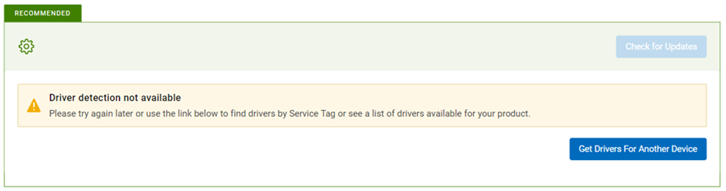
当您单击戴尔驱动程序和下载页面上的单击更新按钮时,将显示消息“Driver Detection not Availabl e”(驱动程序检测不可用):Please try again later or use the link below to find drivers by Service Tag or see a list of drivers for your product.”
Cause
服务已停止或不可用。
Résolution
- 使用最新的 SupportAssist 版本,使您的个人计算机保持最新状态。请参阅系统要求。
- 确保您以 管理员身份登录。
- 打开T ask Manager,切换到 “Services ”选项卡,检查“SupportAssistAgent” 和“DellClientManagementService” 服务是否处于“Running”状态。这两项服务都应处于正在运行状态,以便驱动程序扫描正常工作。
如果系统已开机或重新启动,请等待至少 5 分钟,然后再重新访问支持网站以检查更新。
这允许两项服务完全运行,以允许驱动程序扫描功能。等待 5 分钟后,如果任何或两项服务的状态仍显示为“已停止”,请右键单击并选择“开始”。
如果两项服务都显示为“Running”,请转至步骤 3。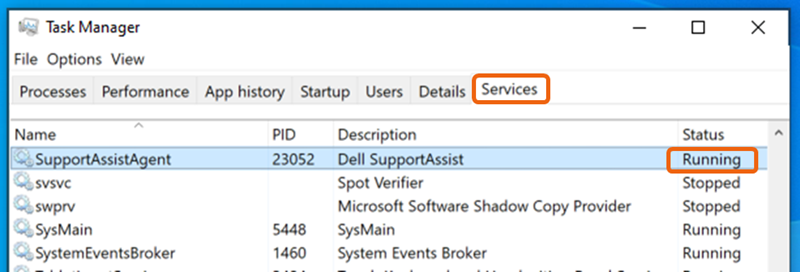
- 重新加载或刷新网页,然后再次尝试检查更新。
- 重新启动系统并等待至少 5 分钟,然后重新访问支持网站 以检查更新。
- 检查 SupportAssist 应用程序中的驱动程序扫描功能是否正常工作。
- 确保防火墙或防病毒应用程序未阻止 SupportAssist 应用程序。
- 将 SupportAssist 应用程序设置为自动定期运行,以使服务及时更新以保持自动扫描平稳运行所需的任何更改。SupportAssist 应用程序>设置 >自动执行扫描和优化> 更新驱动程序和软件:周刊 通过将扫描设置为立即运行来实时检查更新。
- 如果按照上述所有步骤操作无法解决问题,请卸载 SupportAssist 应用程序并重新安装。
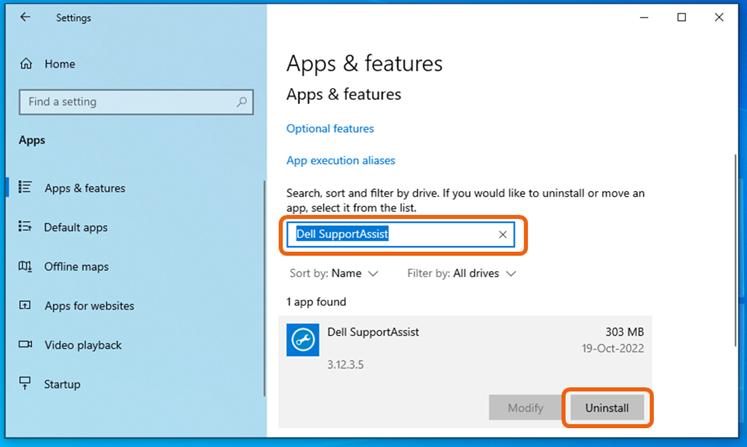
- 在 Windows 10 中:转至开始 >设置 >应用,在“应用和功能”下搜索“Dell SupportAssist”,选择并单击卸载。
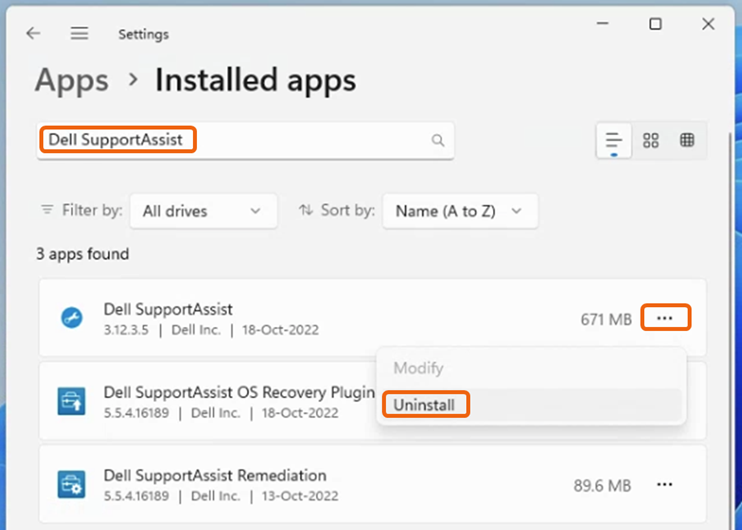
- 在 Windows 11 中:转至 开始 >设置 >应用程序 >已安装的应用程序,搜索 “Dell SupportAssist”, 单击右侧的三个点 (...),然后选择卸载提醒:无需卸载 Dell SupportAssist OS Recovery 插件程序和 Dell SupportAssist Remediation。
- SupportAssist 卸载完成后,重新启动系统。
- 重新访问 支持网站并触发“Check for Updates”,这将触发 SupportAssist 的全新安装。
- 在 Windows 10 中:转至开始 >设置 >应用,在“应用和功能”下搜索“Dell SupportAssist”,选择并单击卸载。
Produits touchés
Alienware, Dell Pro All-in-One, Dell Pro Max Micro, Dell Pro Max Slim, Dell Pro Max Tower, Dell Pro Micro, Dell Pro Slim, Dell Pro Tower, Dell Slim, Dell Tower, Inspiron, OptiPlex, Vostro, XPS, G Series, G Series, Alienware, Dell Plus, Dell Pro
, Dell Pro Max, Dell Pro Plus, Dell Pro Premium, Inspiron, Latitude, Dell Pro Rugged, Vostro, XPS, Fixed Workstations, Mobile Workstations, Surface Pro 4
...
Propriétés de l’article
Numéro d’article: 000200106
Type d’article: Solution
Dernière modification: 11 juill. 2025
Version: 16
Obtenez des réponses à vos questions auprès d’autre utilisateurs de Dell
Services de soutien
Vérifiez si votre appareil est couvert par les services de soutien.