Cyber Recovery: Retrieving certificate failed with TLS protocol
Summary: After upgrading to Cyber Recovery 19.17, there is a new option to verify the certificate when enabling the Transport Layer Security (TLS) protocol. This article covers situations where retrieving the certificate failed with the TLS protocol. ...
This article applies to
This article does not apply to
This article is not tied to any specific product.
Not all product versions are identified in this article.
Symptoms
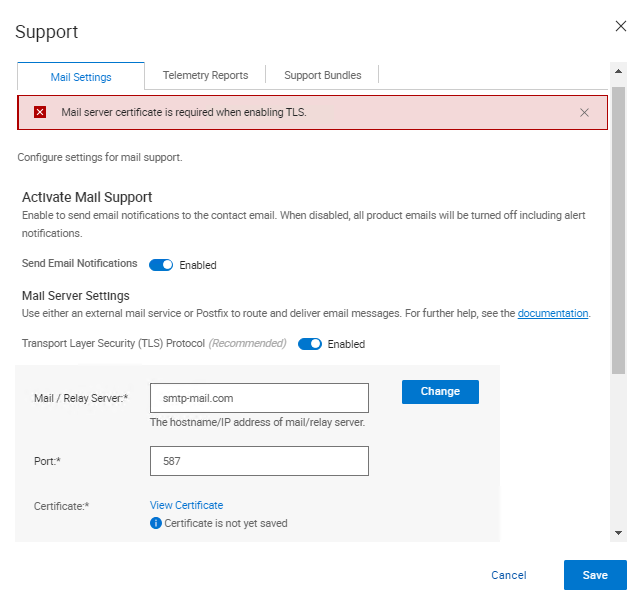
After upgrading to Cyber Recovery 19.17, there is a new option to verify the certificate when enabling Transport Layer Security (TLS) protocol. When verifying the certificate, the following error displays in the Cyber Recovery UI:
Mail server certificate is required when enabling TLS.
Cause
From the Cyber Recovery logs, the following entries are printed.
On crcli.log:
[2024-10-03 11:49:03.273] [DEBUG] [crcli] [restapi_client.go:384 HandleRESTAPIResponse()] : Entering
[2024-10-03 11:49:03.273] [DEBUG] [crcli] [restapi_client.go:392 HandleRESTAPIResponse()] : REST status code :500
[2024-10-03 11:49:03.273] [ERROR] [crcli] [restapi_client.go:401 HandleRESTAPIResponse()] : Failed to retrieve mail server certificate : Failed to connect to mail server: dial tcp: lookup smtp-mail.com: i/o timeout
[2024-10-03 11:49:03.273] [DEBUG] [crcli] [restapi_client.go:402 HandleRESTAPIResponse()] : Exiting
[2024-10-03 11:49:03.273] [ERROR] [crcli] [libcli.go:150 CliErrorExit()] : Failed to retrieve mail server certificate : Failed to connect to mail server: dial tcp: lookup smtp-mail.com: i/o timeout
On edge.log:
[2024-10-03 11:48:53.268] [DEBUG] [edge] [restapi_client.go:200 callRestApi()] : Perform request.Post path=https://notifications:9096/irapi/v8/notifications/retrieveEmailCert
[2024-10-03 11:49:03.272] [DEBUG] [edge] [restapi_client.go:209 callRestApi()] : status = 500 Internal Server Error
[2024-10-03 11:49:03.272] [DEBUG] [edge] [restapi_client.go:410 GetCRResponse()] : Entering
[2024-10-03 11:49:03.272] [DEBUG] [edge] [restapi_client.go:417 GetCRResponse()] : Exiting
[2024-10-03 11:49:03.272] [DEBUG] [edge] [restapi_client.go:210 callRestApi()] : Exiting
[2024-10-03 11:49:03.272] [DEBUG] [edge] [restapi_client.go:116 CallCRRESTAPI()] : Exiting
[2024-10-03 11:49:03.272] [DEBUG] [edge] [restapi_client.go:57 CallRESTAPIHeader()] : Exiting
[2024-10-03 11:49:03.272] [DEBUG] [edge] [restapi_client.go:384 HandleRESTAPIResponse()] : Entering
[2024-10-03 11:49:03.272] [DEBUG] [edge] [restapi_client.go:392 HandleRESTAPIResponse()] : REST status code :500
[2024-10-03 11:49:03.272] [ERROR] [edge] [restapi_client.go:401 HandleRESTAPIResponse()] : Failed to connect to mail server: dial tcp: lookup smtp-mail.com: i/o timeout
[2024-10-03 11:49:03.272] [DEBUG] [edge] [restapi_client.go:402 HandleRESTAPIResponse()] : Exiting
[2024-10-03 11:49:03.272] [DEBUG] [edge] [jsonerr.go:27 JSONError()] : Entering
[2024-10-03 11:49:03.272] [ERROR] [edge] [jsonerr.go:40 JSONError()] : 500 : Failed to connect to mail server: dial tcp: lookup smtp-mail.com: i/o timeout
[2024-10-03 11:49:03.272] [DEBUG] [edge] [jsonerr.go:44 JSONError()] : Exiting
[2024-10-03 11:49:03.272] [DEBUG] [edge] [notifications.go:560 RetrieveEmailCert()] : Exiting
[2024-10-03 11:49:03.272] [INFO] [edge] [restauth.go:111 func1()] : POST /cr/v8/notifications/retrieveEmailCert End RetrieveEmailCert Elapsed=10.005125439s
On notifications.log:
[2024-10-03 11:48:53.270] [INFO] [notifications] [restauth.go:68 func1()] : POST /irapi/v8/notifications/retrieveEmailCert Start RetrieveEmailCert
[2024-10-03 11:48:53.270] [DEBUG] [notifications] [restauth.go:210 validateToken()] : Entering
[2024-10-03 11:48:53.270] [DEBUG] [notifications] [restauth.go:194 DecryptToken()] : Entering
[2024-10-03 11:48:53.270] [DEBUG] [notifications] [encoding.go:48 DecodeString()] : Entering
[2024-10-03 11:48:53.270] [DEBUG] [notifications] [encoding.go:56 DecodeString()] : Exiting
[2024-10-03 11:48:53.270] [DEBUG] [notifications] [crcrypto.go:558 DecryptCFB()] : Entering
[2024-10-03 11:48:53.270] [DEBUG] [notifications] [crcrypto.go:579 DecryptCFB()] : Exiting
[2024-10-03 11:48:53.270] [DEBUG] [notifications] [encoding.go:48 DecodeString()] : Entering
[2024-10-03 11:48:53.270] [DEBUG] [notifications] [encoding.go:56 DecodeString()] : Exiting
[2024-10-03 11:48:53.270] [DEBUG] [notifications] [crcrypto.go:112 GenHash()] : Entering
[2024-10-03 11:48:53.270] [DEBUG] [notifications] [crcrypto.go:118 GenHash()] : Exiting
[2024-10-03 11:48:53.270] [DEBUG] [notifications] [restauth.go:206 DecryptToken()] : Exiting
[2024-10-03 11:48:53.270] [DEBUG] [notifications] [restauth.go:268 ValidateTokenTime()] : Entering
[2024-10-03 11:48:53.270] [DEBUG] [notifications] [restauth.go:281 ValidateTokenTime()] : Exiting
[2024-10-03 11:48:53.270] [DEBUG] [notifications] [restauth.go:255 validateToken()] : Exiting
[2024-10-03 11:48:53.270] [DEBUG] [notifications] [notifications.go:283 RetrieveEmailCert()] : Entering
[2024-10-03 11:48:53.270] [DEBUG] [notifications] [notifications.go:175 ValidateMailServer()] : Entering
[2024-10-03 11:48:53.270] [DEBUG] [notifications] [notifications.go:201 ValidateMailServerURL()] : Entering
[2024-10-03 11:48:53.270] [DEBUG] [notifications] [notifications.go:210 ValidateMailServerURL()] : Exiting
[2024-10-03 11:48:53.270] [DEBUG] [notifications] [notifications.go:215 ValidateMailServerPort()] : Entering
[2024-10-03 11:48:53.270] [DEBUG] [notifications] [notifications.go:222 ValidateMailServerPort()] : Exiting
[2024-10-03 11:48:53.270] [DEBUG] [notifications] [notifications.go:196 ValidateMailServer()] : Exiting
[2024-10-03 11:48:53.270] [DEBUG] [notifications] [email.go:227 RetrieveEmailCert()] : Entering
[2024-10-03 11:48:53.270] [DEBUG] [notifications] [email.go:272 GetTLSConn()] : Entering
[2024-10-03 11:49:03.271] [DEBUG] [notifications] [email.go:283 GetTLSConn()] : Exiting
[2024-10-03 11:49:03.272] [ERROR] [notifications] [email.go:235 RetrieveEmailCert()] : Failed to connect to mail server: dial tcp: lookup smtp-mail.com: i/o timeout
[2024-10-03 11:49:03.272] [DEBUG] [notifications] [email.go:236 RetrieveEmailCert()] : Exiting
[2024-10-03 11:49:03.272] [ERROR] [notifications] [notifications.go:321 RetrieveEmailCert()] : Failed to connect to mail server: dial tcp: lookup smtp-mail.com: i/o timeout
[2024-10-03 11:49:03.272] [DEBUG] [notifications] [jsonerr.go:27 JSONError()] : Entering
[2024-10-03 11:49:03.272] [ERROR] [notifications] [jsonerr.go:40 JSONError()] : 500 : Failed to connect to mail server: dial tcp: lookup smtp-mail.com: i/o timeout
[2024-10-03 11:49:03.272] [DEBUG] [notifications] [jsonerr.go:44 JSONError()] : Exiting
[2024-10-03 11:49:03.272] [DEBUG] [notifications] [notifications.go:323 RetrieveEmailCert()] : Exiting
From version 19.17, Cyber Recovery started verifying the mail server certificate when using TLS.
In non-Domain Name System (DNS) environments entering the mail server as a DNS name fails as Cyber Recovery is unable to resolve the hostname name to an IP Address due to the lack of DNS within the environment.
When an IP address is used as the Mail/Relay Server field within CR and the certificate provided by the mail server does not have the IP in the certificate, verification fails as the certificate is being verified against the IP.
There are a couple of workarounds to get this to work:
- Add the IP address to the certificate provided by the mail server so verification can work.
- Add the entry for mail server and IP in
/etc/hostsin the notifications container to allow CR successfully resolve the mail server and certificate verification can occur.
Resolution
There are two options to resolve this issue:
- The mail server is using a Fully Qualified Domain Name (FQDN) and Cyber Recovery fails to get the certificate.
- Verify that you are using a DNS server in your vault environment and if it is working properly.
- If there is no DNS server in the vault, follow the steps below:
- Enter the Simple Mail Transfer Protocol (SMTP) server details in the hosts files for the notifications docker.
- Connect to Cyber Recovery using SSH.
- Run this command:
docker exec -it cr_notifications_1 bash - Open the file with a text editor:
/etc/hosts - Add the entries for the SMTP server as IP, FQDN, and short name.
- Save the file.
- Run this command to exit the docker container:
exit
- To make the entry in the
/etc/hostsfile persistent through reboots, do the following:- Add a line in
cr-install-path>/etc/docker-compose-prod-<current-version>.ymlfor the IP you want to add to/etc/hostsnotifications: - The new line highlighted in Bold, should have the SMTP FQDN and then the IP:
SMTP.server.com:xxx.xxx.xxx.xxx
build: .image: ${registryName}/cr_notifications:${notificationsVersion}container_name: cr_notifications_1security_opt:- no-new-privileges:truehostname: notificationsexpose:- "9096"depends_on:- postgresqlcap_drop:- ALLenvironment:- LD_LIBRARY_PATH=/cr/lockbox/lib- CRHOSTNAME=${dockerHostFQDN}- ENABLE_TLS=${enableTLS}- ENABLE_POSTFIX=${enablePostfix}- GODEBUG=tlskyber=0extra_hosts:- dockerbridge:${dockerBridge}- ${dockerHostFQDN}:${dockerHost}- SMTP.server.com:xxx.xxx.xxx.xxx - Then run
'crsetup.sh – forcerecreate'WHEN THERE ARE NO JOBS RUNNING.
- Add a line in
- Enter the Simple Mail Transfer Protocol (SMTP) server details in the hosts files for the notifications docker.
- Using an IP address for the SMTP and Cyber Recovery fails to get the certificate.
-
- In this case, a new certificate must be generated to contain the IP address being used.
Or
-
- In case the certificate was created using an FQDN, instead of using the IP to connect to the SMTP, use the FQDN in the Cyber Recovery UI.
Affected Products
PowerProtect Cyber Recovery, Cyber Recovery SeriesArticle Properties
Article Number: 000242079
Article Type: Solution
Last Modified: 07 Jan 2026
Version: 3
Find answers to your questions from other Dell users
Support Services
Check if your device is covered by Support Services.