DNS Does Not Resolve in Dell Security Management Server Virtual
Summary: DNS may no longer work after upgrading to Dell Security Management Server Virtual.
Symptoms
Affected Products:
- Dell Security Management Server
Affected Versions:
- v10.2.14 and Later
Cause
The Dell Security Management Server Virtual 10.2.14 and later appliance uses Ubuntu 18.04 which has a defect with DNS caching that prevents proper name resolution. This failure presents various errors indicating that the server cannot reach specific sites, Temporary Failure in Name Resolution, or Can’t find the server when attempting to add or update a domain.
Resolution
To disable DNS caching:
- Connect to the Dell Security Management Server Virtual Administration Console with
delluser. - Select Launch Shell from the Main Menu.
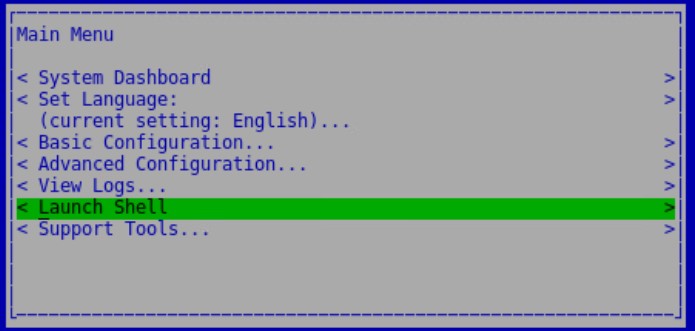
Figure 1: (English Only) Launch Shell
- Switch user to
dellsupportwith the commandsu dellsupport(Default Password:dellsupport)

Figure 2: (English Only) Switch User
- Run the command
sudo unlink /etc/resolv.conf.

Figure 3: (English Only) sudo unlink /etc/reslv.conf
- Run the command.

Figure 4: (English Only) sudo ln -s /run/systemd/resolve/resolv.conf /etc/resolv.conf
- Run the command
sudo systemctl restart systemd-resolved.

Figure 5: (English Only) sudo systemctl restart systemd-resolved
- Exit the
dellsupportuser context by typingexit. - Return to the console by typing
exitagain.
To contact support, reference Dell Data Security International Support Phone Numbers.
Go to TechDirect to generate a technical support request online.
For additional insights and resources, join the Dell Security Community Forum.