Dell Networking SONiC How to configure Static Anycast gateway (anycast address)
Summary: This article explains how to configure Static Anycast Gateway (anycast address) in Dell Networking Enterprise SONiC.
This article applies to
This article does not apply to
This article is not tied to any specific product.
Not all product versions are identified in this article.
Instructions
PrerequisitesWe are using standard interface naming to demonstrate the concepts. See the article Dell Networking S-Series: Basic Interface Configuration – SONiC 4.0 for more information regarding interface naming |
Index
Static Anycast Gateway
SAG in MCLAG
Configuration Syntax
Sample Configuration
Static Anycast Gateway
Static Anycast Gateway (SAG) enables multiple switches to route packets simultaneously using a shared gateway address in an active/active router configuration. Each switch is configured with an anycast virtual IP address and an anycast virtual MAC address. The anycast virtual MAC is shared across all configured anycast IP addresses.
In a spine-leaf EVPN setup, all gateway-routed leaf switches have consistent anycast configurations. Specifically, each switch is set up with the same anycast virtual IP address and anycast virtual MAC address.
SAG in MCLAG
Use Static Anycast Gateway instead on VRRP when Multi-chassis link Aggregation (MCLAG) is used in Dell SONiC. Configure the same anycast IP address and anycast MAC address on both MCLAG Peers on the same vlan interface.
In Dell Enterprise SONiC, MCLAG does not currently support VRRP. As of the latest version (Dell SONiC 4.2), this statement remains accurate. For future compatibility, see the user guide for your version.
As an example, in the below topology we are using same anycast IP address 10.0.0.254/24 for vlan 100 in both MCLAG peers.
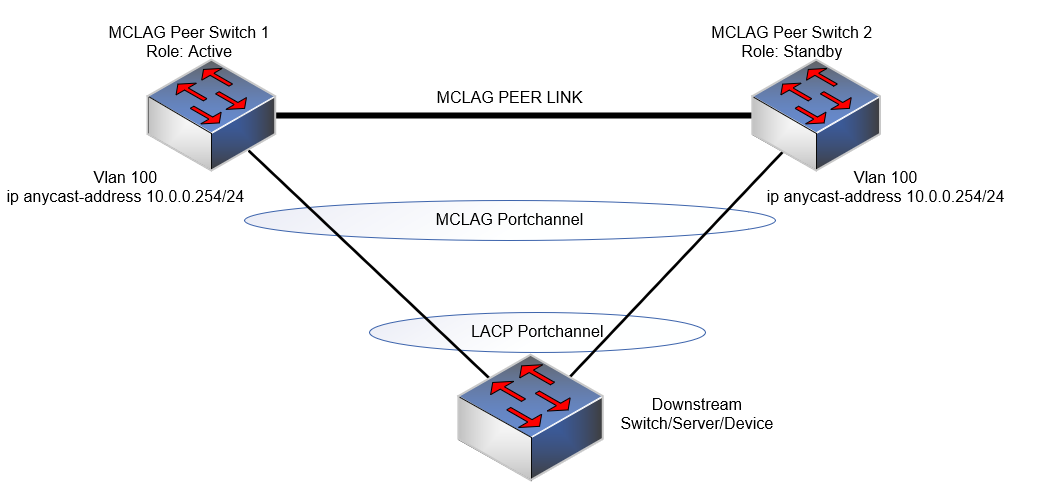
NOTE:
- Anycast IP address cannot be used for management purpose.
- Anycast virtual MAC address cannot be a multicast MAC address.
Configuration Syntax
| Configuration | Explanation |
|---|---|
admin@DELLSONiC:~$ sonic-cli |
Enter Dell SONiC CLI |
DELLSONiC# configure terminal |
Enter configure mode. |
DELLSONiC(config)# ip anycast-address enable |
Enable anycast gateway address |
DELLSONiC(config)# ip anycast-mac-address xx:xx:xx:xx:xx:xx |
Configure anycast MAC address |
DELLSONiC(config)# interface Vlan <vlan ID> |
Configure vlan |
DELLSONiC(config-if-Vlan-<ID>)# ip anycast-address <A.B.C.D/mask> |
Configure anycast gateway address |
To Disable anycast gateway:
| Configuration | Explanation |
|---|---|
DELLSONiC(config)# ip anycast-address disable |
Disable Anycast gateway address |
To Verify use bellow command:
| Configuration | Explanation |
|---|---|
DELLSONiC# show ip static-anycast-gateway |
View details on static-anycast-gateway |
Sample Configuration
Configuring IP anycast-address in Vlan 100: admin@DELLSONiC:~$ sonic-cli DELLSONiC# configure terminal DELLSONiC(config)# ip anycast-mac-address 00:11:22:33:44:55 DELLSONiC(config)# ip anycast-address enable Lets configure anycast IP in interface vlan 100 DELLSONiC(config)# interface Vlan 100 DELLSONiC(config-if-Vlan100)# ip anycast-address 10.0.0.254/24 DELLSONiC(config-if-Vlan100)# end DELLSONiC# |
To verify the IP address for Vlan 100:
DELLSONiC# show ip interfaces Flags: U-Unnumbered interface, A-Anycast IP ----------------------------------------------------------------------------------------------------------------- Interface IP address/mask VRF Admin/Oper Flags ----------------------------------------------------------------------------------------------------------------- Vlan100 10.0.0.254/24 up/up A |
To verify static anycast gateways:
DELLSONiC# show ip static-anycast-gateway Configured Anycast Gateway MAC address: 00:11:22:33:44:55 IPv4 Anycast Gateway MAC address: enable Total number of gateway: 1 Total number of gateway admin UP: 1 Total number of gateway oper UP: 1 Interfaces Gateway Address Vrf Admin/Oper ------------------- --------------- --------------- ---------- Vlan10 10.0.0.254/24 up/up |
Affected Products
Enterprise SONiC Distribution, PowerSwitch E3200-ON Series, Dell EMC Networking N3200-ON, PowerSwitch S5212F-ON, PowerSwitch S5224F-ON, PowerSwitch S5232F-ON, PowerSwitch S5248F-ON, PowerSwitch S5296F-ON, PowerSwitch Z9100-ON, PowerSwitch Z9264F-ON
, PowerSwitch Z9332F-ON, PowerSwitch Z9432F-ON
...
Article Properties
Article Number: 000223335
Article Type: How To
Last Modified: 20 Mar 2024
Version: 3
Find answers to your questions from other Dell users
Support Services
Check if your device is covered by Support Services.