Dell Networking SONiC Statische Anycast-gateway configureren (Anycast-adres)
Summary: In dit artikel wordt uitgelegd hoe u een statische Anycast Gateway (anycast-adres) configureert in Dell Networking Enterprise SONiC.
This article applies to
This article does not apply to
This article is not tied to any specific product.
Not all product versions are identified in this article.
Instructions
VereistenWe gebruiken standaard interfacenaamgeving om de concepten te demonstreren. Lees het artikel Dell Networking S-serie: Basic Interface Configuration – SONiC 4.0 voor meer informatie over interfacenaamgeving |
Index
Statische Anycast Gateway
SAG in MCLAG
Configuratiesyntaxis
Voorbeeldconfiguratie
Statische Anycast Gateway
Met statische Anycast Gateway (SAG) kunnen meerdere switches pakketten gelijktijdig routeren met behulp van een gedeeld gatewayadres in een actieve/actieve routerconfiguratie. Elke switch is geconfigureerd met een anycast virtueel IP-adres en een anycast virtueel MAC-adres. De virtuele MAC van anycast wordt gedeeld over alle geconfigureerde anycast-IP-adressen.
In een spine-leaf EVPN-installatie hebben alle gateway-gerouteerde leaf-switches consistente anycast-configuraties. In het bijzonder is elke switch ingesteld met hetzelfde anycast virtuele IP-adres en anycast virtueel MAC-adres.
SAG in MCLAG
Gebruik in plaats daarvan statische Anycast Gateway op VRRP wanneer Multi-chassis Link Aggregation (MCLAG) wordt gebruikt in Dell SONiC. Configureer hetzelfde anycast IP-adres en anycast MAC-adres op beide MCLAG Peers op dezelfde VLAN-interface.
In Dell Enterprise SONiC biedt MCLAG momenteel geen ondersteuning voor VRRP. Vanaf de nieuwste versie (Dell SONiC 4.2) blijft deze instructie accuraat. Raadpleeg de gebruikershandleiding voor uw versie voor toekomstige compatibiliteit.
Als voorbeeld gebruiken we in de onderstaande topologie hetzelfde anycast IP-adres 10.0.0.254/24 voor vlan 100 in beide MCLAG-peers.
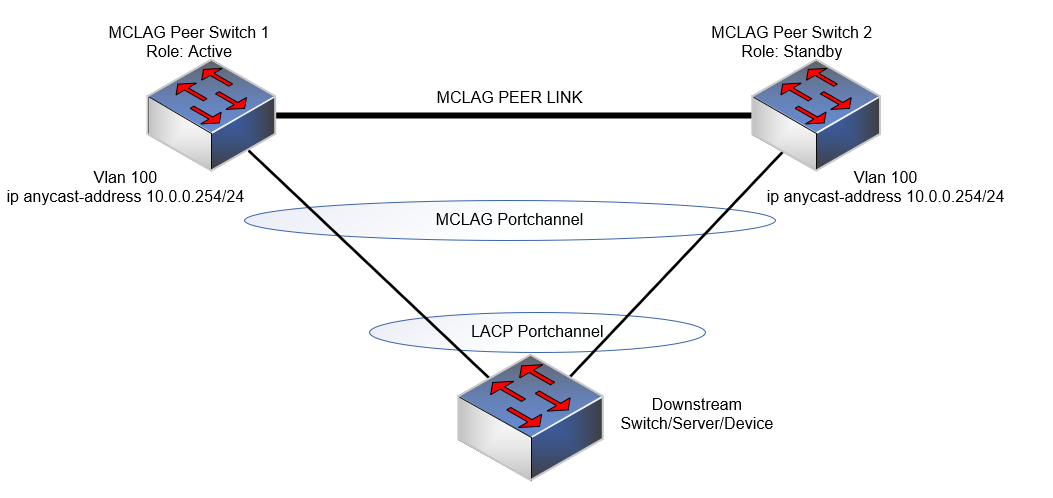
OPMERKING:
- Anycast IP-adres kan niet worden gebruikt voor beheerdoeleinden.
- Anycast virtueel MAC-adres kan geen multicast MAC-adres zijn.
Configuratiesyntaxis
| Configuratie | Uitleg |
|---|---|
admin@DELLSONiC:~$ sonic-cli |
Voer Dell SONiC CLI in |
DELLSONiC# configure terminal |
Ga naar de configuratiemodus. |
DELLSONiC(config)# ip anycast-address enable |
Anycast-gatewayadres inschakelen |
DELLSONiC(config)# ip anycast-mac-address xx:xx:xx:xx:xx:xx |
Configureer een anycast MAC-adres |
DELLSONiC(config)# interface Vlan <vlan ID> |
VLAN configureren |
DELLSONiC(config-if-Vlan-<ID>)# ip anycast-address <A.B.C.D/mask> |
Anycast-gatewayadres configureren |
Ga als volgt te werk om de anycast-gateway uit te schakelen:
| Configuratie | Uitleg |
|---|---|
DELLSONiC(config)# ip anycast-address disable |
Anycast-gatewayadres uitschakelen |
Gebruik de opdracht balg om te controleren:
| Configuratie | Uitleg |
|---|---|
DELLSONiC# show ip static-anycast-gateway |
Details bekijken op static-anycast-gateway |
Voorbeeldconfiguratie
Configuring IP anycast-address in Vlan 100: admin@DELLSONiC:~$ sonic-cli DELLSONiC# configure terminal DELLSONiC(config)# ip anycast-mac-address 00:11:22:33:44:55 DELLSONiC(config)# ip anycast-address enable Lets configure anycast IP in interface vlan 100 DELLSONiC(config)# interface Vlan 100 DELLSONiC(config-if-Vlan100)# ip anycast-address 10.0.0.254/24 DELLSONiC(config-if-Vlan100)# end DELLSONiC# |
Het IP-adres voor Vlan 100 verifiëren:
DELLSONiC# show ip interfaces Flags: U-Unnumbered interface, A-Anycast IP ----------------------------------------------------------------------------------------------------------------- Interface IP address/mask VRF Admin/Oper Flags ----------------------------------------------------------------------------------------------------------------- Vlan100 10.0.0.254/24 up/up A |
Statische anycast-gateways verifiëren:
DELLSONiC# show ip static-anycast-gateway Configured Anycast Gateway MAC address: 00:11:22:33:44:55 IPv4 Anycast Gateway MAC address: enable Total number of gateway: 1 Total number of gateway admin UP: 1 Total number of gateway oper UP: 1 Interfaces Gateway Address Vrf Admin/Oper ------------------- --------------- --------------- ---------- Vlan10 10.0.0.254/24 up/up |
Affected Products
Enterprise SONiC Distribution, PowerSwitch E3200-ON Series, Dell EMC Networking N3200-ON, PowerSwitch S5212F-ON, PowerSwitch S5224F-ON, PowerSwitch S5232F-ON, PowerSwitch S5248F-ON, PowerSwitch S5296F-ON, PowerSwitch Z9100-ON, PowerSwitch Z9264F-ON
, PowerSwitch Z9332F-ON, PowerSwitch Z9432F-ON
...
Article Properties
Article Number: 000223335
Article Type: How To
Last Modified: 20 Mar 2024
Version: 3
Find answers to your questions from other Dell users
Support Services
Check if your device is covered by Support Services.