Dell Networking SONiC 如何配置静态任播网关(任播地址)
Summary: 本文介绍如何在 Dell Networking Enterprise SONiC 中配置静态任播网关(任播地址)。
This article applies to
This article does not apply to
This article is not tied to any specific product.
Not all product versions are identified in this article.
Instructions
前提条件我们使用标准接口命名来演示这些概念。请参阅文章 Dell Networking S 系列:基本接口配置 — SONiC 4.0,了解有关接口命名的更多信息 |
索引
静态任播网关
静态任播网关 (SAG) 支持多个交换机使用主动/主动路由器配置中的共享网关地址同时路由数据包。每台交换机均配置有任播虚拟 IP 地址和任播虚拟 MAC 地址。任播虚拟 MAC 在所有配置的任播 IP 地址之间共享。
在主干分支 EVPN 设置中,所有网关路由分支交换机都具有一致的任播配置。具体而言,每台交换机都设置有相同的任播虚拟 IP 地址和任播虚拟 MAC 地址。
MCLAG 中的 SAG
在 Dell SONiC 中使用多机箱链路聚合 (MCLAG) 时,请在 VRRP 上改用静态任播网关。在同一 vlan 接口上的两个 MCLAG 对等体上配置相同的任播 IP 地址和任播 MAC 地址。
在 Dell Enterprise SONiC 中,MCLAG 当前不支持 VRRP。截至最新版本 (Dell SONiC 4.2),此陈述仍然准确无误。有关将来的兼容性,请参阅您的版本的用户指南。
例如,在下面的拓扑中,我们对两个 MCLAG 对等体中的 vlan 100 使用相同的任播 IP 地址 10.0.0.254/24。
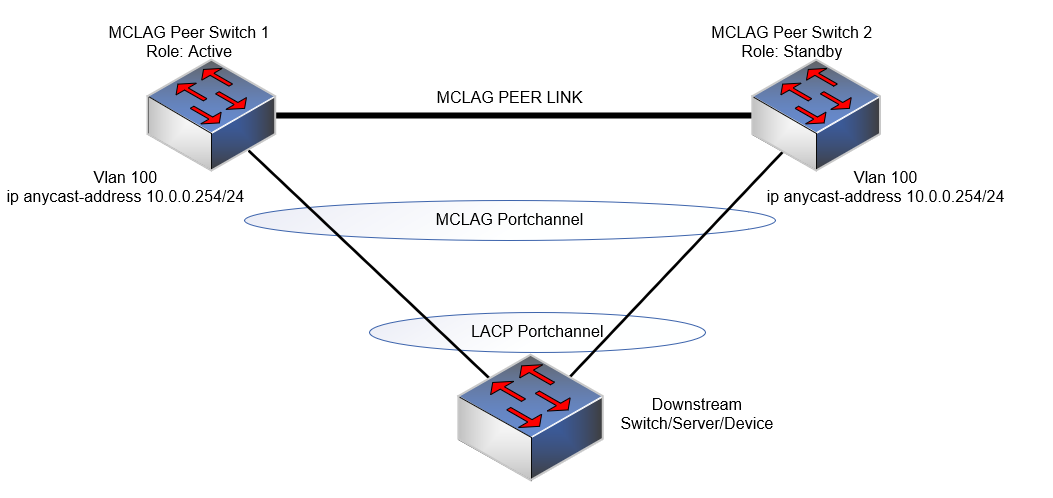
提醒:
- 任播 IP 地址不能用于管理目的。
- 任播虚拟 MAC 地址不能是多播 MAC 地址。
配置语法
| 配置 | 说明 |
|---|---|
admin@DELLSONiC:~$ sonic-cli |
戴尔 SONiC CLI |
DELLSONiC# configure terminal |
进入配置模式。 |
DELLSONiC(config)# ip anycast-address enable |
启用任播网关地址 |
DELLSONiC(config)# ip anycast-mac-address xx:xx:xx:xx:xx:xx |
配置任播 MAC 地址 |
DELLSONiC(config)# interface Vlan <vlan ID> |
配置 VLAN |
DELLSONiC(config-if-Vlan-<ID>)# ip anycast-address <A.B.C.D/mask> |
配置任播网关地址 |
要禁用任播网关,请执行以下操作:
| 配置 | 说明 |
|---|---|
DELLSONiC(config)# ip anycast-address disable |
禁用任播网关地址 |
要验证,请使用以下命令:
| 配置 | 说明 |
|---|---|
DELLSONiC# show ip static-anycast-gateway |
查看有关 static-anycast-gateway 的详细信息 |
示例配置
在 Vlan 100 中配置 IP 任播地址: admin@DELLSONiC:~$ sonic-cli DELLSONiC# configure terminal DELLSONiC(config)# ip anycast-mac-address 00:11:22:33:44:55 DELLSONiC(config)# ip anycast-address enable Lets configure anycast IP in interface vlan 100 DELLSONiC(config)# interface Vlan 100 DELLSONiC(config-if-Vlan100)# ip anycast-address 10.0.0.254/24 DELLSONiC(config-if-Vlan100)# end DELLSONiC# |
要验证 Vlan 100 的 IP 地址,请执行以下操作:
DELLSONiC# show ip interfaces Flags: U-Unnumbered interface, A-Anycast IP ----------------------------------------------------------------------------------------------------------------- Interface IP address/mask VRF Admin/Oper Flags ----------------------------------------------------------------------------------------------------------------- Vlan100 10.0.0.254/24 up/up A |
要验证静态任播网关,请执行以下操作:
DELLSONiC# show ip static-anycast-gateway Configured Anycast Gateway MAC address: 00:11:22:33:44:55 IPv4 Anycast Gateway MAC address: enable Total number of gateway: 1 Total number of gateway admin UP: 1 Total number of gateway oper UP: 1 Interfaces Gateway Address Vrf Admin/Oper ------------------- --------------- --------------- ---------- Vlan10 10.0.0.254/24 up/up |
Affected Products
Enterprise SONiC Distribution, PowerSwitch E3200-ON Series, Dell EMC Networking N3200-ON, PowerSwitch S5212F-ON, PowerSwitch S5224F-ON, PowerSwitch S5232F-ON, PowerSwitch S5248F-ON, PowerSwitch S5296F-ON, PowerSwitch Z9100-ON, PowerSwitch Z9264F-ON
, PowerSwitch Z9332F-ON, PowerSwitch Z9432F-ON
...
Article Properties
Article Number: 000223335
Article Type: How To
Last Modified: 20 Mar 2024
Version: 3
Find answers to your questions from other Dell users
Support Services
Check if your device is covered by Support Services.