Dell Networking SONiC Sådan konfigureres Static Anycast-gateway (Anycast-adresse)
Summary: Denne artikel beskriver, hvordan du konfigurerer Static Anycast Gateway (anycast-adresse) i Dell Networking Enterprise SONiC.
This article applies to
This article does not apply to
This article is not tied to any specific product.
Not all product versions are identified in this article.
Instructions
ForudsætningerVi bruger standard interface navngivning til at demonstrere begreberne. Se artiklen Dell Networking S-serien: Basic Interface Configuration – SONiC 4.0 for at få flere oplysninger om navngivning af grænseflader |
Indeks
Statisk Anycast-gateway
SAG i MCLAG
Syntaks
for konfigurationEksempel på konfiguration
Statisk Anycast-gateway
Static Anycast Gateway (SAG) gør det muligt for flere switche at distribuere pakker samtidigt ved hjælp af en delt gateway-adresse i en aktiv/aktiv routerkonfiguration. Hver switch er konfigureret med en anycast virtuel IP-adresse og en anycast virtuel MAC-adresse. Den virtuelle anycast-MAC deles på tværs af alle konfigurerede anycast IP-adresser.
I en spine-leaf EVPN-opsætning har alle gateway-dirigerede bladswitche ensartede anycast-konfigurationer. Specifikt er hver switch konfigureret med den samme anycast virtuelle IP-adresse og anycast virtuel MAC-adresse.
SAG i MCLAG
Brug i stedet Static Anycast Gateway på VRRP, når MCLAG (Multi-chassis link Aggregation) bruges i Dell SONiC. Konfigurer den samme anycast IP-adresse og anycast MAC-adresse på begge MCLAG peers på den samme vlan-grænseflade.
I Dell Enterprise SONiC understøtter MCLAG i øjeblikket ikke VRRP. Fra og med den nyeste version (Dell SONiC 4.2) er denne erklæring stadig nøjagtig. For fremtidig kompatibilitet, se brugervejledningen til din version.
Som et eksempel bruger vi i nedenstående topologi den samme anycast IP-adresse 10.0.0.254/24 til vlan 100 i begge MCLAG-peers.
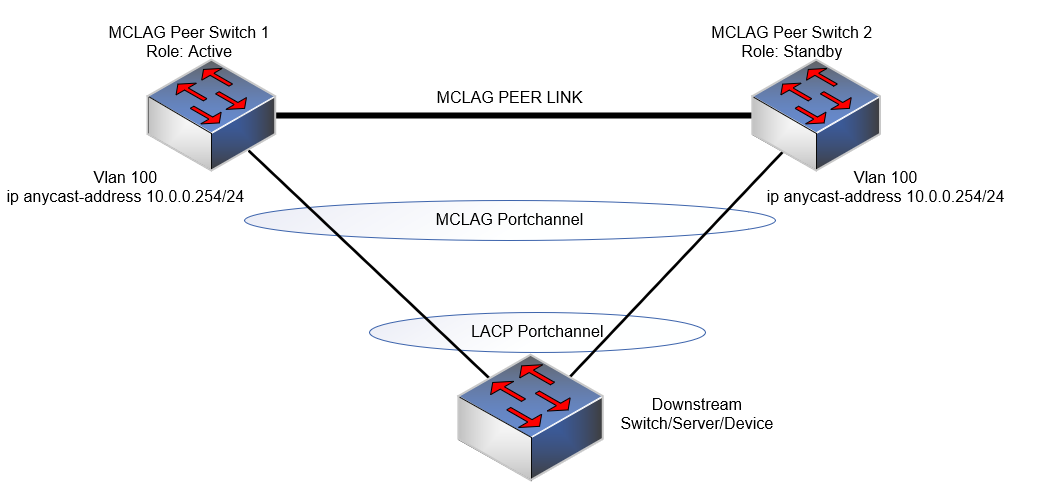
BEMÆRK:
- Anycasts IP-adresse kan ikke bruges til administrationsformål.
- Anycast virtuel MAC-adresse kan ikke være en multicast MAC-adresse.
Syntaks for konfiguration
| Konfiguration | Forklaring |
|---|---|
admin@DELLSONiC:~$ sonic-cli |
Indtast Dell SONiC CLI |
DELLSONiC# configure terminal |
Gå til konfigurationstilstand. |
DELLSONiC(config)# ip anycast-address enable |
Aktivér anycast-gatewayadresse |
DELLSONiC(config)# ip anycast-mac-address xx:xx:xx:xx:xx:xx |
Konfigurer anycast MAC-adresse |
DELLSONiC(config)# interface Vlan <vlan ID> |
Konfigurer vlan |
DELLSONiC(config-if-Vlan-<ID>)# ip anycast-address <A.B.C.D/mask> |
Konfigurer anycast-gateway-adresse |
Sådan deaktiverer du anycast-gateway:
| Konfiguration | Forklaring |
|---|---|
DELLSONiC(config)# ip anycast-address disable |
Deaktiver Anycast-gateway-adresse |
For at bekræfte brug kommando nedenfor:
| Konfiguration | Forklaring |
|---|---|
DELLSONiC# show ip static-anycast-gateway |
Se detaljer på static-anycast-gateway |
Eksempelkonfiguration
Konfiguration af IP anycast-adresse i Vlan 100: admin@DELLSONiC:~$ sonic-cli DELLSONiC# configure terminal DELLSONiC(config)# ip anycast-mac-address 00:11:22:33:44:55 DELLSONiC(config)# ip anycast-address enable Lets configure anycast IP in interface vlan 100 DELLSONiC(config)# interface Vlan 100 DELLSONiC(config-if-Vlan100)# ip anycast-address 10.0.0.254/24 DELLSONiC(config-if-Vlan100)# end DELLSONiC# |
Sådan bekræftes IP-adressen for Vlan 100:
DELLSONiC# show ip interfaces Flags: U-Unnumbered interface, A-Anycast IP ----------------------------------------------------------------------------------------------------------------- Interface IP address/mask VRF Admin/Oper Flags ----------------------------------------------------------------------------------------------------------------- Vlan100 10.0.0.254/24 up/up A |
Sådan bekræfter du statiske anycast-gateways:
DELLSONiC# show ip static-anycast-gateway Configured Anycast Gateway MAC address: 00:11:22:33:44:55 IPv4 Anycast Gateway MAC address: enable Total number of gateway: 1 Total number of gateway admin UP: 1 Total number of gateway oper UP: 1 Interfaces Gateway Address Vrf Admin/Oper ------------------- --------------- --------------- ---------- Vlan10 10.0.0.254/24 up/up |
Affected Products
Enterprise SONiC Distribution, PowerSwitch E3200-ON Series, Dell EMC Networking N3200-ON, PowerSwitch S5212F-ON, PowerSwitch S5224F-ON, PowerSwitch S5232F-ON, PowerSwitch S5248F-ON, PowerSwitch S5296F-ON, PowerSwitch Z9100-ON, PowerSwitch Z9264F-ON
, PowerSwitch Z9332F-ON, PowerSwitch Z9432F-ON
...
Article Properties
Article Number: 000223335
Article Type: How To
Last Modified: 20 Mar 2024
Version: 3
Find answers to your questions from other Dell users
Support Services
Check if your device is covered by Support Services.