NetWorker: AD login fails "nested exception is javax.naming.PartialResultException"
Summary: NetWorker is configured with an external authority resource: either Lightweight Directory Access Protocol (LDAP) or Microsoft Active Directory (AD). External user logins fail with HTTP 404 "Make sure that the server is running." ...
Symptoms
NetWorker Management Console (NMC) authentication of external (LDAP or AD) users fails with HTTP 404:

NetWorker Web User Interface (NWUI) authentication fails, stating that it failed to authenticate the user:

This issue is only seen for external users. Local NetWorker user accounts (such as the Administrator account) can authenticate successfully.
The NetWorker authentication server logs the following in the catalina.log.0 file:
Linux: /nsr/authc/logs/catalina.log.0
Windows: C:\Program Files\EMC NetWorker\nsr\authc-server\tomcat\logs\catalina.log.0
May 04, 2025 11:44:37 AM org.apache.catalina.core.StandardWrapperValve invoke
SEVERE: Servlet.service() for servlet [api-latest] in context with path [/auth-server] threw exception
org.springframework.ldap.PartialResultException: Unprocessed Continuation Reference(s); nested exception is javax.naming.PartialResultException: Unprocessed Continuation Reference(s); remaining name ''
gstd.conf file to confirm which server is processing authentication for the NMC.
Determining the authc server:
On the NMC server, open the gstd.conf file:
Linux: /opt/lgtonmc/etc/gstd.conf
Windows: C:\Program Files\EMC NetWorker\Management\GST\etc\gstd.conf
The file contains a authsvc_hostname line which defines the NetWorker authentication server used by the NMC.
[root@nsr ~]# cat /opt/lgtonmc/etc/gstd.conf | grep authsvc
    string authsvc_hostname = "nsr.amer.lan";
    int authsvc_port = 9090;
Cause
The error message indicates that there was an issue during an LDAP search operation. The PartialResultException suggests that the LDAP server returned a referral to another LDAP server or directory, but the referral is not processed correctly.
The external authority resource is configured without a user or group search path:
NetWorker Web User Interface (NWUI)->Authentication Server->External Authorities:

Resolution
Use one of the following options.
Option 1:
Configure the external authority resource in NetWorker to use search paths. Search paths are used to restrict NetWorker visibility to a specific location and subtree in the domain hierarchy. Meaning, only users and groups under the paths specified are visible to NetWorker. Context referrals are ignored.
There is no specific value that resolves this issue. Settings are environment-specific and may require the domain administrator to determine the most appropriate values. The NetWorker authentication server's authc_mgmt command can be used to determine the paths of users and groups visible to NetWorker.
Query LDAP users visible to NetWorker:
authc_mgmt -u Administrator -p 'NetWorker_Admin_Password' -e query-ldap-users -D query-tenant=TENTANT_NAME -D query-domain=DOMAIN_NAME
[root@nsr ~]# authc_mgmt -u Administrator -p '!Password1' -e query-ldap-users -D query-tenant=default -D query-domain=amer.lan
The query returns 44 records.
User Name            Full Dn Name
Administrator        CN=Administrator,CN=Users,dc=amer,dc=lan
....
bkupadmin            CN=Backup Administrator,CN=Users,dc=amer,dc=lan
Query LDAP groups visible to NetWorker:
authc_mgmt -u Administrator -p 'NetWorker_Admin_Password' -e query-ldap-groups -D query-tenant=TENTANT_NAME -D query-domain=DOMAIN_NAME
[root@nsr ~]# authc_mgmt -u Administrator -p '!Password1' -e query-ldap-groups -D query-tenant=default -D query-domain=amer.lan
The query returns 75 records.
Group Name                              Full Dn Name
Administrators                          CN=Administrators,CN=Builtin,dc=amer,dc=lan
...
NetWorker_Admins                        CN=NetWorker_Admins,CN=Users,dc=amer,dc=lan
Query the LDAP group membership of an AD/LDAP user:
authc_mgmt -u Administrator -p 'NetWorker_Admin_Password' -e query-ldap-groups-for-user -D query-tenant=TENTANT_NAME -D query-domain=DOMAIN_NAME -D user-name=EXTERNAL_USERNAME
[root@nsr ~]# authc_mgmt -u Administrator -p '!Password1' -e query-ldap-groups-for-user -D query-tenant=default -D query-domain=amer.lan -D user-name=bkupadmin
The query returns 1 records.
Group Name       Full Dn Name
NetWorker_Admins CN=NetWorker_Admins,CN=Users,dc=amer,dc=lan
In the example provided, the AD group CN=NetWorker_Admins,CN=Users,DC=amer,DC=lan is used to grant AD users in this group Administrative access to the NMC and NetWorker server.
Modifying the external authority Group Search path to include CN=Users (excluding Domain Component (DC) values) resolved the issue:
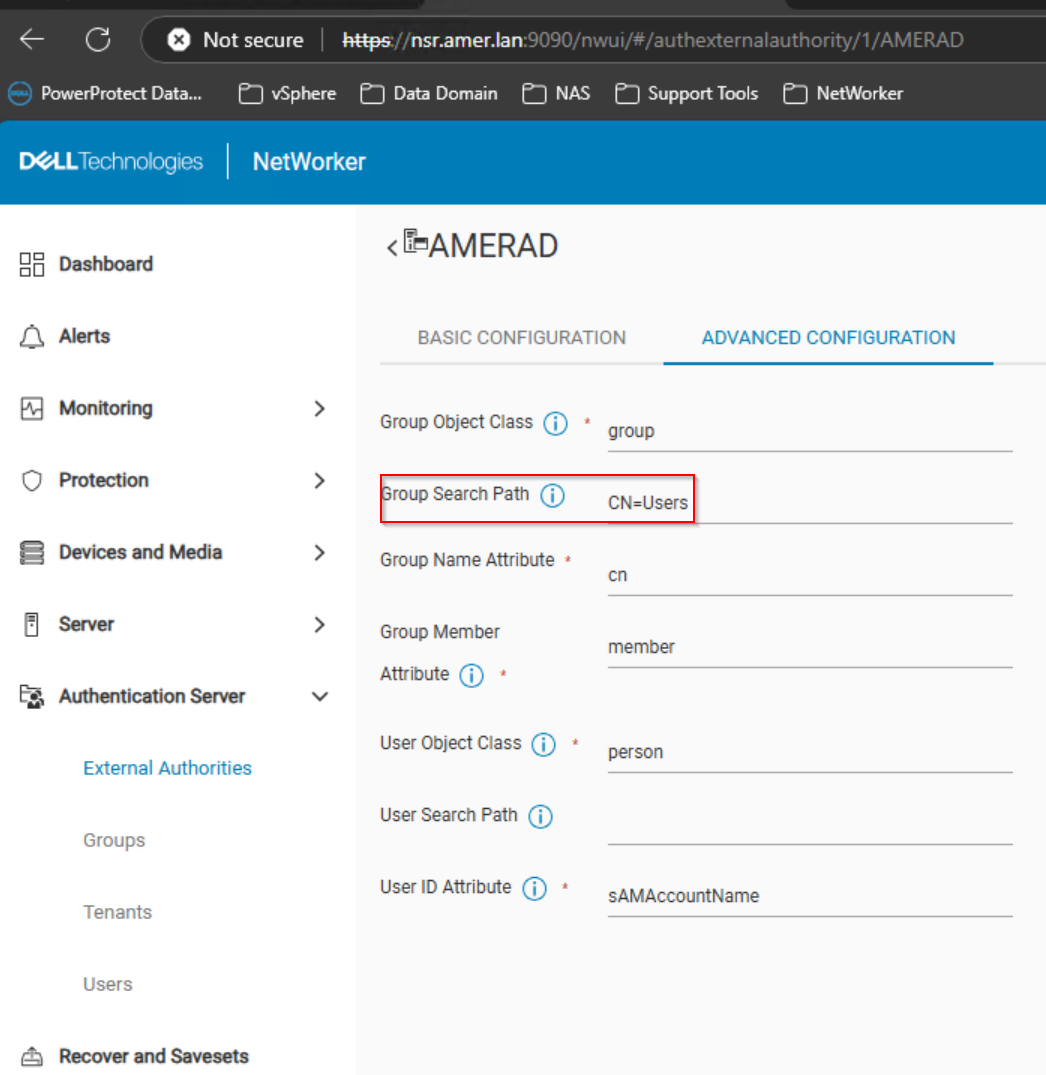
Option 2:
Consult with the domain administrator regarding configurations on the domain/LDAP server. Ensure that the LDAP server is correctly configured and that the referrals it provides are valid and accessible.