PowerProtect: File System Mount Error Encountered During File Level Restore On Linux
Summary: PowerProtect Data Manager File System file level restore fails at the mount stage.
This article applies to
This article does not apply to
This article is not tied to any specific product.
Not all product versions are identified in this article.
Symptoms
File System file level restores failing to mount on Linux.
Potential error code: ARA0002
Failure: Unable to restore FILE_SYSTEM asset /home because of an agent issue.
Note: The assets above change depending on asset selection
Read More:
General error during mount operation: failure obtaining copy updates

Potential error code: ARA0002
Failure: Unable to restore FILE_SYSTEM asset /home because of an agent issue.
Note: The assets above change depending on asset selection
Read More:
General error during mount operation: failure obtaining copy updates
Cause
On a vanilla machine deployment for Linux, by default ::1 is present in the /etc/hosts file.
With IPV6 enabled, pinging localhost does not return the required 127.0.0.1 when PowerProtect Data Manager agent communicates with a local REST Server.
With IPV6 enabled, pinging localhost does not return the required 127.0.0.1 when PowerProtect Data Manager agent communicates with a local REST Server.
A current requirement of the product is that the response to ping localhost should be 127.0.0.1.
In this case, it was sending ::1
Example:
# ping localhost
PING localhost(localhost (::1)) 56 data bytes
64 bytes from localhost (::1): icmp_seq=1 ttl=64 time=0.053 ms
64 bytes from localhost (::1): icmp_seq=2 ttl=64 time=0.042 ms
64 bytes from localhost (::1): icmp_seq=3 ttl=64 time=0.039 ms
Resolution
1. Using VI/VIM edit the /etc/hosts file on the destination VM for the restore.
# vi /etc/hosts
2. Comment out the ::1 entry and save the changed file.
Before:

After:
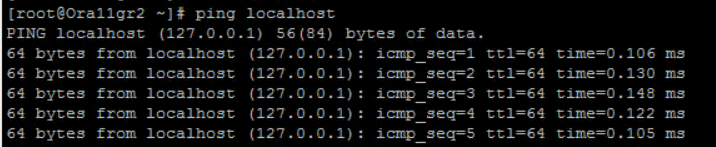
3. Carry out ping localhost again and you should see 127.0.0.1 returned and not ::1.
# vi /etc/hosts
2. Comment out the ::1 entry and save the changed file.
Before:
After:
3. Carry out ping localhost again and you should see 127.0.0.1 returned and not ::1.
Article Properties
Article Number: 000219300
Article Type: Solution
Last Modified: 26 Feb 2024
Version: 2
Find answers to your questions from other Dell users
Support Services
Check if your device is covered by Support Services.