NVP vProxy: FLR fails with "Unable to make ssh connection to 'DD_HOSTNAME', error ssh: handshake failed connection reset by peer"
Summary: Virtual Machine (VM) FLR performed through NetWorker VMware Protection (NVP) vProxy is failing to create an NFS export on the Data Domain with the connection reset by peer.
This article applies to
This article does not apply to
This article is not tied to any specific product.
Not all product versions are identified in this article.
Symptoms
The NetWorker VMware Protection integration is configured with the vProxy Appliance. The file level restore (FLR) fails with the following error message:
159373:nsrvproxy_flr: vProxy Log: YYYY-MM-DDTHH:MM:SSZ ERROR: [@(#) Build number: ###] Unable to create NFS export at 'dd.emclab.local:/data/col1/nwserver/FLR-nvp.emclab.local-f4b12a68-7ffc-413a-91ba-9087b3a09d36': Unable to run SSH command, error Unable to make ssh connection to 'dd.emclab.local', error ssh: handshake failed: read tcp 192.168.25.213:35304->192.168.25.18:22: read: connection reset by peer
- You can connect to the Data Domain (DD) from the NVP vProxy appliance over port 22:
curl -v DD_HOSTNAME:22
[root@nvp ~]# curl -v dd.emclab.local:22
* About to connect() to dd.emclab.local port 22 (#0)
*   Trying 192.168.25.18...
* Connected to dd.emclab.local (192.168.25.18) port 22 (#0)
> GET / HTTP/1.1
> User-Agent: curl/7.29.0
> Host: dd.emclab.local:22
> Accept: */*
>
* Recv failure: Connection reset by peer
* Closing connection 0
curl: (56) Recv failure: Connection reset by peer
- SSH connections to the Data Domain from the vProxy fail:
ssh sysadmin@DD_HOSTNAME
[root@nvp ~]# ssh sysadmin@dd.emclab.local
ssh_exchange_identification: read: Connection reset by peer
Cause
The Data Domain Access Management has SSH restrictions configured that only allow certain hosts to connect.
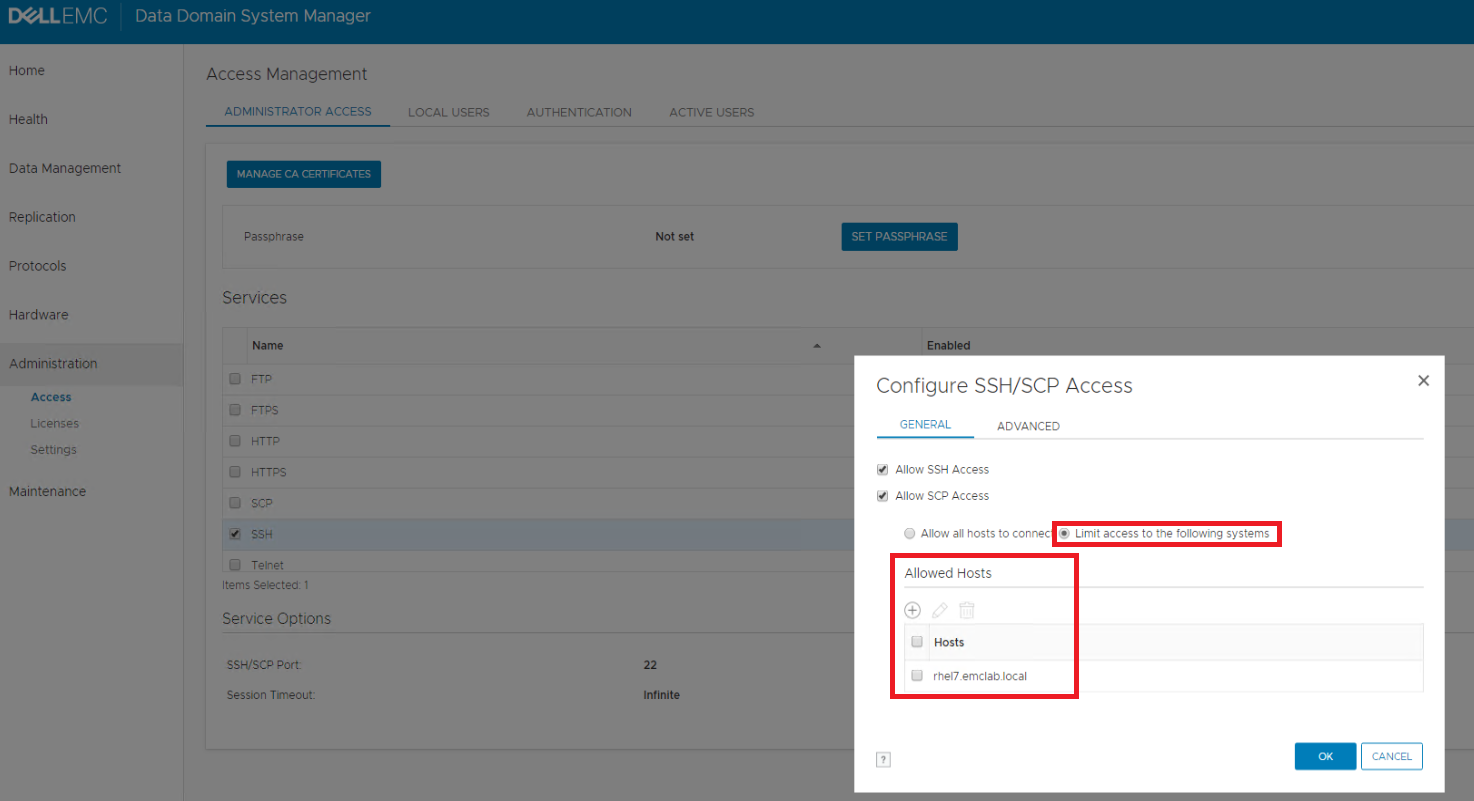
During a vProxy File Level (or Instant Access) restore, the vProxy connects to the Data Domain over SSH. It then creates a temporary NFS datastore on the Data Domain. This datastore contains the VM disks required for the restore operation. During FLR, this temporary datastore is mounted as a VMware NFS datastore and the disks are attached to the target FLR VM to perform the restore process. During Instant Access restore, the VM is created in VMware while the data resides on the Data Domain NFS datastore. VM integrity can be validated by the user before initiating a VMware storage migration; migrating the VM to another VMware datastore.
VM backups and other restore methods do not perform this SSH operation, so it is possible to only observe this problem during FLR or Instant Access restore.
Resolution
- Ensure that ALL port requirements are met: NVP vProxy: Troubleshooting Network Connectivity For Backup and Restore Operations
- Log in to the Data Domain Enterprise Manager web interface with the sysadmin account:
https://DD_HOSTNAME - Select the Administration tab in the left menu.
- Select Administrator Access from the top menu.
- Select SSH and click Configure.
- If the Limit access to the following systems radio button is selected, you must add the FQDN of your vProxies to the list.
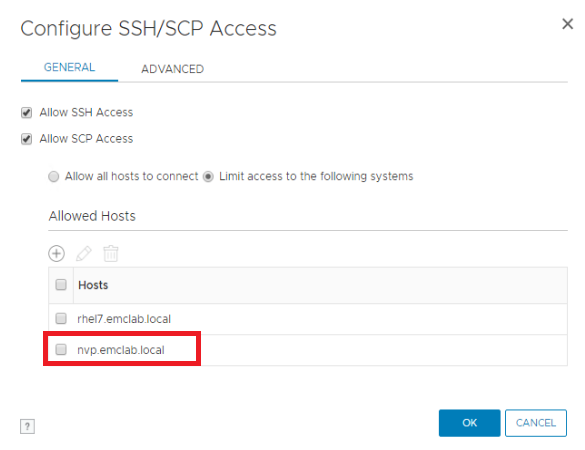
NOTE: Optionally, select Allow all hosts to connect if strict SSH restrictions are not required.
- Test SSH connectivity to the DD by either opening a PuTTy session to the DD or rerunning:
ssh sysadmin@DD_HOSTNAME - If the SSH connection succeeds, re-attempt the FLR mount.
Additional Information
- NVP vProxy: Troubleshooting Network Connectivity For Backup and Restore Operations
- NetWorker: vProxy FLR fails with error "Failed to log in to Data Domain service"
- NVP vProxy: FLR or Instant Access Restore Fails with "Unable to create datastore. Unable to complete Sysinfo operation"
- vProxy: FLR is failing for all clients with the error "Unable to create datastore"
Affected Products
NetWorkerProducts
Data Domain, NetWorkerArticle Properties
Article Number: 000166434
Article Type: Solution
Last Modified: 04 Jun 2025
Version: 5
Find answers to your questions from other Dell users
Support Services
Check if your device is covered by Support Services.