Avamar: PDM Recommendation Fails with Error "org.apache.axis2.AxisFault: Socket is closed
Summary: Avamar Proxy Deployment Manager (PDM) fails with internal error due to "org.apache.axis2.AxisFault: Socket is closed"
This article applies to
This article does not apply to
This article is not tied to any specific product.
Not all product versions are identified in this article.
Symptoms
In Avamar 19.3 (or later) the PDM recommendation fails with internal error:
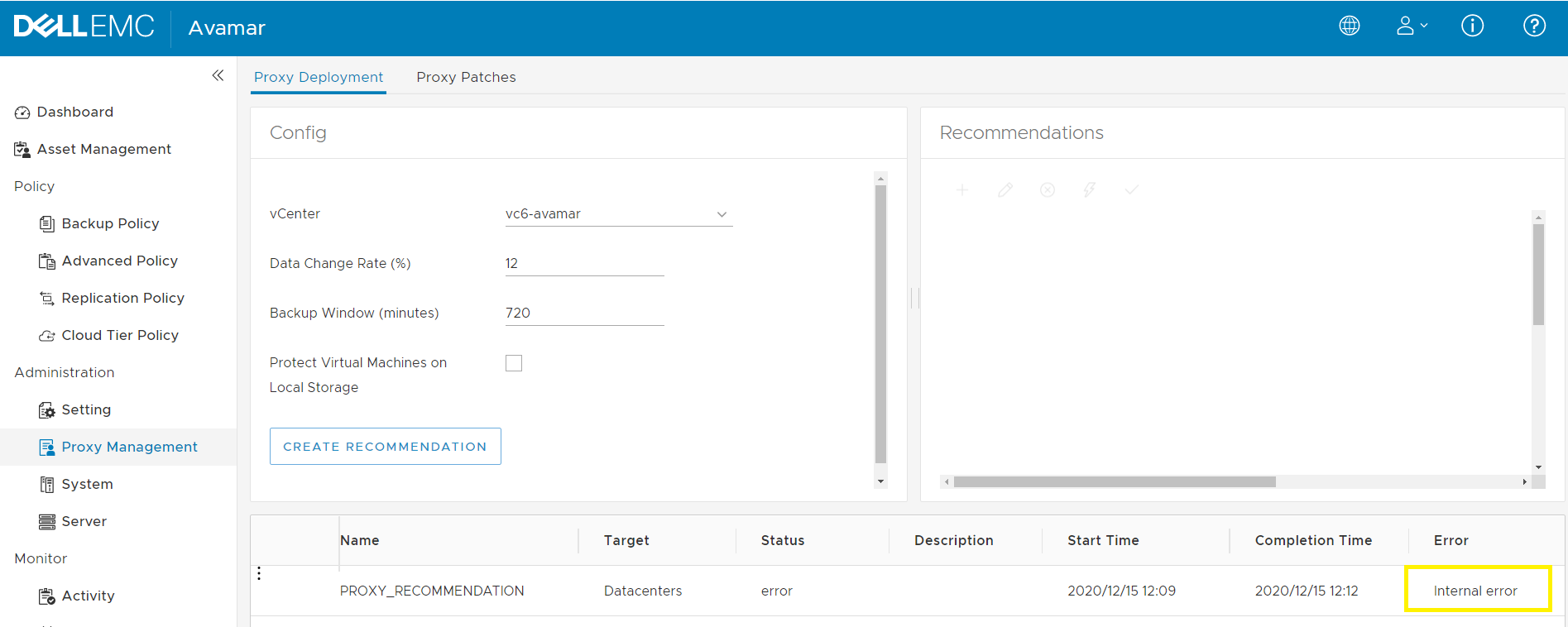
On the Avamar server, the /usr/local/avamar/var/log/vcs/deploymanager.log shows the following Java exception:
2020-12-14T16:21:00.989-0500 TRACE [Pool-6-worker-3][CredentialsMcConnectionFactory#  newMcConnection]: mcUrl:https://127.0.0.1:9443/services/mcsdk20
2020-12-14T16:22:52.543-0500 TRACE [cTaskExecutor-4][CredentialsMcConnectionFactory#  newMcConnection]: client.getServiceStub():com.avamar.mc.sdk20.Mcsdk20Stub@667b1a3c
2020-12-14T16:22:52.544-0500 TRACE [cTaskExecutor-4][CredentialsMcConnectionFactory#  newMcConnection]: user:root
2020-12-14T16:22:52.715-0500 ERROR [cTaskExecutor-4][CredentialsMcConnectionFactory#  newMcConnection]: Error connecting to mc service Exception
org.apache.axis2.AxisFault: Socket is closed
        at org.apache.axis2.AxisFault.makeFault(AxisFault.java:430)
        at org.apache.axis2.transport.http.SOAPMessageFormatter.writeTo(SOAPMessageFormatter.java:83)
        at org.apache.axis2.transport.http.AxisRequestEntity.writeRequest(AxisRequestEntity.java:84)
        at org.apache.commons.httpclient.methods.EntityEnclosingMethod.writeRequestBody(EntityEnclosingMethod.java:499)
        at org.apache.commons.httpclient.HttpMethodBase.writeRequest(HttpMethodBase.java:2114)
        at org.apache.commons.httpclient.HttpMethodBase.execute(HttpMethodBase.java:1096)
        at org.apache.commons.httpclient.HttpMethodDirector.executeWithRetry(HttpMethodDirector.java:398)
        at org.apache.commons.httpclient.HttpMethodDirector.executeMethod(HttpMethodDirector.java:171)
        at org.apache.commons.httpclient.HttpClient.executeMethod(HttpClient.java:397)
        at org.apache.commons.httpclient.HttpClient.executeMethod(HttpClient.java:346)
        at org.apache.axis2.transport.http.AbstractHTTPSender.executeMethod(AbstractHTTPSender.java:557)
Cause
PDM appliance is unable to establish a secure TLS connection with Avamar's MCSDK service using the loopback IP (127.0.0.1). This connection is not established due to a Tomcat keystore file certificate discrepancy.
Resolution
The root cause of the certificate discrepancy is under investigation with Avamar engineering.
Workaround:
Workaround:
- On the Avamar server, run the following commands to download the Avamar MCSDK service's certificate, as root user.
root@ave193:# openssl s_client -connect localhost:9443 -showcerts </dev/null 2>/dev/null > mcsdk-cert.crt
- Install the file from step 1 into Tomcat keystore using a new alias
kb181136using these commands:
For Avamar 19.3 and 19.4, run this command:
admin@ave193:~/>: keystore_passphrase=$(avlockbox.sh -r keystore_passphrase)

admin@ave193:~/>: keytool -import -file mcsdk-cert.crt -keystore /home/admin/.keystore -alias kb181136 -trustcacerts -noprompt -storepass $keystore_passphrase
For Avamar 19.7 and later, the Tomcat keystore file is in a different location. Run this command instead:
root@ave197:# keystore_passphrase=$(avlockbox.sh -r keystore_passphrase)

root@ave197:# keytool -import -file mcsdk-cert.crt -keystore /home/tomcat/.keystore -alias kb181136 -trustcacerts -noprompt -storepass $keystore_passphrase
The output should look like this.
Certificate was added to keystore
- Run these cleanup commands:
root@ave193:# rm mcsdk-cert.crt

root@ave193:# unset keystore_passphrase
- Perform another PDM recommendation.
Additional Information
For similar "PDM internal error" issue, see article Avamar - Proxy Deployment Manager (PDM) recommendation fails with internal error "java.lang.ArrayIndexOutOfBoundsException: -1"
Affected Products
AvamarProducts
Avamar Client for VMwareArticle Properties
Article Number: 000181136
Article Type: Solution
Last Modified: 16 Oct 2025
Version: 8
Find answers to your questions from other Dell users
Support Services
Check if your device is covered by Support Services.