How to Override the HTTP Timeout During Activation of Dell Encryption
Summary: Customers experiencing slow server response times during activation may have the activation fail because the timeout period to communicate with the server expires.
Instructions
Affected Products:
- Dell Encryption
- Dell Data Protection | Encryption
Check Shield for Windows Log for a Timeout Error Message
The default value for the Dell Security Management Server (formerly Dell Data Protection | Enterprise Edition) is 60 seconds for connection and the Shield default value is 30 seconds for send and receive operations.
To diagnose the issue, look for HTTP timeouts in the Shield log. The Shield Log shows the errors similar to the following message:
[XmlRpcActivate: 427] HTTP request failed yet again. HTTP error(12002) -
The operation timed out
[Activator: 700] Activation - Verify network connectivity to the CMG Server at "XYZPolicy" and CMG Device Server at "https://XYZpolicy:8083/xapi"
[User: 632] - Device Server Connection error (12002)
What You Will Need
To resolve this issue, you must install the Dell Encryption v8.1.0.5744 or later. Updating to the newer build allows you to increase the timeout period to meet your network environment needs.
To access the latest build, install media, go to Dell Data Protection | Encryption Product Support.
- Back up the Registry before proceeding, reference How to Back Up and Restore the Registry in Windows
.
- Editing the Registry can cause the computer to become unresponsive on the next reboot.
- Contact Dell Data Security International Support Phone Numbers for assistance if you have concerns about performing this step.
- Upgrade to the latest Dell Encryption version (minimum 8.1.0.5744) where possible.
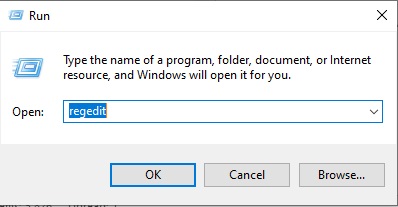
- Open the Windows Registry Editor on the endpoint that is downloading the key material by typing regedit into a Run window and selecting OK.
- Go to
Computer\HKEY_LOCAL_MACHINE\SOFTWARE\Microsoft\Windows NT\CurrentVersion\Winlogon\CMGShield. - Create a DWORD called
HTTPTimeout. - Right-click
HTTPTimeoutand select Modify. - Set the Value Data to 300 in decimal.
This registry override value updates the Shield for Windows' send and receive operations. The computer doubles the registry override value for connection operations. Valid registry values are 30 seconds up to 300 seconds. Anything above or below is changed to the min and max allowed values.
To contact support, reference Dell Data Security International Support Phone Numbers.
Go to TechDirect to generate a technical support request online.
For additional insights and resources, join the Dell Security Community Forum.