PowerEdge: Understanding PERC Battery Errors
Summary: This article provides information about various battery error codes, their possible causes, and examples.
Instructions
Table of Contents:
- BAT0015: The PERC battery is low
- BAT0020: The PERC1 battery is not ready
- BAT0017: The PERC Battery has failed
- BAT0021: The PERC battery has reached the end of its usable life or has failed
Common Causes for Battery Warnings and Failure events:
- Firmware issue
- A Battery Relearn in progress
- Battery detection issues
- Battery disabled
- Battery charging failures
- A Battery health check failure
Warning Events:
BAT0015    The PERC battery is low.
BAT0020    The PERC1 battery is not ready either because the battery is not fully charged or a transient battery event is observed.
Critical Events:
BAT0017    The PERC1 battery has failed.
BAT0021    The PERC1 battery has reached the end of its usable life or has failed.
BAT1029    The battery on Integrated RAID Controller 1 can no longer recharge. (Deprecated replaced with BAT0017)
BAT0015: The PERC battery is low
This error code can occur due to a battery learn cycle or a battery that is not holding a charge. To troubleshoot, check the controller logs for the examples below.
-
Example: Learn Cycle Scheduled

07/30/25  1:55:45: C0:EVT#01861-07/30/25  1:55:45: 151=Battery relearn started
07/30/25  1:56:50: C0:EVT#01862-07/30/25  1:56:50: 152=Battery relearn in progress
07/30/25  2:32:35: C0:EVT#01863-07/30/25  2:32:35: 148=Battery is discharging
07/30/25  3:49:30: C1:Learn completed successfully.
07/30/25  3:49:30: C0:EVT#01864-07/30/25  3:49:30: 153=Battery relearn completed
This is working as designed, the battery must be drained in order for the learn cycle to properly test its ability to charge.
Recommendation: Update the PERC firmware, as most of the controllers have updated firmware to hide the messaging during learn cycles.
-
Example Charging issue:
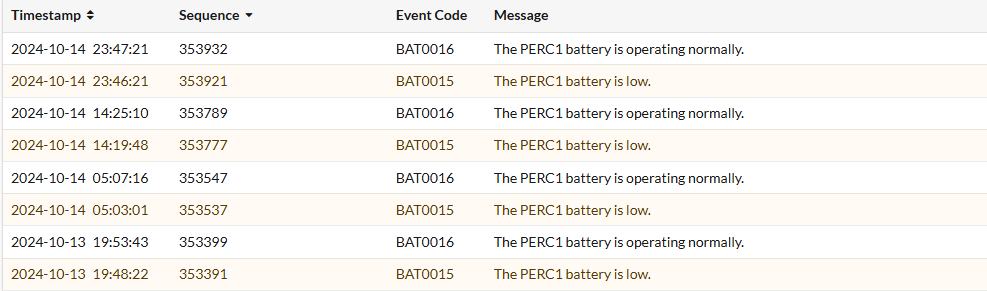
10/14/24 8:26:29: C0: Remaining Capacity : 134 mAh Full Charge Capacity: 602 mAh 10/14/24 8:26:29: C0: Relative State of Charge: 22 % FwBBUState : 1 10/14/24 8:31:54: C0:EVT#185874-10/14/24 8:31:54:
147=Battery started charging10/14/24 8:31:54: C0: Remaining Capacity : 140 mAh Full Charge Capacity: 605 mAh 10/14/24 8:31:54: C0: Relative State of Charge: 23 % FwBBUState : 1 10/14/24 9:54:14: C0:EVT#185878-10/14/24 9:54:14:148=Battery is discharging10/14/24 17:41:09: C0: Remaining Capacity : 134 mAh Full Charge Capacity: 604 mAh 10/14/24 17:41:09: C0: Relative State of Charge: 22 % FwBBUState : 1 10/14/24 17:45:29: C0:EVT#185882-10/14/24 17:45:29:147=Battery started charging10/14/24 17:46:34: C0: Remaining Capacity : 141 mAh Full Charge Capacity: 618 mAh 10/14/24 17:46:34: C0: Relative State of Charge: 22 % FwBBUState : 1Looking at the controller logs we can see how it is never charging up to a full 100% before it starts discharging which causes it to keep having to charge repeatedly indicating an issue with the battery holding a charge or possibly a charging failure from the controller.
Recommendation: Update the PERC Firmware and monitor if the errors persist. If errors persist, then the recommended is to engage Dell Technical Support.
-
Example: Battery Disabled repeatedly
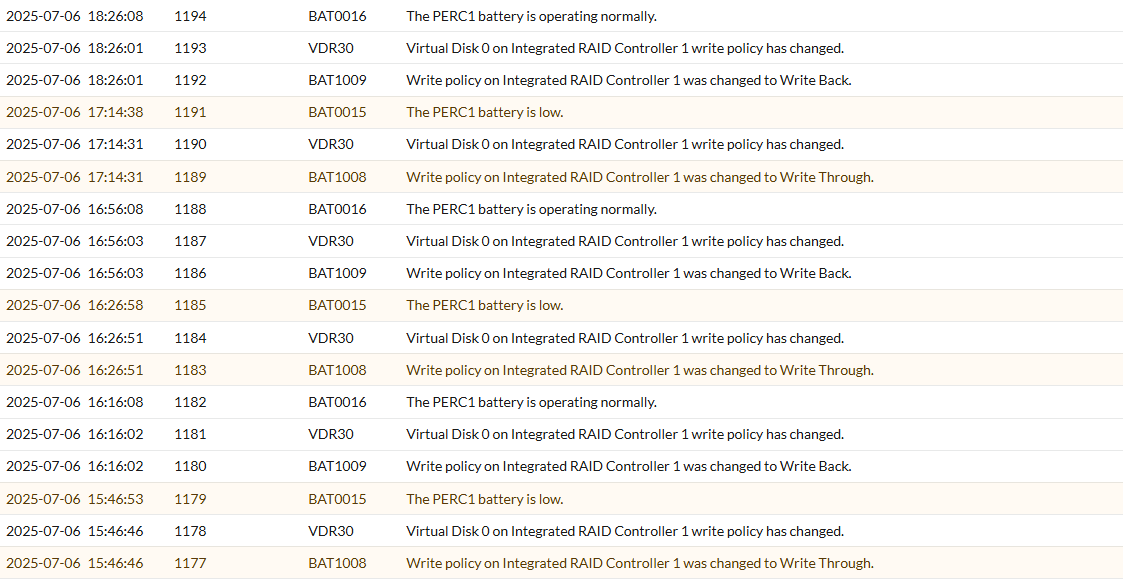
07/06/25 13:25:30: C1: _____________________________________________ 07/06/25 13:25:30: C1: *** BATTERY MONITORED INFORMATION *** 07/06/25 13:25:30: C1: ____________________________________________________________________________ 07/06/25 13:25:30: C1: Temperature : 33 C Voltage : 3904 mV 07/06/25 13:25:30: C1: Current : 0 mA GasGaugeStat : 138 07/06/25 13:25:30: C1: GPID : 20357815 ChargerStatus : 1 07/06/25 13:25:30: C1: Remaining Capacity : 95 mAh Full Charge Capacity: 128 mAh 07/06/25 13:25:30: C1: Relative State of Charge: 75 % FwBBUState : 1 07/06/25 13:25:30: C1: ____________________________________________________________________________ 07/06/25 13:17:56: C0:EVT#01712-07/06/25 13:17:56: 195=
BBU disabled; changing WB virtual disks to WT, Forced WB VDs are not affected 07/06/25 13:25:30: C0:EVT#01714-07/06/25 13:25:30: 194=BBU enabled; changing WT virtual disks to WB 07/06/25 15:25:46: C0:EVT#01720-07/06/25 15:25:46: 195=BBU disabled; changing WB virtual disks to WT, Forced WB VDs are not affected 07/06/25 15:35:30: C0:EVT#01722-07/06/25 15:35:30: 194=BBU enabled; changing WT virtual disks to WB 07/06/25 16:26:28: C0:EVT#01724-07/06/25 16:26:28: 195=BBU disabled; changing WB virtual disks to WT, Forced WB VDs are not affected 07/06/25 16:36:10: C0:EVT#01726-07/06/25 16:36:10: 194=BBU enabled; changing WT virtual disks to WB 07/06/25 17:30:20: C0:EVT#01728-07/06/25 17:30:20: 195=BBU disabled; changing WB virtual disks to WT, Forced WB VDs are not affected 07/06/25 17:35:45: C0:EVT#01730-07/06/25 17:35:45: 194=BBU enabled; changing WT virtual disks to WBLooking at the Controller log we see that the battery is being disabled and reenabled without any charging taking place, so the battery low warning is triggered by the battery being disabled.
Recommendation: Update the PERC firmware followed by a full shutdown and power drain which triggers a fresh battery inventory and battery relearn cycle.
BAT0020: The PERC1 battery is not ready
This error code can also occur due to a battery learn cycle or a battery that has been disabled.
-
Example: Learn Cycle
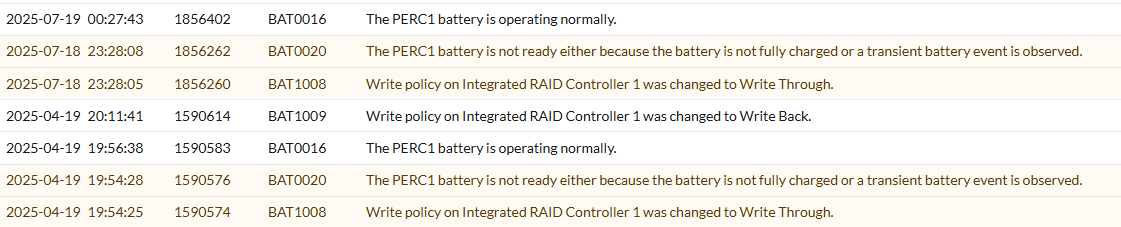
07/19/25  0:23:47: C1:Battery fully charged: Starting a Learn cycle
07/19/25  0:23:47: C0:EVT#01120-07/19/25  0:23:47: 151=Battery relearn started
07/19/25  0:24:52: C0:EVT#01121-07/19/25  0:24:52: 152=Battery relearn in progress
07/19/25  5:54:12: C1:Learn completed successfully.
07/19/25  5:54:12: C0:EVT#01128-07/19/25  5:54:12: 153=Battery relearn completed

07/19/25  5:54:12: C1:Next Learn will start on 10 17 2025
07/19/25  5:54:12: C1:	 Auto Learn Period      : 90  days
07/19/25  5:54:12: C1:	 Next Learn Time        : 813995652
07/19/25  5:54:12: C1:	 Delayed Learn Interval : 0  hours from scheduled time
07/19/25  5:54:12: C1:	 Next Learn scheduled on: 10 17 2025   5:54:12
Here we can see that the battery was going through its normal relearn cycle and then it completed successfully and we can see based on the next scheduled run that it is on the default three month cycle for relearn, which explains the previous messages in the logs from 4/19 three months previously.
Recommendation: Update the PERC firmware, as most of the controllers have updated firmware to hide the messaging during learn cycles.
-
Example: Battery Disabled repeatedly
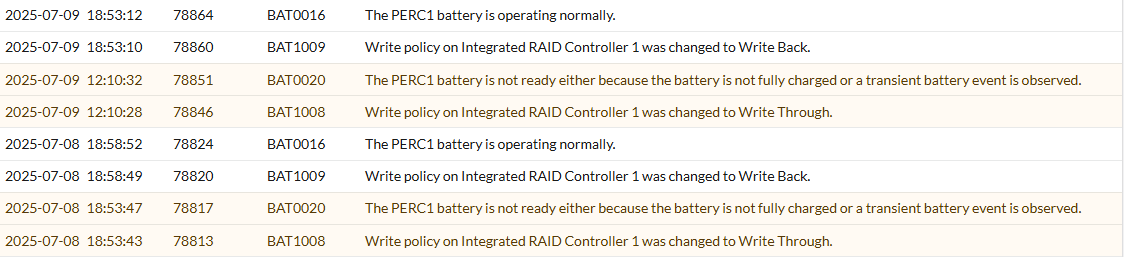
07/08/25 18:53:39: C0:EVT#03167-07/08/25 18:53:39: 195=
BBU disabled; changing WB virtual disks to WT, Forced WB VDs are not affected 07/08/25 18:58:48: C0:EVT#03171-07/08/25 18:58:48: 194=BBU enabled; changing WT virtual disks to WB 07/09/25 12:10:23: C0:EVT#03175-07/09/25 12:10:23: 195=BBU disabled; changing WB virtual disks to WT, Forced WB VDs are not affected 07/09/25 18:53:08: C0:EVT#03179-07/09/25 18:53:08: 194=BBU enabled; changing WT virtual disks to WBIn this example, the logs will show the battery (BBU) being disabled and then shortly after being enabled again over and over. This can be caused by firmware issues and controller charging issues.
Recommendation: Update the PERC Firmware and monitor. If the errors persist, engage Dell Technical Support.
BAT0017 - The PERC Battery has failed
This error code can occur due to a battery that has reached the end of its usable life or has failed. To troubleshoot, check the controller logs for battery failure, charging, or detection issues.
-
Example: Battery Health Check Failed

T15: C0:EVT#02053-T15:
150=Battery has failed and cannot support data retention. Please replace the batteryT15: C0:EVT#02054-T15: 162=Current capacity of the battery is below threshold T15: C0:EVT#02055-T15: 155=Battery relearn pending: Battery is under charge 07/18/25 2:59:59: C0:EVT#02068-07/18/25 2:59:59: 242=Battery charge complete 07/18/25 2:59:59: C1:Battery fully charged: Starting a Learn cycle 07/18/25 2:59:59: C0:EVT#02069-07/18/25 2:59:59: 151=Battery relearn started 07/18/25 3:01:04: C0:EVT#02070-07/18/25 3:01:04: 152=Battery relearn in progress 07/18/25 6:48:34: C0:EVT#02071-07/18/25 6:48:34: 148=Battery is discharging 07/18/25 7:51:24: C1:Learn completed successfully. 07/18/25 7:51:24: C0:EVT#02072-07/18/25 7:51:24: 153=Battery relearn completed 07/18/25 7:51:24: C1:Next Learn will start on 10 16 2025 07/18/25 7:52:29: C0:EVT#02073-07/18/25 7:52:29: 162=Current capacity of the battery is below threshold 07/18/25 7:52:29: C0:EVT#02074-07/18/25 7:52:29: 152=Battery relearn in progressHere we see that during boot on its initial Battery health checks done on the controller's initialization it identified the Battery has failed and suggested replacement.
This is due to the battery health being below threshold, but the battery is not completely dead so we see it triggering relearn over and over discharging and charging the battery which causes it to flip from Failed to normal because it is able to complete the learn cycle and charge, but we can see that it is not holding it for long and triggers the relearn again.Recommendation: Engage Dell Technical Support.
-
Example: Battery removed or Charging Fault
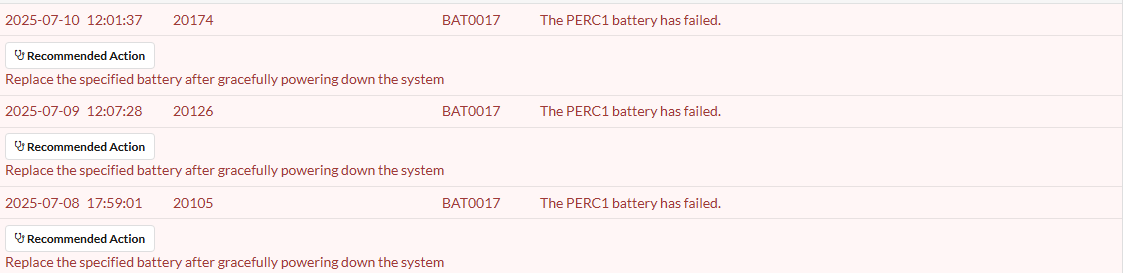
07/09/25 18:39:15:
C1:Charger detected Battery removal or Charger Fault condition07/09/25 18:44:15: C1:Charger detected Battery removal or Charger Fault condition 07/09/25 18:49:15: C1:Charger detected Battery removal or Charger Fault condition T11: C0: disableAutoRebuild=0, disableBatteryWarning=0, eccBucketSize=ff T11: C0:Charger detected Battery removal or Charger Fault condition T11: C0:EVT#56196-T11:161=Battery removed07/10/25 11:59:03: C0:Charger detected Battery removal or Charger Fault condition 07/10/25 11:59:03: C0:Charger detected Battery removal or Charger Fault condition 07/10/25 12:02:42: C1:Charger detected Battery removal or Charger Fault condition 07/10/25 12:07:42: C1:Charger detected Battery removal or Charger Fault conditionIn this example we see that the controller detected either a battery removal or charger fault that is preventing the battery from being detected properly.
So here provided the battery was not physically removed it could be a firmware issue, battery Failure, or controller charging failure.Recommendation: Update the PERC Firmware and check if the battery status. If the errors persist, engage Dell Technical Support.
BAT0021 - The PERC battery has reached the end of its usable life or has failed
This error code can occur due to a battery that has reached the end of its usable life or has failed. To troubleshoot, check the controller logs for battery failure, charging, or detection issues.
-
Example: Battery or Charging Problems detected

T8: C0:Unknown DPN,
please check batteryT8: C0:EVT#00606-T8:200=Battery/charger problems detected; SOH BadT8: C0:EVT#00607-T8: 195=BBU disabled; changing WB virtual disks to WT, Forced WB VDs are not affected T8: C0:Battery type is unsupported T8: C0:Unable to read Battery Pack-Side EEPROM 128 bytes from Offset =0x0.Err - 1 T8: C0:Unable to read Battery Pack-Side EEPROM bytes.Err - 1Here we see during the initialization on boot the Battery was found bad, the
SOH Badmessage here is direct indication that the Battery has failed, we even see it go on to state the battery is unsupported indicating it is no longer detecting it correctly as a valid battery.Recommendation: Engage Dell Technical Support.