Avamar: ADME-Backup Error - Login error 74: Account not found in the Avamar database
Summary: Avamar Data Migration Enabler (ADME) fails in export because a client has an invalid domain path due to a change in domain location. This results in a Login error 74: Account not found in the Avamar database. ...
This article applies to
This article does not apply to
This article is not tied to any specific product.
Not all product versions are identified in this article.
Symptoms
Upon triggering a Backup, ADME fails instantly in the selection phase:
========================================== SELECTION - PHASE =========================================ADMe is locked - retaining existing password...
ADMe session started...
Environment-1 is now locked by [ Batch-Owner=admbatch-OracleJob.cfg PID=13218 ]
User-Input: 1 -sid OracleGrp -select -d -butype cod mod nah
INFO-01A: Active-Auto Date Range - 2018-08-01 to 2018-08-10
Purging previous pseudo client backups from [/ADME/admepseudo]
avtar Error 5126: Login error 74: Account not found in the Avamar database
avtar FATAL 5308: Failed to initiate session with server
avtar Error 5126: Login error 74: Account not found in the Avamar database
avtar FATAL 5308: Failed to initiate session with server
avtar Error 5126: Login error 74: Account not found in the Avamar database
avtar FATAL 5308: Failed to initiate session with server
Scanning-Group [OracleGrp]-[cai-oracle.emc.com]...
avtar Error 5126: Login error 74: Account not found in the Avamar database
avtar FATAL 5308: Failed to initiate session with server
INFO-07: Configuration check succeeded
INFO-14: Total backup count selected [0]
ERROR-04A Selection list is empty [ RC=1 ], this will impact continuing with a migration operation
Env- Session Complete: RC=1 08/09/18 16:52
ATO-BATCH-FAILURE: [-select] RC=[] Start-Time:09/08/18 16:52 End-Time:09/08/18 16:52 Elapsed-Time-HH:MM=n/a Env#:1
Cause
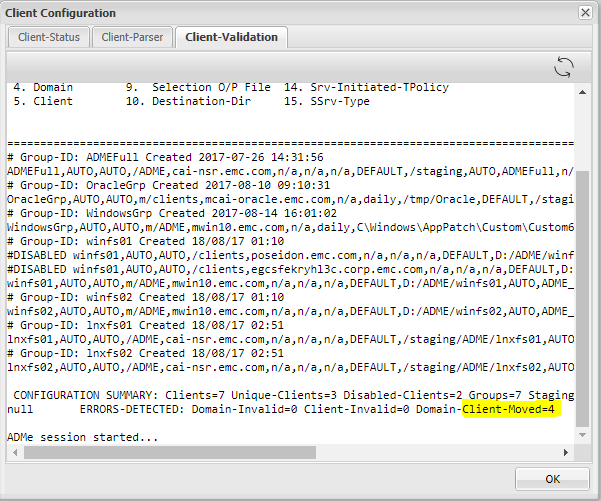
The cause for this is because ADME cannot find the mentioned client. One possible reason is that the client has moved from one domain to another.
- Checking the client validation, we can see that ADME is pointing that some of the clients have moved from their existing domain.
- This means that the ADME is seeing the old client path and it must be updated with the new path (domain) where the client has moved to.
Resolution
- ADME Fails exporting some or specific clients because it cannot find the client.
- The cause for this is that the client has been moved.
- The client must be updated with the correct path.
- The steps to update the path are:
- In order to update the client path, the following steps need to be done from the ADME interactive CLI.
- Open Avamar Server as root, and type 'adme'
- Choose the second option, you can either type 2 or C.
- Click 'G' for Groups.
- Choose the Group where that has the client where it has its domain changed.
- Type 'M' for Modify.
- You must update the fourth field that has the client's domain path.
- Finally after updating the new client domain, you must type 'C' to commit the changes.
Old Path:
New Path:
Additional Information
- Open Avamar Server and type 'adme'
- Choose the second option, you can either type 2 or C:
==< cai-ave74 >================================ | ADMe Avamar Data Migration (Enabler) | | MAIN - MENU | | Version-4.1.11.45e =============================================== | 1. J) Job Policy Manager | | 2. C) Client-Config Manager | | 3. E) Environment-File Manager | | 4. V) View Selection Worklist | | 5. L) Event Log View | | 6. H) Help | | 7. R) Recovery Manager | | 8. S) Interactive Selection | | 9. M) Interactive Migration | | 10. A) ADMe Administration | | 11. G) ADMe Upgrade | | | =============================================== - Click 'G' for Groups
==========================================================================================================< cai-ave74 >=============== CONFIGURATION MANAGER [DOMAIN-VIEW]: <domain-name> [client-count] ==================================================================================================================================== 1) /ADME [1] 2) /MC_RETIRED [8] 3) /NDMP [2] 4) /Oracle [1] 5) /REPLICATE/cai-ave.emc.com [1] 6) /REPLICATE/cai-ave.emc.com/cai-vcen 7) /REPLICATE/cai-ave.emc.com/cai-vcen 8) /REPLICATE/cai-ave.emc.com/cai-vcen 9) /REPLICATE/cai-ave.emc.com/clients 10) /REPLICATE/cai-ave75.emc.com [1] 11) /REPLICATE/cai-ave75.emc.com/cai-vc 12) /VMWare [2] 13) /cai-vcenter.emc.com [3] 14) /cai-vcenter.emc.com/ContainerClien 15) /cai-vcenter.emc.com/VirtualMachine 16) /clients [4] 17) /clients/_DESACTIVATED [1] ==================================================================================================================================== Config Options: [#=Domain I=Inhibit-Stats G=Group F=Refresh H=Search S=Status-All C=Cfg-View P=Cfg-Parse R=Report U=Cfg-Edit B=Build-CSV-Stats W=Col-Width Q=Quit] > G -
Choose the Group where that has the client where it has its domain changed:
==========================================================================================================< cai-ave74 >=============== CONFIGURATION MANAGER [GROUP-VIEW]: <group-name> [client-count] ==================================================================================================================================== 1) ADMEFull [1] 2) OracleGrp [1] 3) WindowsGrp [1] 4) lnxfs01 [1] 5) lnxfs02 [1] 6) winfs01 [3] 7) winfs02 [1] ==================================================================================================================================== Config Options: [#=Group Z=Calculate-Aggregate-Size C=View-Cfg R=Report U=Cfg-Edit S=Status-All Def=Domain-View>] > 2 - Type 'M' for Modify:
==========================================================================================================< cai-ave74 >=============== CONFIGURATION MANAGER [GROUP-CLIENT-VIEW]: <client-name> [#Entries-state] Blue=Not-Config Green=Enabled Red=Disabled Yellow=Invalid ==================================================================================================================================== 1) cai-oracle.emc.com [1-E] ==================================================================================================================================== CLIENT-STATS-DISABLED: Not-Configured=0 Disabled=0 Enabled=0 Invalid=0 Retired=0 ==================================================================================================================================== Config Options: [ D=Disable E=Enable M=Modify O=Remove R=Report T=Audit V=Quick-View Def=Group-View>] > M Enter a client# to add/modify or [ Press Enter to Return ]:> 1 DEBUG2 - Itemx=cai-oracle.emc.com Domainx=OracleGrp Mode=3 Available Client Group-ID's: ADMEFull OracleGrp WindowsGrp lnxfs01 lnxfs02 winfs01 winfs02 Client [cai-oracle.emc.com] is currently defined in groups: OracleGrp Ready to Modify client [/clients][cai-oracle.emc.com] in ADMe configuration. Enter An Existing or New Group-ID or [Def=OracleGrp] Q=Quit: -
Update the 4th field which has the client's domain path:
==================================================================
         Review All Fields to Establish Selected Client Entry
==================================================================

        Fld-1 ADMe Group-ID Name [OracleGrp]: >
        Fld-2 Start-Date [AUTO]: >
        Fld-3 End-Date [AUTO]: >
        Fld-4 Domain-Name [/clients]: >
        Fld-5 Client-Name [cai-oracle.emc.com]: >
        Fld-6 Avamar-Policy-Group-Name [n/a]: >
        Fld-7 Avamar-Retention-Type [daily]: >
        Fld-8 Exclude-Folders [/tmp/Oracle]: >
        Fld-9 Output-FIle [DEFAULT]: >
        Fld-10 Stage-Destination-Directory [/staging/OracleGrp]: >
        Fld-11 Migration-BU-Scripts [AUTO]: >
        Fld-12 Migration-Monthly-Policy [ORCLNWGRP]: >
        Fld-13 Migration-EOY-Policy [n/a]: >
        Fld-14 Migration-Server-Policy [n/a]: >
        Fld-15 Staging-Server-Type WINDOWS | UNIX [UNIX]: >
        Fld-16 Destination-Path-Suffix [n/a]: >
        Fld-17 Include-Folders [n/a]: >
        Fld-18 Incremental-Delete [n/a]: >


==================================================================

 Confirm Client Entry: [ C=Commit M=Modify Enter=Refresh Q=Quit]: >


==================================================================
 Enter All Fields to Modify a Client Entry, press enter to accept defaults
==================================================================

        Fld-1 ATO-Group-ID Name [OracleGrp]: >
        Fld-2 Start-Date [AUTO]:
        Fld-3 End-Date [AUTO]:
        Fld-4 Domain-Name [/clients]: > /Oracle
        Fld-5 Client-Name [cai-oracle.emc.com]: >
        Fld-6 Avamar-Policy-Group-Name [n/a]:
        Fld-7 Retention-Type [daily]:
        Fld-8 Exclude-Folders [/tmp/Oracle]:
        Fld-9 Output-FIle [DEFAULT]:
        Fld-10 Stage-Destination-Directory [/staging/OracleGrp]:
        Fld-11 Migration-BU-Scripts [AUTO]:
        Fld-12 Export-Policy-Client-Initiated [ORCLNWGRP]:
        Fld-13 Export-EOY-Policy-Client-Initiated [n/a]:
        Fld-14 Export-Policy-Server-Initiated [n/a]:
        Fld-15 Staging-Server-Type WINDOWS | UNIX [UNIX]:
        Fld-16 User-Defined-Destination-Path-Suffix [n/a]:
        Fld-17 Include-Folders [n/a]:
        Fld-18 Incremental-Delete [n/a]:


==================================================================

 Confirm Client Entry: [ C=Commit M=Modify Enter=Refresh Q=Quit]: > C
Affected Products
Avamar Data Migration EnablerProducts
Avamar Client, Avamar Data Migration EnablerArticle Properties
Article Number: 000052310
Article Type: Solution
Last Modified: 05 Sept 2025
Version: 5
Find answers to your questions from other Dell users
Support Services
Check if your device is covered by Support Services.