OpenManage Enterprise: web UI inaccessible after configure time zone to GMT 02:00 Kyiv
Summary: New deployments of OpenManage Enterprise 4.4.0 are experiencing service failures after configuring the time zone for GMT +02:00 Helsinki, Kyiv, Riga, Sofia, Tallinn, Vilnius. The issue is only seen on fresh deployment of OpenManage Enterprise (OME) 4.4.0 on Hyper-V. Deploying OpenManage Enterprise (OME) on other hypervisors is not impacted. ...
Symptoms
Restarting the services or appliance after configuring the time zone to 'GMT +02:00 Helsinki, Kyiv, Riga, Sofia, Tallinn, Vilnius,' causes the core services to fail to start.
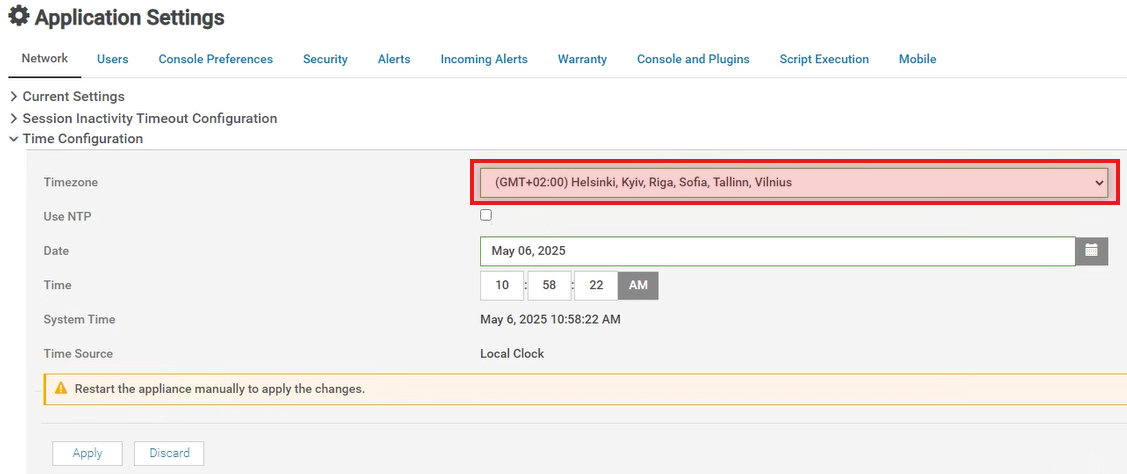
Trying to access the web UI results in an HTTP Status 500 internal service error.

Accessing the Text User Interface (TUI) using the local admin password fails. Also, checking the appliance status may show several services in an activating state.
Cause
OpenManage Enterprise 4.4.0 contains an updated Java Virtual Machine (JVM). This new JVM version maps the 'GMT +02:00 Helsinki, Kyiv' time zone to the new zone name 'Europe Kyiv' (previously 'Europe Kiev'). However, the version of PostgreSQL used by OpenManage Enterprise, version 11, does not support the new time zone name. The start of the database service after the time zone change causes an initialization loop resulting in core service failures.
Resolution
OpenManage Enterprise version 4.6.0, tentatively scheduled for November of 2025 release, updates PostgreSQL to support the new time zone name.
As a workaround, select any other GMT +02:00 time zone when configuring OpenManage Enterprise version 4.4.0. Alternatively, if the time zone is required, deploy version 4.3.2 where the issue is not seen.