Secure Connect Gateway: How To Get The Serial Number
Summary: This article explains two different methods that can be used to gather the serial number of the Secure Connect Gateway.
This article applies to
This article does not apply to
This article is not tied to any specific product.
Not all product versions are identified in this article.
Instructions
To obtain the serial number of a Secure Connect Gateway the following steps below can be followed:
1. Connect to the gateway

2. Click About:

3. Look for the serial number here:
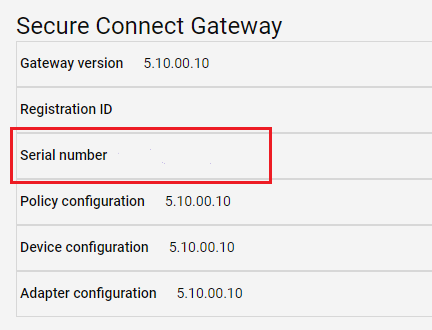
4. To copy the serial number, double-click the serial number to select it. Then press ctrl-C to copy the serial number into the clipboard.
1. Log in to the SCG using putty or other ssh client (we use Putty in this example).
2. Run the following command for 5.18 and earlier:
3. Run the following command for 5.18 and later: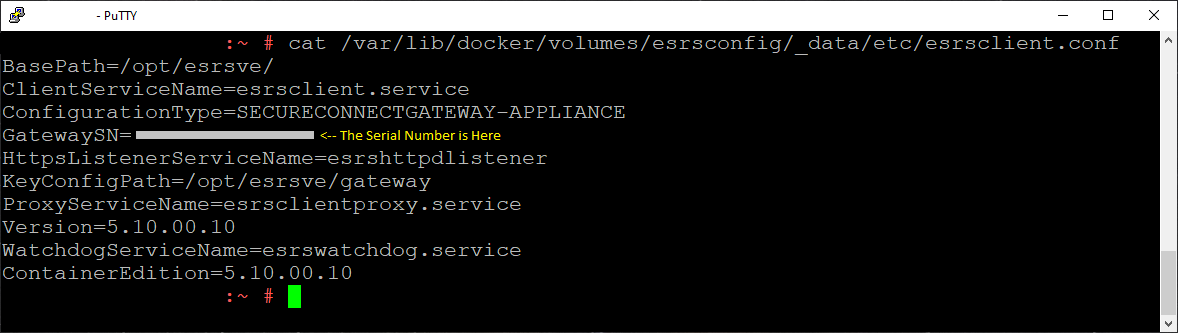
7. Note the line that starts with GatewaySN. The serial number appears after the equal sign (=).
8. To copy the serial number, double-click the serial number to select it. In Putty, any text that is selected is placed in the local system clipboard for you to paste in another document.
9. Gateways that have not been provisioned will not have a serial number.
Get the Secure Connect Gateway serial number using the user interface.
1. Connect to the gateway
Example url:
https://<gateway IP>:5700
2. Log in to the gateway:
2. Click About:
3. Look for the serial number here:
4. To copy the serial number, double-click the serial number to select it. Then press ctrl-C to copy the serial number into the clipboard.
Get the Secure Connect Gateway serial number using the command-line interface.
1. Log in to the SCG using putty or other ssh client (we use Putty in this example).
2. Run the following command for 5.18 and earlier:
# cat /var/lib/docker/volumes/esrsconfig/_data/etc/esrsclient.conf
3. Run the following command for 5.18 and later:
# cat /var/lib/docker/volumes/esrsconfig/_data/opt/esrsve/version/esrsclient.conf
4. If the commands above do not return the files you are looking for, search for the file with the find command:
# find / -name esrsclient.conf
5. Use cat to read the file that is returned from the find command:
# cat /path/to/esrsclient.conf
6. The cat commands above should return something substantially similar to the output below:
7. Note the line that starts with GatewaySN. The serial number appears after the equal sign (=).
8. To copy the serial number, double-click the serial number to select it. In Putty, any text that is selected is placed in the local system clipboard for you to paste in another document.
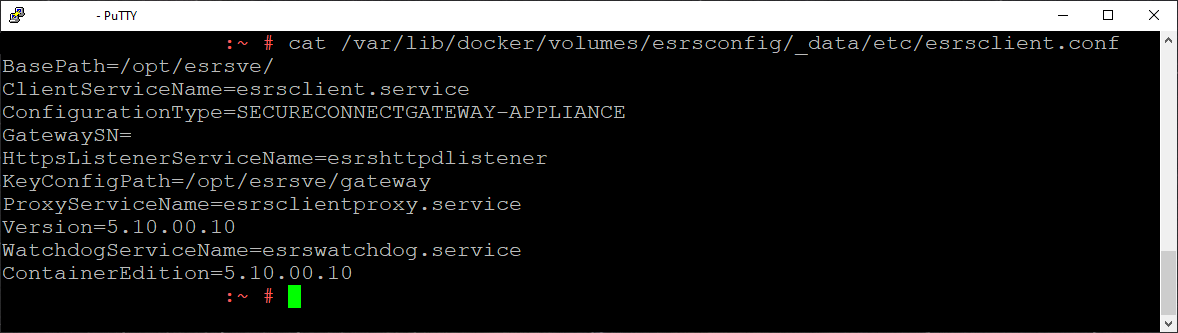
9. Gateways that have not been provisioned will not have a serial number.
Affected Products
Secure Connect Gateway - Virtual EditionArticle Properties
Article Number: 000200099
Article Type: How To
Last Modified: 16 Jul 2024
Version: 5
Find answers to your questions from other Dell users
Support Services
Check if your device is covered by Support Services.