NVP: FLR or Instant Access Restore fails "Failed to log in to Data Domain service"
Summary: Virtual Machine (VM) FLR or Instant Access restore, and it is failing to connect to the DD over SSH and create the Network File System (NFS) export. Authentication errors are reported.
This article applies to
This article does not apply to
This article is not tied to any specific product.
Not all product versions are identified in this article.
Symptoms
The NetWorker VMware Protection (NVP) integration is configured with the vProxy Appliance. The file level recovery (FLR) or instant access (IA) recovery of a virtual machine fails, indicating that it is unable to authenticate with the Data Domain. The Recovery configuration window in the NetWorker Management Console (NMC) and the recovery log shows:
Virtual machine recovery failed: vProxy recovery failed with error message: Session "efc196c5-263c-446a-94bc-72f1a62687e1" failed. Error: Unable to create NFS export at '[DATA_DOMAIN]:/data/col1/[NETWORKER_SERVER]/Recover-[VPROXY]-efc196c5-263c-446a-94bc-72f1a62687e1': Unable to run SSH command, error Unable to make ssh connection to '[DATA_DOMAIN]', error ssh: handshake failed: ssh: unable to authenticate, attempted methods [none password], no supported methods remain.
Error may also appear as:
Unable to create NFS export at 'DD_NAME:/data/col1/NSR_NAME/FLR-VPRXY_NAME-SESSION-ID': Unable to create NFS export. A 'POST' method to DataDomain at 'https://DD_NAME:3009/rest/v2.0/dd-systems/0/protocols/nfs/exports' responded with code 403: Error from DataDomain: 'User not authorized to execute this command: Possible reasons are user doesn't have enough permissions, user permissions have changed or session has expired. Please relogin!, code 5321'
Unable to create NFS export at 'DD_NAME:/data/col1/NSR_NAME/FLR-VPRXY_NAME-SESSION-ID': Unable to login while creating NFS export at 'DD_NAME:/data/col1/NSR_NAME/FLR-VPRXY_NAME-SESSION-ID': Failed to login to DataDomain service at 'https://DD_NAME:3009/rest/v1.0/auth'. A 'POST' method to DataDomain at 'https://DD_NAME:3009/rest/v1.0/auth' responded with code 400: Error from DataDomain: '**** Value of "password" is empty or invalid., code 5437'
NOTE: The error may differ depending on the Data Domain OS version involved. The error indicates that there is an authorization issue when the vProxy attempts to create an NFS export during FLR.
Cause
FLR (and Instant Access Restore) requires DD management credentials in the NetWorker 'Data Domain Systems' resources. The credentials entered are incorrect, missing, or the account specified does not have the correct role.
Resolution
Update the Management user password:
- Connect to the Data Domain web management interface:
https://DD_HOSTNAME/ddem - Log in with the
sysadminuser or other management user account. - Go to Administration -> Access -> Local Users.
- Ensure that the account used by NetWorker for the "management user" has "admin" rights on the Data Domain:
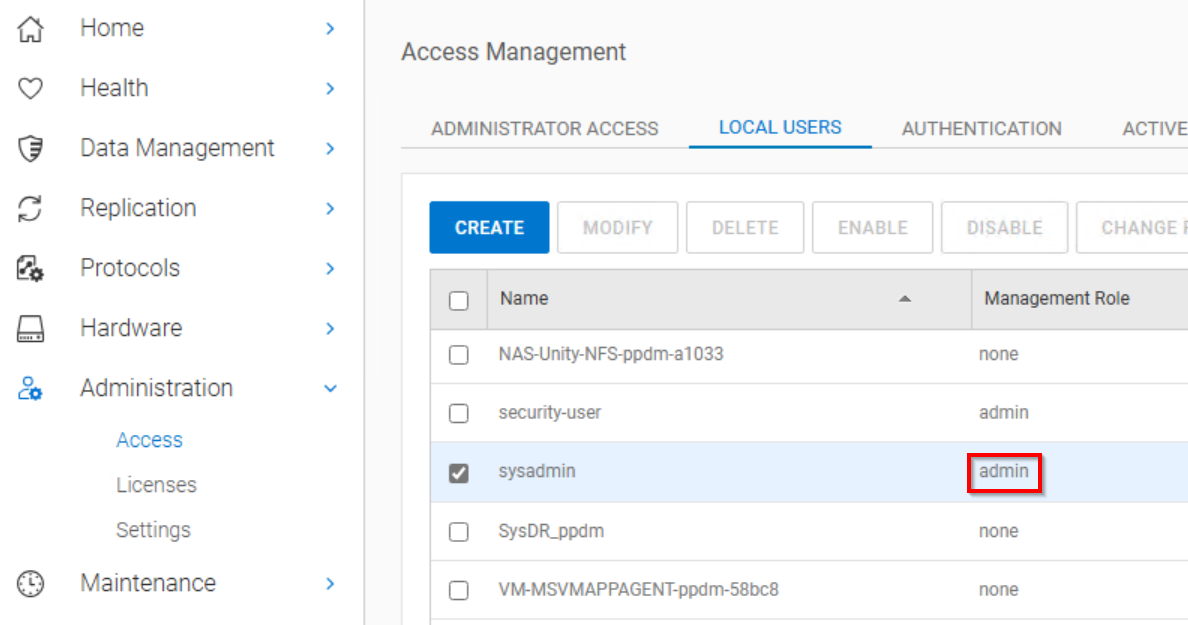
NOTE: The default role of sysadmin is "admin." If you have created another user account for NetWorker to use as the management user, ensure that it is set to "admin."
- Connect to the NetWorker server from the NMC or NetWorker Web User Interface (NWUI) as the NetWorker Administrator.
- Access the Data Domain Systems.
-
- NMC: Devices -> Data Domain Systems
- NWUI: Devices and Media -> Data Domain Systems
- Open the Data Domain properties.
- Enter the management user and password:
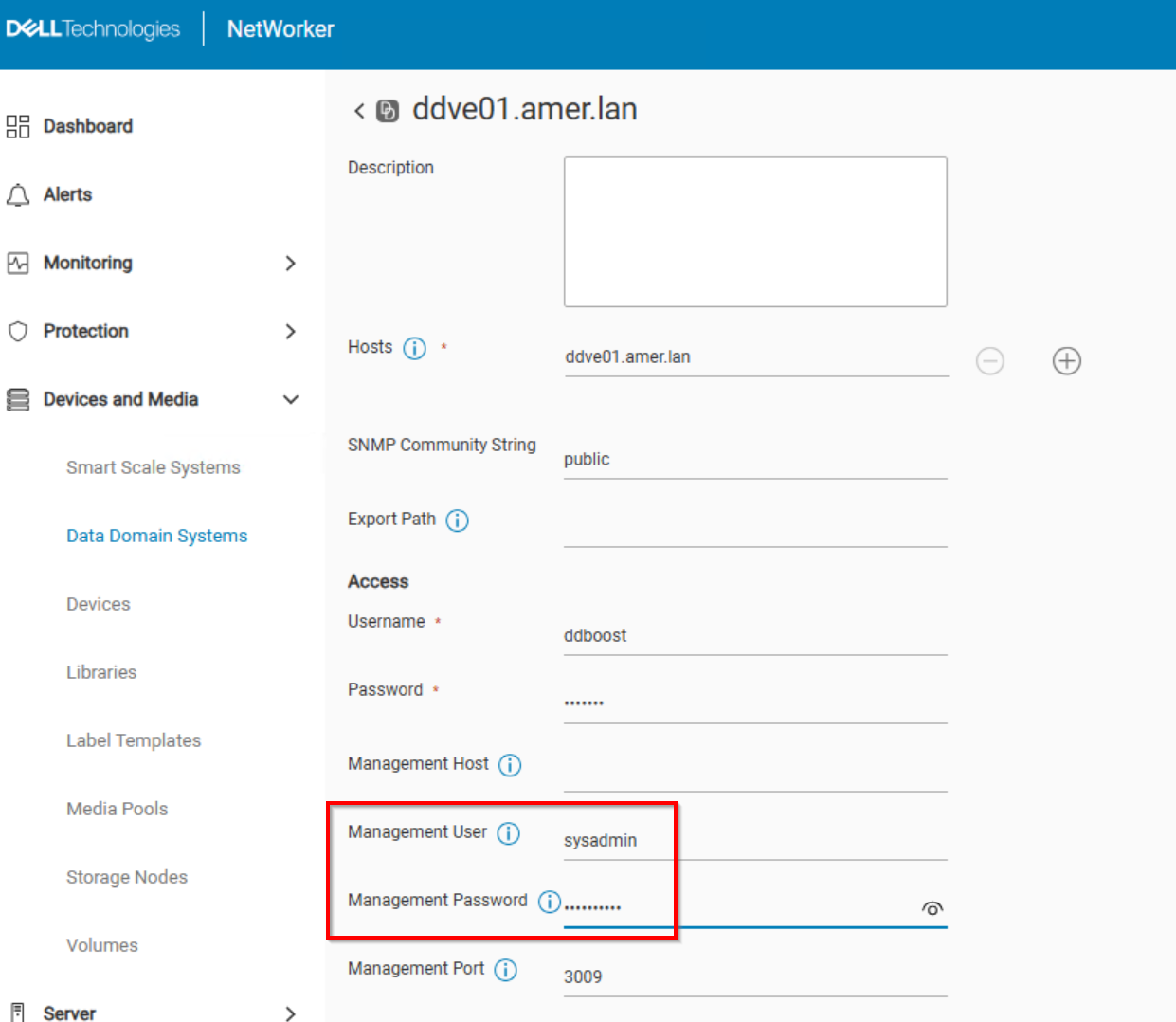
- Click Save.
- Perform the FLR (or Instant Access Restore) operation again after setting the DD management credentials.
Additional Information
During FLR (Or IA restore), the vProxy connects to the DD using SSH. The "management user" specified creates an NFS export on the data domain. The NFS export is mounted in VMware as an NFS datastore. The NFS export is used to recover the VM data. VM backups and other restore methods do not operate the same way, so this issue only appears during FLR or IA restore operations.
Affected Products
NetWorkerArticle Properties
Article Number: 000065426
Article Type: Solution
Last Modified: 11 Jun 2025
Version: 5
Find answers to your questions from other Dell users
Support Services
Check if your device is covered by Support Services.