Alienware 13 R2, 15 R2 & 17 R3: Systems Not Powering Up
Summary: Alienware 13 R2, 15 R2 & 17 R3 may stop powering on after a shutdown. Here is how to fix the issue by bridging the CLRP1 Pins.
This article applies to
This article does not apply to
This article is not tied to any specific product.
Not all product versions are identified in this article.
Symptoms
Alienware 13 R2 may not turn on anymore after shut down. This issue may happen suddenly and without any specific behavior prior to the issues.
- Alienware 13 R2
- Alienware 15 R2
- Alienware 17 R3
Cause
Cause information is not available.
Resolution
Alienware 15 R2 and 17 R3
-
Shut down the computer.
-
Remove the bottom cover.
-
Disconnect the battery cable.
-
Remove the memory. Watch this video
to learn how to remove the memory.
-
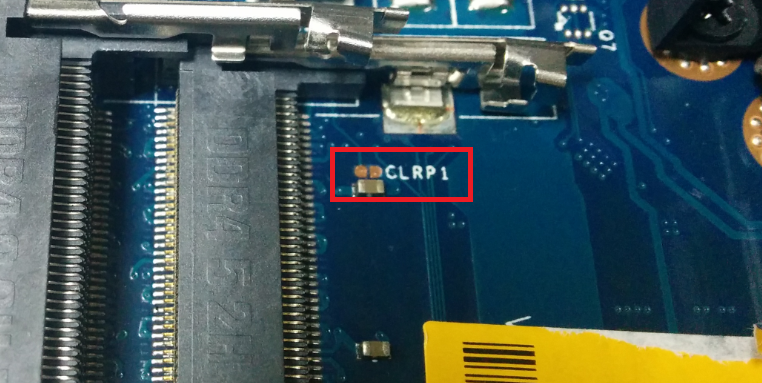
Locate the CLRP1 Pins.
-
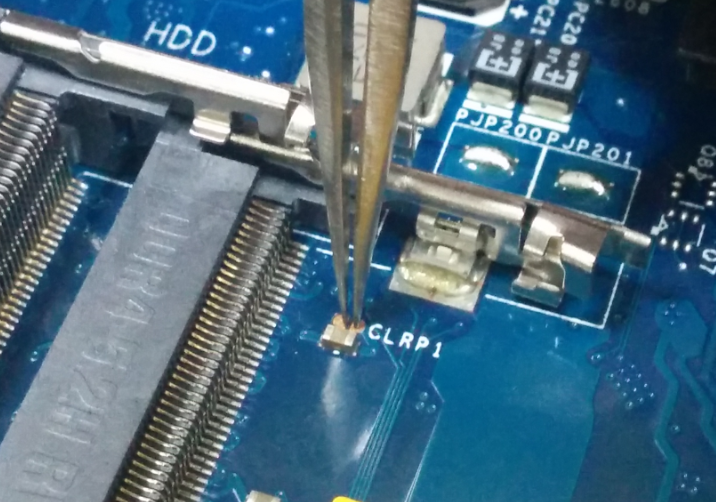
Using pliers or a flat head screwdriver touch both pins simultaneously.
-
Connect everything back and try again. If your computer loads Windows, update your computer Bios to version 1.2.15 or higher from our Drivers page.
Alienware 13 R2
-
Shut down the computer.
-
Remove the bottom cover.
-
Disconnect the battery cable.
-
Remove the memory. Watch this video
-
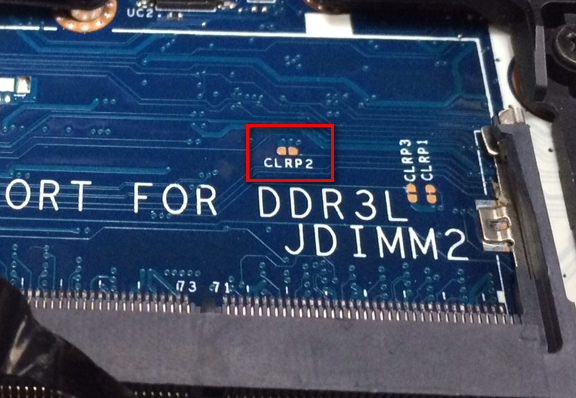
Locate the CLRP2 Pins.
-
Using pliers or a flat head screwdriver touch both pins simultaneously.

-
Connect everything back and try again. If your computer loads Windows, update your computer Bios to version 1.2.15 or higher from our Drivers page.
If the steps above do not fix the issue, you may try additional steps from our article Alienware Computer Does Not Turn On or Go Into Windows.
Affected Products
Alienware 13 R2, Alienware 15 R2, Alienware 17 R3Article Properties
Article Number: 000143135
Article Type: Solution
Last Modified: 13 May 2025
Version: 12
Find answers to your questions from other Dell users
Support Services
Check if your device is covered by Support Services.