Alienware 13 R2、15 R2 和 17 R3:系统无法开机
Summary: Alienware 13 R2、15 R2 和 17 R3 可能会在关机后停止开机。下面介绍如何通过桥接 CLRP1 引脚来解决此问题。
This article applies to
This article does not apply to
This article is not tied to any specific product.
Not all product versions are identified in this article.
Symptoms
Alienware 13 R2 在关机后可能无法再开机。此问题可能会突然发生,并且在出现问题之前没有任何特定行为。
- Alienware 13 R2
- Alienware 15 R2
- Alienware 17 R3
Cause
无可用的原因信息。
Resolution
Alienware 15 R2和17 R3:
-
关闭计算机。
-
卸下底盖。
-
断开电池线缆的连接。
-
卸下内存。观看 此视频
,了解如何拆卸内存。
-
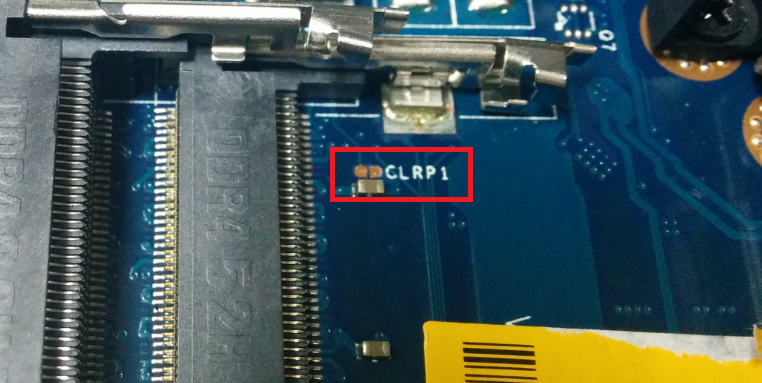
找到 CLRP1 插针。
-
使用钳子或平头螺丝刀同时触摸两个针脚。

-
全部重新连接,然后再试。如果您的计算机加载 Windows,请从我们的驱动程序页面将您的计算机 BIOS 更新到 1.2.15 或更高版本。
Alienware 13 R2
-
关闭计算机。
-
卸下底盖。
-
断开电池线缆的连接。
-
卸下内存。观看此视频
-
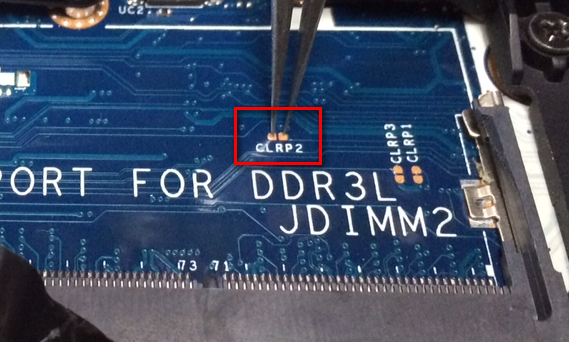
找到 CLRP2 插针。

-
使用钳子或平头螺丝刀同时触摸两个针脚。
-
全部重新连接,然后再试。如果您的计算机加载 Windows,请从我们的驱动程序页面将您的计算机 BIOS 更新到 1.2.15 或更高版本。
如果上述步骤无法解决问题,您可以尝试我们文章 Alienware 计算机无法开机或进入 Windows 中的其他步骤。
Additional Information
Affected Products
Alienware 13 R2, Alienware 15 R2, Alienware 17 R3Article Properties
Article Number: 000143135
Article Type: Solution
Last Modified: 13 May 2025
Version: 12
Find answers to your questions from other Dell users
Support Services
Check if your device is covered by Support Services.