Connectrix: Receive the error "Server is inaccessible, or firmware path is invalid" during switch upgrade
Summary: This issue occurs when the initial process of a switch upgrade is performed. Firmware FOS file is copied from an ftp/scp/sftp server and loaded to the switch resulting in the firmware invalid, patch not found error. ...
This article applies to
This article does not apply to
This article is not tied to any specific product.
Not all product versions are identified in this article.
Symptoms
Below is the error message received when a "firmwaredownload" is performed on the switch:
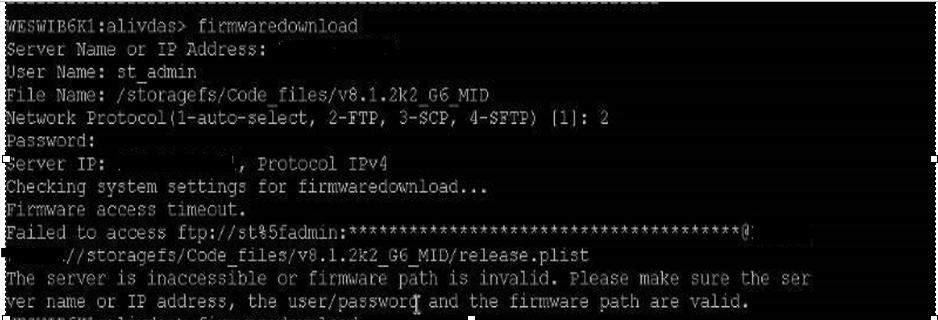
Figure 1: Screenshot of Server is inaccessible, or the firmware path is invalid error.
Cause
This issue is due to the switch being unable to locate the required firmware patch file. There are multiple folders and files under the root directory when the firmware image files are copied.
For example:
Below is a copy of FOS version 8.1.x:
Post extraction of the FOS files, the below list did not contain the release.plist file:
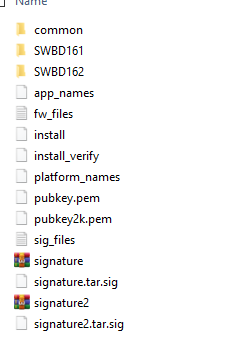
Figure 2: Screenshot of FOS version 8.1.x, post extraction of the FOS files without the required file.
Locate the file under the subfolders:
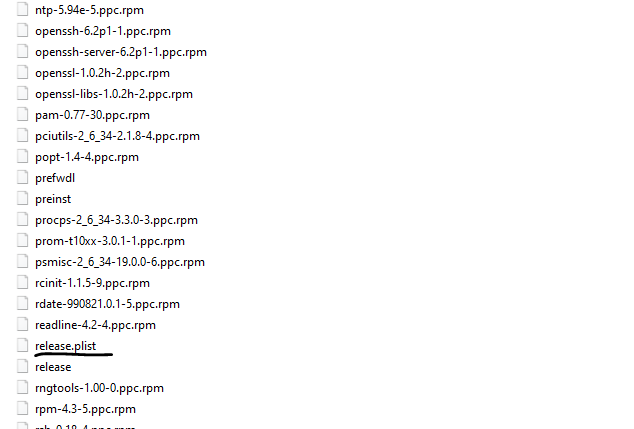
Figure 3: Screenshot of the missing file located under the subfolder
Resolution
Workaround 1:
- Make a copy of the shared FOS firmware file under the root directory and extract it to the same location.
- Manually locate the release.plist file under the subfolders as shown above and move it under the root directory.
NOTE: Do not copy the release.plist file to avoid duplicate copies.
- Post this, perform the firmware download command, and the switch can successfully recognize the FOS files.
Workaround 2:
If the above does not work, try to insert "//" and point the path of the FOS file.
For example:
File Name: v8.1.2k2_G6_MID
Use: File Name: //v8.1.2k2_G6_MID
Affected Products
Connectrix B-SeriesArticle Properties
Article Number: 000198121
Article Type: Solution
Last Modified: 13 May 2026
Version: 7
Find answers to your questions from other Dell users
Support Services
Check if your device is covered by Support Services.