Dell VxRail: How to redeploy an NSX-T manager node when it is down and unrecoverable in the cluster | NSX-T 3.2
Summary: This KB can be used to redeploy an NSX-T manager node when it is down and unrecoverable in the cluster | NSX-T 3.2.
This article applies to
This article does not apply to
This article is not tied to any specific product.
Not all product versions are identified in this article.
Instructions
Before using this KB, ensure that the current NSX-T manager node is unrecoverable and the other nodes in the NSX-T cluster are still providing service.
1. Login to the NSX-T manager and detach the problem node from existing cluster.
2. Remove the problem node from NSX manager cluster.

b. Remove the problem node from the cluster using the command "detach node <uuid>", where uuid is the UUID identified above.


3. Redeploy a new NSX-T node. See the official VMware document to deploy new NSX-T manager.
https://docs.vmware.com/en/VMware-Validated-Design/6.0.1/sddc-backup-and-restore/GUID-9D125AA7-202E-442E-874D-77D303389A11.html
4. Add the new NSX-T node to the existing cluster.


b. Add node to existing cluster.

c. Check the cluster status. Allow about 10 minutes for all services to come up.
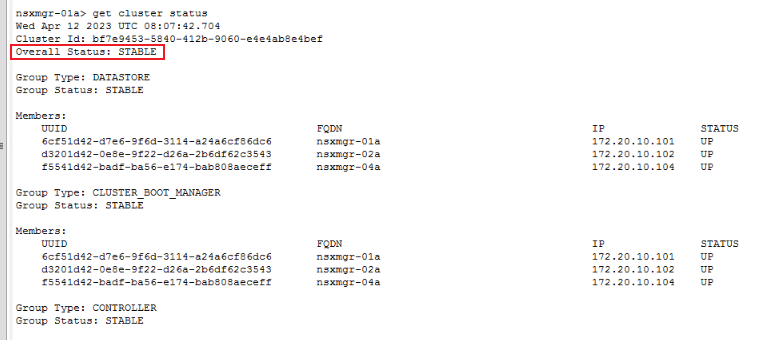

1. Login to the NSX-T manager and detach the problem node from existing cluster.
a. Login to the SSH and run the command "get cluster status".
get cluster status
b. Identify the node that is down or failed.
2. Remove the problem node from NSX manager cluster.
a. Query the problem node UUID with "get cluster config".
get cluster config
b. Remove the problem node from the cluster using the command "detach node <uuid>", where uuid is the UUID identified above.
detach node <uuid>
3. Redeploy a new NSX-T node. See the official VMware document to deploy new NSX-T manager.
https://docs.vmware.com/en/VMware-Validated-Design/6.0.1/sddc-backup-and-restore/GUID-9D125AA7-202E-442E-874D-77D303389A11.html
4. Add the new NSX-T node to the existing cluster.
a. Prepare the existing NSX-T cluster information before adding the new NSX-T manger node to the existing cluster.
get cluster config | find cluster id
get certificate api thumbprint | NSX-T Manager API certificate
b. Add node to existing cluster.
ssh to new NSX-T manager
join existing_manager_node_ip cluster-id cluster_id thumbprint api_thumbprint username admin
c. Check the cluster status. Allow about 10 minutes for all services to come up.
get cluster status
Affected Products
VxRailArticle Properties
Article Number: 000209841
Article Type: How To
Last Modified: 12 Apr 2023
Version: 1
Find answers to your questions from other Dell users
Support Services
Check if your device is covered by Support Services.