PowerProtect Data Manager Appliance DM5500: "Mandatory uplinks in PCIeSlot 1:1/PCIeSlot 4:1 for appliance are not connected…"
Summary: This KB covers an issue seen during the deployment phase where the PowerProtect Data Manager Appliance shows the following Critical Warning: : Initial network configuration screen shows the message "Mandatory uplinks in PCIeSlot 1:1/PCIeSlot 4:1 for appliance are not connected. Make sure required uplinks are connected to network switch with appropriate cables." ...
This article applies to
This article does not apply to
This article is not tied to any specific product.
Not all product versions are identified in this article.
Symptoms
The following error maybe seen on the PowerProtect Data Manager Appliance UI upon initial login:

This issue may occur if you do not use same speed SFPs for all four uplinks. We do not support a mixture of copper and optical connections as well.
DM5500 Port Layout
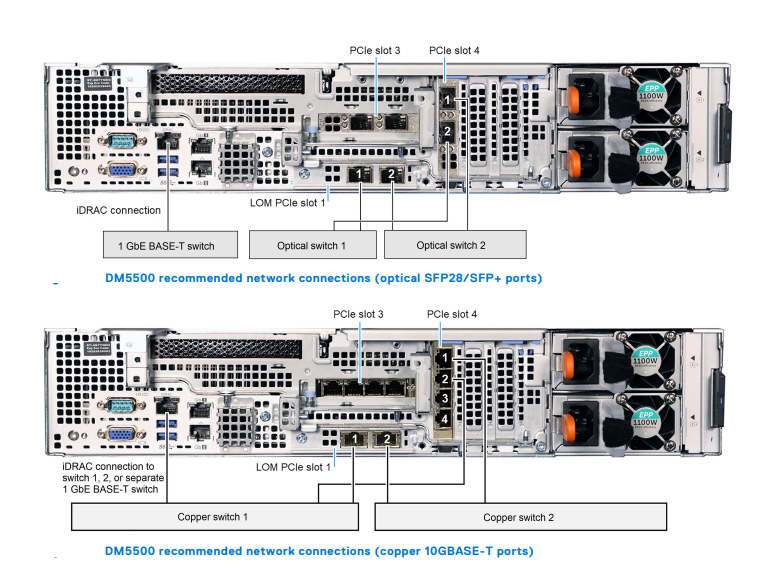
Four network ports are required for standard installation. Two ports are used for the customer management IP address, and two ports are used for the data uplinks to the public customer network.
The following table shows the combinations of NIC ports on the DM5500, depending on how the customer configures the HBAs. A maximum of six optical ports and ten copper ports are available.

This issue may occur if you do not use same speed SFPs for all four uplinks. We do not support a mixture of copper and optical connections as well.
DM5500 Port Layout
Four network ports are required for standard installation. Two ports are used for the customer management IP address, and two ports are used for the data uplinks to the public customer network.
- Port 1 on the LOM PCIe slot 1 and port 1 in PCIe slot 4 are the customer management IP ports and should go to different switches for improved reliability and fault tolerance.
- Port 2 on the LOM PCIe slot 1 and port 2 in PCIe slot 4 are the uplink ports used for data traffic and should go to different switches.
The following table shows the combinations of NIC ports on the DM5500, depending on how the customer configures the HBAs. A maximum of six optical ports and ten copper ports are available.
NOTE: In the above table, the row 1 on columns LOM (PCIe slot 1) and (PCIe slot 4) respectively state that either two 10 GbE SFP28 or two 25 GbE SFP28 are supported. If you choose 10 GbE SFP28 for the two ports on PCIe slot1, then you must go with the same 10 GbE SFP28 on the PCIe slot4. The same statement stands true for 25 GbE SFP28s as well.
Cause
The following could be the causes of this issue:
- If you use a mix of 10 GbE and 25 GbE SFPs, that would cause this problem
- All four uplinks should have the same speed
- We do not support a mix of Copper and Optical connections
Resolution
DM5500 Appliance does not support a mix of 10 GbE and 25 GbE SFPs on the uplink ports. All 4 uplink ports must be connected to either 10 GbE SFPs or 25 GbE SFPs.
NOTE:
- All four uplinks should have the same speed
- We do not support a mix of Copper and Optical connections
Affected Products
PowerProtect Data Manager Appliance, PowerProtect DM5500Article Properties
Article Number: 000211263
Article Type: Solution
Last Modified: 25 May 2026
Version: 8
Find answers to your questions from other Dell users
Support Services
Check if your device is covered by Support Services.