Battery Is Not Able to Charge When Computer Powers on with BIOS Warning Message and LED Is Displaying 1A1W
Summary: The battery is not able to charge when the computer powers on with a BIOS warning message.
This article applies to
This article does not apply to
This article is not tied to any specific product.
Not all product versions are identified in this article.
Symptoms
Affected Platforms:
- Dell 14 DC14255
- Dell 14 Plus 2-in-1 DB04255
- Dell 14 Plus DB14255
- Dell 16 Plus DB16255Dell Pro 14 Essential PV14255
- Inspiron 13 5320
- Inspiron 13 5330
- Inspiron 14 5420
- Inspiron 14 5425
- Inspiron 14 5430
- Inspiron 14 5435
- Inspiron 14 7425 2-in-1
- Inspiron 14 7430 2-in-1
- Inspiron 14 7435 2-in-1
- Inspiron 14 7445 2-in-1
- Inspiron 14 Plus 7420
- Inspiron 16 5620
- Inspiron 16 5630
- Inspiron 16 5635
- Inspiron 16 7630 2-in-1
- Inspiron 16 7635 2-in-1
- Inspiron 16 Plus 7620
- Inspiron 5410
- Inspiron 5418
- Inspiron 5510
- Inspiron 5518
- Inspiron 5625
- Latitude 3330
- Latitude 3420
- Latitude 3430
- Latitude 3520
- Latitude 3530
- Vostro 16 5630
- Vostro 5320
- Vostro 5410
- Vostro 5510
- Vostro 5620
- Vostro 7620
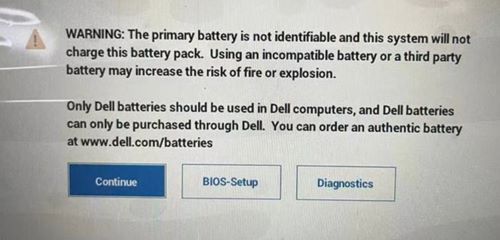
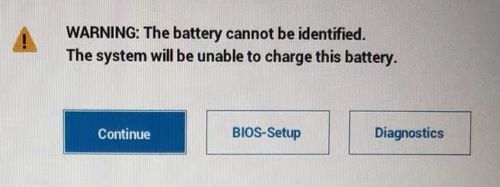
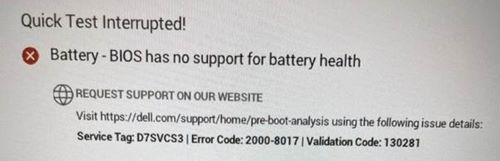
When the computer powers on, the laptop blocks the BIOS warning message, and the computer cannot charge the battery.
Cause
EC cannot get battery-related information and stops charging due to authentication failure and determined that it is a non-Dell battery.
Resolution
Containment when the issue has already happened:
- For Intel platforms, end users should remove AC and shutdown the computer for at least two minutes and then power on the computer.
- For AMD platforms, end users must remove the AC adapter and shutdown the computer for at least two minutes and then power on twice.
Update the BIOS to resolve the issue:
| Dell Computer | BIOS Version |
|---|---|
| Dell 14 DC14255 | 1.6.2 to be released in December 2025 |
| Dell Pro 14 Essential PV14255 | |
| Inspiron 14 7445 2-in-1 | |
| Dell 14 Plus 2-in-1 DB04255 | 1.6.1 to be released in December 2025 |
| Dell 14 Plus DB14255 | |
| Dell 16 Plus DB16255 | |
| Latitude 3420/3520 | 1.26.0 |
| Latitude 3430/3530 | 1.8.0 |
| Inspiron 14 5425 | |
| Inspiron 5625 | |
| Inspiron 14 7425 2-in-1 | |
| Inspiron 5410/5418 | 2.19.0 |
| Inspiron 5510/5518 | |
| Vostro 5410 | |
| Vostro 5510 | |
| Inspiron 13 5320 | 1.10.0 |
| Vostro 5320 | |
| Inspiron 14 5420 | 1.13.0 |
| Inspiron 16 5620 | |
| Vostro 5620 | |
| Inspiron 14 Plus 7420 | 1.12.0 |
| Inspiron 16 Plus 7620 | |
| Vostro 7620 | |
| Latitude 3330 | |
| Inspiron 13 5330 | 1.2.0 |
| Inspiron 14 7430 2-in-1 | 1.2.1 |
| Inspiron 14 5430 | |
| Inspiron 16 5630 | |
| Inspiron 16 7630 2-in-1 | |
| Vostro 16 5630 | |
| Inspiron 14 7435 2-in-1 | 1.0.0 |
| Inspiron 14 5435 | |
| Inspiron 16 5635 | |
| Inspiron 16 7635 2-in-1 |
Affected Products
Dell 14 Plus 2-in-1 DB04255, Dell 14 Plus DB14255, Dell 16 Plus DB16255, Dell 14 DC14255, Dell Pro 14 Essential PV14255, Inspiron 13 5320, Inspiron 13 5330, Inspiron 14 5410/5418, Inspiron 14 5420, Inspiron 14 5425, Inspiron 14 5430, Inspiron 14 5435
, Inspiron 14 Plus 7420, Inspiron 14 7425 2-in-1, Inspiron 14 7430 2-in-1, Inspiron 14 7435 2-in-1, Inspiron 14 7445 2-in-1, Inspiron 15 5510/5518, Inspiron 16 5620, Inspiron 16 5625, Inspiron 16 5630, Inspiron 16 5635, Inspiron 16 Plus 7620, Inspiron 16 7630 2-in-1, Inspiron 16 7635 2-in-1, Latitude 3330, Latitude 3420, Latitude 3430, Latitude 3520, Latitude 3530, Vostro 5320, Vostro 14 5410, Vostro 15 5510, Vostro 5620, Vostro 16 5630, Vostro 7620
...
Article Properties
Article Number: 000214810
Article Type: Solution
Last Modified: 27 Nov 2025
Version: 6
Find answers to your questions from other Dell users
Support Services
Check if your device is covered by Support Services.