Dell Laptop Shows a Warning Message When Turning on with AC Adapter or Dell Dock Connected
Summary: This article provides information about a warning message that displays on a Dell laptop when turning on the computer while connected to an AC adapter or Dell dock.
This article applies to
This article does not apply to
This article is not tied to any specific product.
Not all product versions are identified in this article.
Symptoms
A warning message may display when turning on the computer while connected to an AC adapter or Dell Dock.
The issue occurs on several laptop models when set in BIOS to auto-power. The wattage error message may differ based on the power source connected. In addition to the error message, the computer is also not properly charging.
See the following examples of the warning messages:
Alert! A 7W AC power adapter has been detected. The system can only boot when a 60W power adapter or greater.
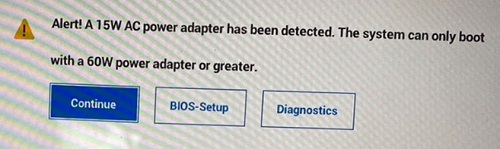
Alert! A 15W AC power adapter has been detected. The system can only boot when a 60W power adapter or greater.
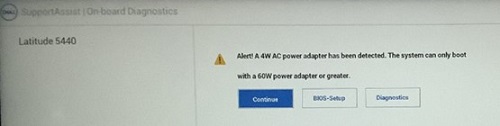
Alert! A 4W AC power adapter has been detected. The system can only boot when a 60W power adapter or greater.

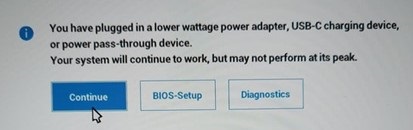
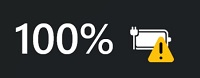
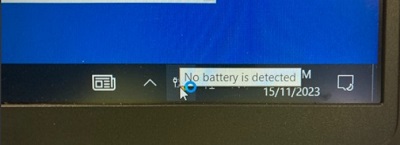
If you are using Windows 10, open any application such as Microsoft Word or Microsoft PowerPoint, and you may see the message "No battery is detected". You may also see this message when you leave the computer idle for 10 to 30 minutes.
Affected Platform with Impacted BIOS Version:
- Latitude 5340 - BIOS 1.5.0/1.6.0/1.7.1
- Latitude 5440 - BIOS 1.5.0/1.6.0/1.8.1
- Latitude 5540 - BIOS 1.5.0/1.6.0/1.7.1
- Latitude 7340 - BIOS 1.5.0/1.6.0/1.8.1
- Latitude 7440 - BIOS 1.5.0/1.6.0/1.8.1
- Latitude 7640 - BIOS 1.5.0/1.6.0/1.8.1
- Latitude 9440 2-in-1 - BIOS 1.3.2/1.4.1/1.6.0
- Precision 3480 - BIOS 1.5.0/1.6.0/1.8.1
- Precision 3580 - BIOS 1.5.0/1.6.0/1.7.1
- Precision 3581 - BIOS 1.5.0/1.6.0/1.7.1
Affected Docks:
- Dell Dock WD19
- Dell Dock - WD19S
- Dell Thunderbolt Dock - WD19TB
- Dell Thunderbolt Dock - WD19TBS
- Dell Performance Dock - WD19DC
- Dell Performance Dock - WD19DCS
Cause
No cause information is available.
Resolution
Updating to the latest version of BIOS resolves the issue. To download and install the BIOS, refer to the BIOS Update Guide.
- Latitude 5340 - BIOS 1.10.0 or later
- Latitude 5440 - BIOS 1.12.0 or later
- Latitude 5540 - BIOS 1.10.1 or later
- Latitude 7340 - BIOS 1.11.0 or later
- Latitude 7440 - BIOS 1.12.0 or later
- Latitude 7640 - BIOS 1.12.0 or later
- Latitude 9440 2-in-1 - BIOS 1.8.0 or later
- Precision 3480 - BIOS 1.12.0 or later
- Precision 3580 - BIOS 1.10.1 or later
- Precision 3581 - BIOS 1.10.1 or later
Affected Products
Dell Dock WD19, Dell Performance Dock - WD19DC, Dell Performance Dock – WD19DCS, Dell Dock – WD19S, Dell Thunderbolt Dock - WD19TB, Dell Thunderbolt Dock – WD19TBS, Latitude 5340, Latitude 7340, Latitude 5440, Latitude 7440, Latitude 9440 2-in-1
, Latitude 5540, Latitude 7640, Precision 3480, Precision 3580, Precision 3581
...
Article Properties
Article Number: 000216629
Article Type: Solution
Last Modified: 13 Nov 2025
Version: 14
Find answers to your questions from other Dell users
Support Services
Check if your device is covered by Support Services.