PowerEdge: R7625 Bus fatal error occur when rebooting from Ubuntu 22.04 with Solarflare XtremeScale X2522 network card
Summary: This article gives the solution of PowerEdge R7625 Bus fatal error occur when rebooting from Ubuntu 22.04 with Solarflare XtremeScale X2522 network card.
This article applies to
This article does not apply to
This article is not tied to any specific product.
Not all product versions are identified in this article.
Symptoms
Bus fatal error occurs when rebooting from Ubuntu 20.04 on a PowerEdge R7525 server with Solarflare XtremeScale X2522 network card, login operating system and confirm that the network card work is fine. Below is the System event log fatal error screenshot.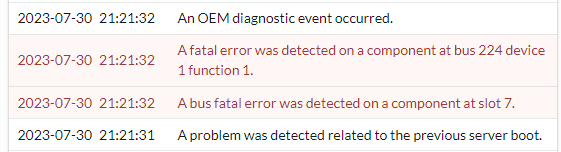
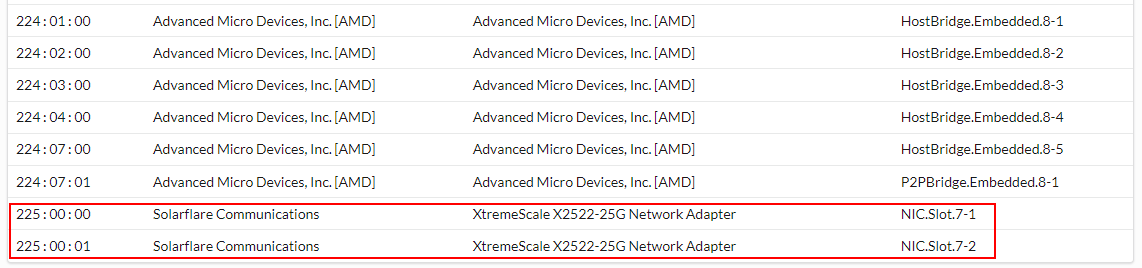
1.TSR log check PCIe slot7 component is a Solarflare XtremeScale X2522 network card.

2.Lifecycle log check bus fatal error occurs when rebooting.
2023-07-31 10:21:37      86           CPU9000              An OEM diagnostic event occurred.
2023-07-31 10:21:36      85           PCI1318                A fatal error was detected on a component at bus 224 device 1 function 1.
2023-07-31 10:21:34      84           PCI1360                A bus fatal error was detected on a component at slot 7.
2023-07-31 10:21:31      83           PST0090               A problem was detected related to the previous server boot.
2023-07-31 10:20:45      82           SYS1005                The server power action is initiated because the host device initiated a warm-reset operation.
2023-07-31 10:20:06      81           SYS1003                System CPU Resetting.
3.the network card order check is third-party order, NON-DELL OEM card.
4.update the Solarflare XtremeScale X2522 network card firmware to the latest version and re-install Ubuntu server 22.04, then rebooting operating system test, the bus fatal error was persisted.
5.the Solarflare XtremeScale X2522 network card move to PCIe slot4 and reboot operating system test, the bus fatal error was detected at slot4, follow the network card.
6.try to update the network card driver is unsuccessful.
7.try to install Windows 2019 and CentOS 7.9, then rebooting the operating system test, no bus fatal errors occur.
Cause
N/A
Resolution
***Do Not Replace Any Hardware***
1.This is a cosmetic issue and can safely be ignored. The issue only occurs if rebooting the server from the operating system Ubuntu 22.04.
2.For this case, the customer swap install CentOS 7.9 use normal.
Workaround:
Clear System event log from the IDRAC web interface, the error message can be ignored.
Affected Products
Rack Servers, OEM Server Solutions, OEMR R7525, PowerEdge R7525, Ubuntu Server LTSArticle Properties
Article Number: 000216678
Article Type: Solution
Last Modified: 14 Apr 2025
Version: 3
Find answers to your questions from other Dell users
Support Services
Check if your device is covered by Support Services.