PowerProtect: Server DR replication fails with error SDR_MTREE_REPL_FAILED_TO_ADD
Summary: During configuration of the PPDM Server Disaster Recovery, when attempting to "Enable Replication", the configuration job fails with SDR_MTREE_REPL_FAILED_TO_ADD code=500.
This article applies to
This article does not apply to
This article is not tied to any specific product.
Not all product versions are identified in this article.
Symptoms
The error usually shows as:
**** Error getting CA certificate for <Data Domain host> (**** Error communicating with host <Data Domain host>: failed to connect to host.)
Example: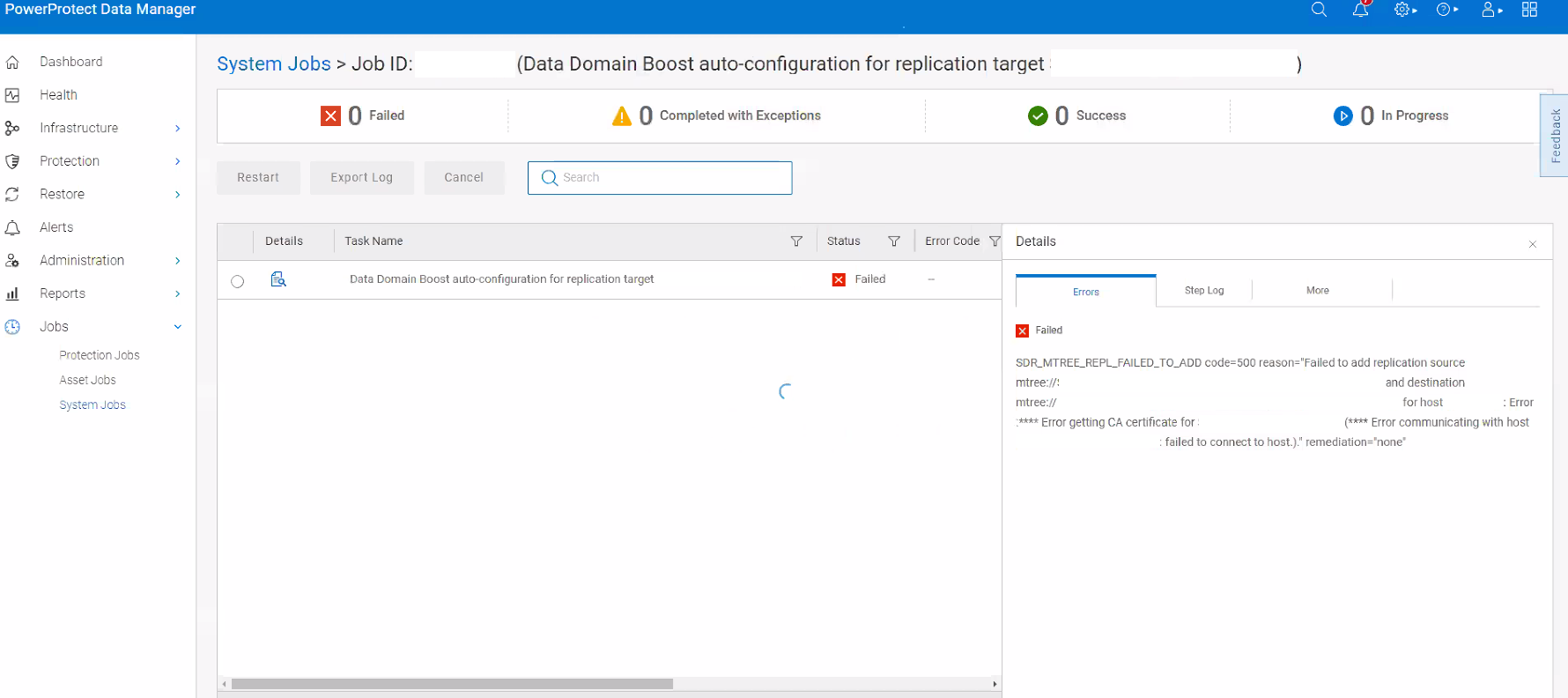
Cause
This is a Data Domain issue with adding the mtree replication configuration. The source Data Domain and destination Data Domain are having connectivity issues to each other's port 3009.
This port is used by Data Domain to verify the peer DD certificates.
For more information, see: Data Domain: From Some Newer DD OS Versions, CA Certificate Errors May be Reported When Creating Replication Contexts From DD CLI.
This port is used by Data Domain to verify the peer DD certificates.
For more information, see: Data Domain: From Some Newer DD OS Versions, CA Certificate Errors May be Reported When Creating Replication Contexts From DD CLI.
Resolution
- Log in to both Data Domains and confirm connectivity to management interface and port 3009
It is possible that a route is missing on the Data Domains, or a firewall is blocking the port 3009. Resolve the connectivity issue by confirming the firewall is not blocking the port, and set up a route to allow communication.
If further assistance is needed, engage Data Domain support and reference this article:
Data Domain: From Some Newer DD OS Versions, CA Certificate Errors May be Reported When Creating Replication Contexts From DD CLI.
net ping <Data Domain IP>
net ping <Data Domain FQDN>
se telnet <Data Domain IP> 3009OR
net route trace <Data Domain IP> dest-port 3009
It is possible that a route is missing on the Data Domains, or a firewall is blocking the port 3009. Resolve the connectivity issue by confirming the firewall is not blocking the port, and set up a route to allow communication.
If further assistance is needed, engage Data Domain support and reference this article:
Data Domain: From Some Newer DD OS Versions, CA Certificate Errors May be Reported When Creating Replication Contexts From DD CLI.
Affected Products
PowerProtect SoftwareArticle Properties
Article Number: 000221881
Article Type: Solution
Last Modified: 09 Oct 2024
Version: 3
Find answers to your questions from other Dell users
Support Services
Check if your device is covered by Support Services.