Powerstore: File system used space discrepancy between client and Powerstore GUI (User correctable)
Summary: Customer may notice file system used space discrepancy between the client and Powerstore GUI if the user opens the file system properties via Storage --> File Systems --> Modify tab.
This article applies to
This article does not apply to
This article is not tied to any specific product.
Not all product versions are identified in this article.
Symptoms
There is an observed file system used space discrepancy between the client and Powerstore GUI if the user opens the file system properties via Storage --> File Systems --> Modify tab.
Example:
From the Linux client, the used space of file system is 5.7GB.
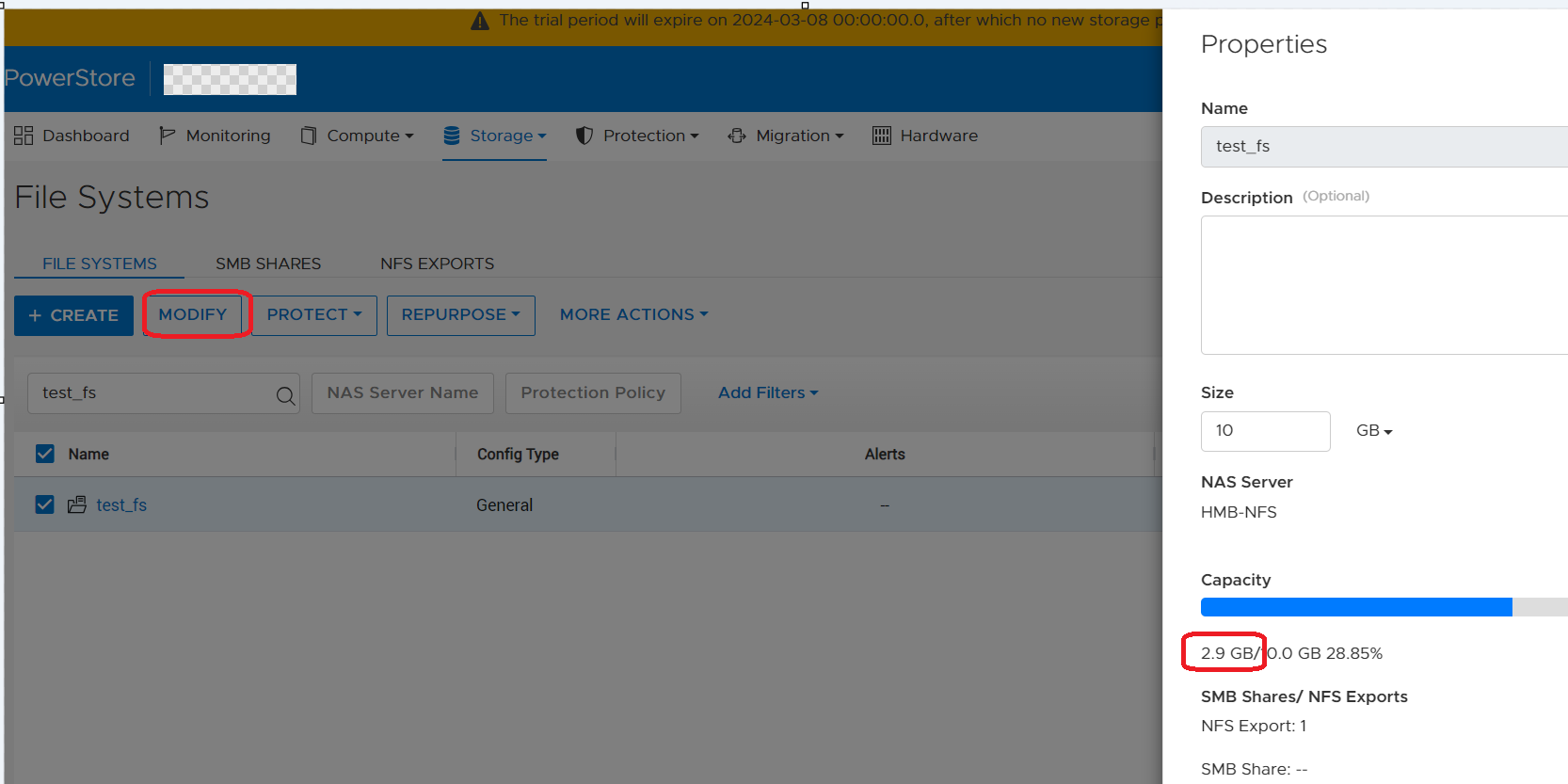
From Powerstore PSTCLI, the used space of the file system is 2.88GB.
Example:
From the Linux client, the used space of file system is 5.7GB.
-bash-4.4# df -h | egrep "Filesystem|export"
Filesystem                   Size  Used Avail Use% Mounted on
10.241.219.176:/test_export   10G  5.7G  4.4G  57% /mnt/test_mp
From Powerstore GUI file system properties via Storage --> File Systems --> Modify, the used space of file system is 2.9GB.
From Powerstore PSTCLI, the used space of the file system is 2.88GB.
cli> file_system -name test_fs show
id                               = 65e7c24d-8da2-1fb7-ce3a-3aff9b777928
name                             = test_fs
description                      =
nas_server_id                    = 631f5e75-7391-e506-819e-2efcdba0778f
parent_id                        =
filesystem_type                  = Primary
size_total                       = 10737418240 (10.00G)
size_used                        = 3097493504 (2.88G)
config_type                      = General
protection_policy_id             =
access_policy                    = Native
locking_policy                   = Advisory
folder_rename_policy             = All_Forbidden
is_smb_sync_writes_enabled       = no
is_smb_op_locks_enabled          = yes
is_smb_no_notify_enabled         = no
is_smb_notify_on_access_enabled  = no
is_smb_notify_on_write_enabled   = no
smb_notify_on_change_dir_depth   = 512
is_async_MTime_enabled           = no
is_quota_enabled                 = no
grace_period                     = 604800
default_hard_limit               = 0
default_soft_limit               = 0
creation_timestamp               =
expiration_timestamp             =
last_refresh_timestamp           =
last_writable_timestamp          =
is_modified                      =
access_type                      =
creator_type                     =
file_events_publishing_mode      = None
Cause
The Powerstore GUI shows incorrect used space when the user opens the file system properties via Storage --> File Systems --> Modify tab. In this case, the Powerstore GUI doesn't issue REST commands to the SDNAS container to fetch the latest file system properties, so the GUI still displays the old file system used space from its local database.
Here are some details about how Powerstore GUI updates the file system's used space:
1. The SDNAS container always has the latest file system properties including used space.
2. The Powerstore GUI displays the used space from its local database (managementDB).
3. Only when the user opens the Filesystem's page (refer to the below screenshot), will Powerstore send the REST calls to SDNAS to fetch the latest file system properties and update its local DB/GUI with the current used size.

Here are some details about how Powerstore GUI updates the file system's used space:
1. The SDNAS container always has the latest file system properties including used space.
2. The Powerstore GUI displays the used space from its local database (managementDB).
3. Only when the user opens the Filesystem's page (refer to the below screenshot), will Powerstore send the REST calls to SDNAS to fetch the latest file system properties and update its local DB/GUI with the current used size.
Resolution
Workaround:
The workaround is to open the file system page in the GUI via Storage --> File Systems --> click the File system. The used space of this file system in GUI and pstcli will be updated in less than 5 minutes.
Fix:
There is an enhancement in a future PowerStore OS that ensures the usage details of the file system will be updated every 30 seconds in the GUI.
The workaround is to open the file system page in the GUI via Storage --> File Systems --> click the File system. The used space of this file system in GUI and pstcli will be updated in less than 5 minutes.
Fix:
There is an enhancement in a future PowerStore OS that ensures the usage details of the file system will be updated every 30 seconds in the GUI.
Affected Products
PowerStore, PowerStoreOSArticle Properties
Article Number: 000222779
Article Type: Solution
Last Modified: 14 May 2024
Version: 3
Find answers to your questions from other Dell users
Support Services
Check if your device is covered by Support Services.