PowerStore: 클라이언트와 Powerstore GUI 간의 파일 시스템 사용 공간 불일치(사용자 수정 가능)
Summary: Storage --> File Systems --> Modify 탭을 통해 파일 시스템 속성을 열면 고객이 클라이언트와 Powerstore GUI 간에 파일 시스템 사용 공간 불일치를 확인할 수 있습니다.
This article applies to
This article does not apply to
This article is not tied to any specific product.
Not all product versions are identified in this article.
Symptoms
사용자가 Storage --> File Systems --> Modify 탭을 통해 파일 시스템 속성을 열면 클라이언트와 Powerstore GUI 간에 파일 시스템 사용 공간 불일치가 관찰됩니다.
예제:
Linux 클라이언트에서 파일 시스템의 사용 공간은 5.7GB입니다.
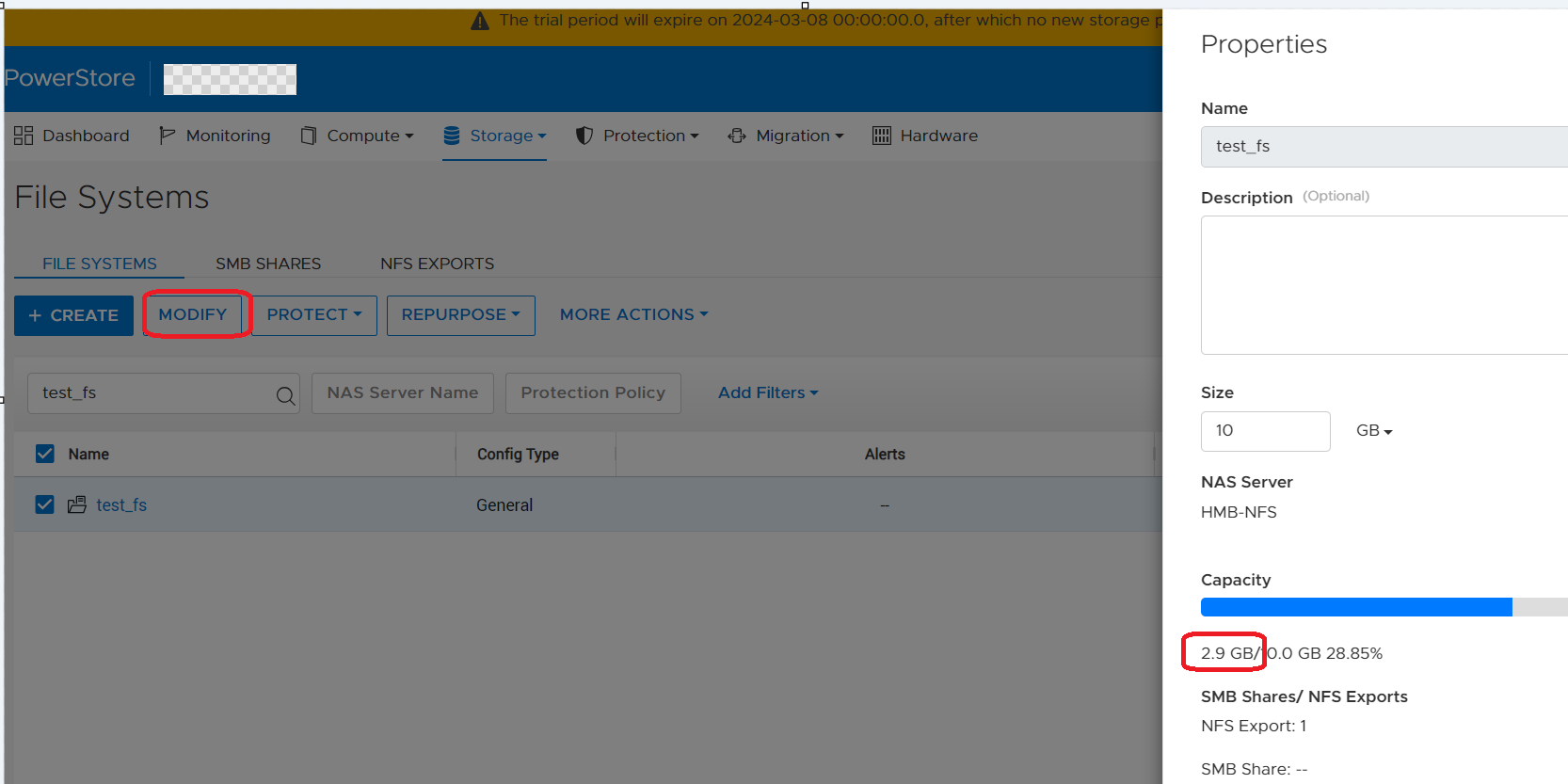
Powerstore PSTCLI에서 파일 시스템의 사용 공간은 2.88GB입니다.
예제:
Linux 클라이언트에서 파일 시스템의 사용 공간은 5.7GB입니다.
-bash-4.4# df -h | egrep "Filesystem|export"
Filesystem                   Size  Used Avail Use% Mounted on
10.241.219.176:/test_export   10G  5.7G  4.4G  57% /mnt/test_mp
Powerstore GUI 파일 시스템 속성에서 Storage --> File Systems --> Modify를 통해 파일 시스템의 사용 공간은 2.9GB입니다.
Powerstore PSTCLI에서 파일 시스템의 사용 공간은 2.88GB입니다.
cli> file_system -name test_fs show
id                               = 65e7c24d-8da2-1fb7-ce3a-3aff9b777928
name                             = test_fs
description                      =
nas_server_id                    = 631f5e75-7391-e506-819e-2efcdba0778f
parent_id                        =
filesystem_type                  = Primary
size_total                       = 10737418240 (10.00G)
size_used                        = 3097493504 (2.88G)
config_type                      = General
protection_policy_id             =
access_policy                    = Native
locking_policy                   = Advisory
folder_rename_policy             = All_Forbidden
is_smb_sync_writes_enabled       = no
is_smb_op_locks_enabled          = yes
is_smb_no_notify_enabled         = no
is_smb_notify_on_access_enabled  = no
is_smb_notify_on_write_enabled   = no
smb_notify_on_change_dir_depth   = 512
is_async_MTime_enabled           = no
is_quota_enabled                 = no
grace_period                     = 604800
default_hard_limit               = 0
default_soft_limit               = 0
creation_timestamp               =
expiration_timestamp             =
last_refresh_timestamp           =
last_writable_timestamp          =
is_modified                      =
access_type                      =
creator_type                     =
file_events_publishing_mode      = None
Cause
사용자가 Storage --> File Systems --> Modify 탭을 통해 파일 시스템 속성을 열면 Powerstore GUI에 사용된 공간이 잘못 표시됩니다. 이 경우 Powerstore GUI는 SDNAS 컨테이너에 REST 명령을 실행하여 최신 파일 시스템 속성을 가져오지 않으므로 GUI는 여전히 로컬 데이터베이스에서 사용된 이전 파일 시스템 공간을 표시합니다.
다음은 Powerstore GUI가 파일 시스템의 사용 공간을 업데이트하는 방법에 대한 몇 가지 세부 정보입니다.
1. SDNAS 컨테이너에는 사용된 공간을 포함하여 항상 최신 파일 시스템 속성이 있습니다.
2. Powerstore GUI는 로컬 데이터베이스(managementDB)의 사용된 공간을 표시합니다.
3. 사용자가 파일 시스템의 페이지를 열 때만(아래 스크린샷 참조) PowerStore는 REST 호출을 SDNAS로 전송하여 최신 파일 시스템 속성을 가져오고 로컬 DB/GUI를 현재 사용된 크기로 업데이트합니다.
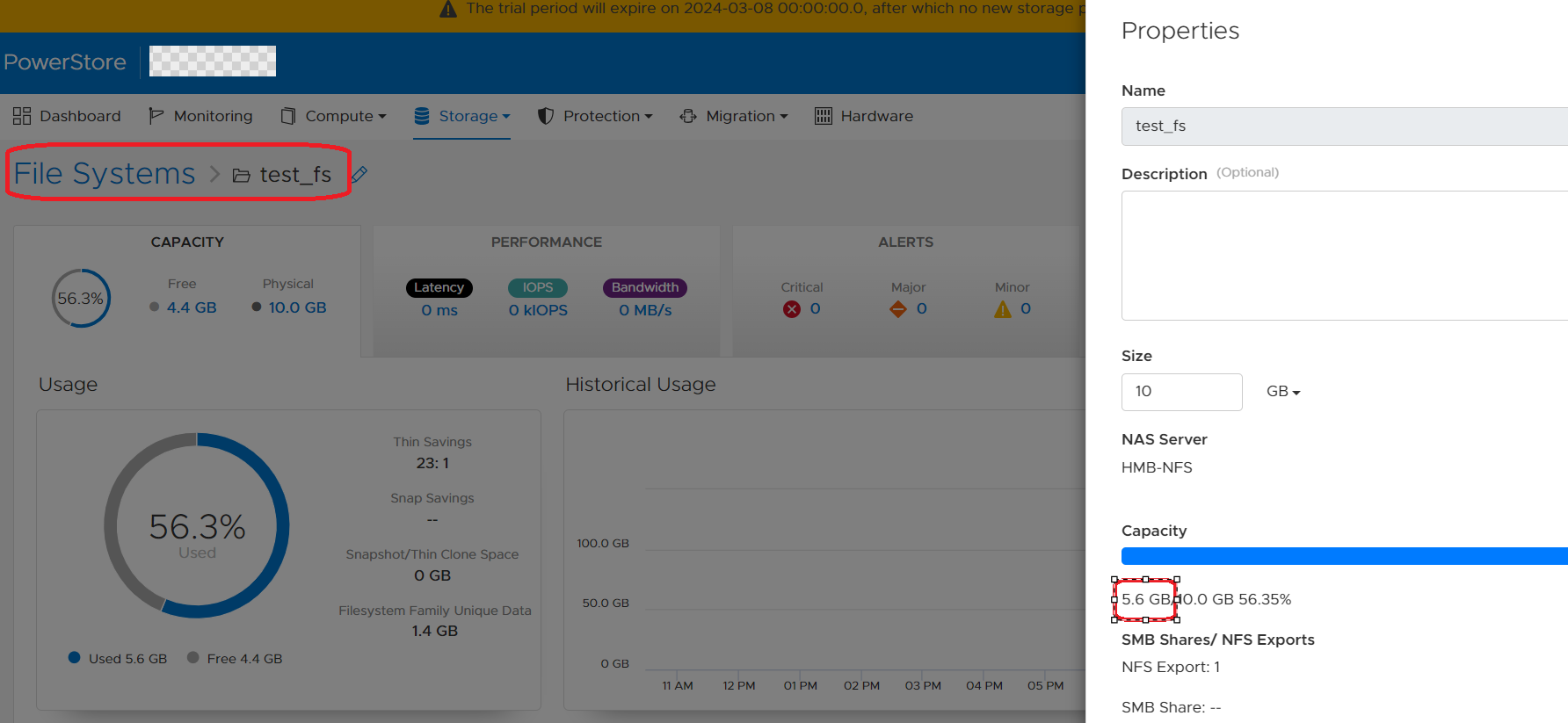
다음은 Powerstore GUI가 파일 시스템의 사용 공간을 업데이트하는 방법에 대한 몇 가지 세부 정보입니다.
1. SDNAS 컨테이너에는 사용된 공간을 포함하여 항상 최신 파일 시스템 속성이 있습니다.
2. Powerstore GUI는 로컬 데이터베이스(managementDB)의 사용된 공간을 표시합니다.
3. 사용자가 파일 시스템의 페이지를 열 때만(아래 스크린샷 참조) PowerStore는 REST 호출을 SDNAS로 전송하여 최신 파일 시스템 속성을 가져오고 로컬 DB/GUI를 현재 사용된 크기로 업데이트합니다.
Resolution
해결:
해결 방법은 Storage(스토리지)를> 통해 GUI에서 File System(파일 시스템)> 을 열고 File system(파일 시스템)을 클릭하는 것입니다. GUI 및 pstcli에서 이 파일 시스템의 사용된 공간은 5분 이내에 업데이트됩니다.
수정:
향후 PowerStore OS에는 파일 시스템의 사용 세부 정보가 GUI에서 30초마다 업데이트되도록 하는 개선 사항이 있습니다.
해결 방법은 Storage(스토리지)를> 통해 GUI에서 File System(파일 시스템)> 을 열고 File system(파일 시스템)을 클릭하는 것입니다. GUI 및 pstcli에서 이 파일 시스템의 사용된 공간은 5분 이내에 업데이트됩니다.
수정:
향후 PowerStore OS에는 파일 시스템의 사용 세부 정보가 GUI에서 30초마다 업데이트되도록 하는 개선 사항이 있습니다.
Affected Products
PowerStore, PowerStoreOSArticle Properties
Article Number: 000222779
Article Type: Solution
Last Modified: 14 May 2024
Version: 3
Find answers to your questions from other Dell users
Support Services
Check if your device is covered by Support Services.