Dell VxRail: Unable to generate Advisory report through internet update
Summary: While using internet updates for any VxRail system, it fails to generate the advisory report.
This article applies to
This article does not apply to
This article is not tied to any specific product.
Not all product versions are identified in this article.
Symptoms
While using internet updates for any VxRail system, it fails to generate the advisory report.
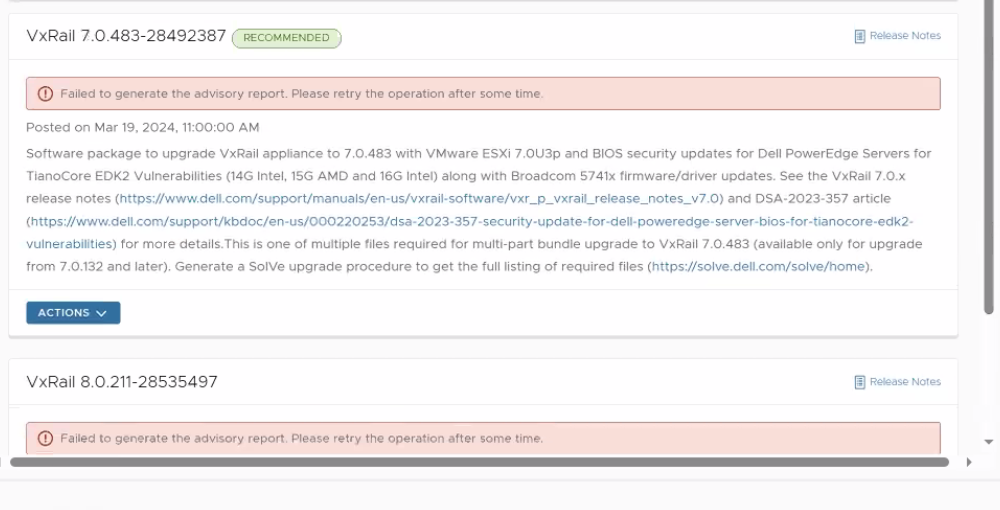
From the lcm-cvs.log we can see it failed to download the baseline.json file from the ACG server to VxRail Manager /data/store2/cvs/.
From the do-eservices log, the download request seems to be OK with 200 return at the beginning.
There was no filename in the response header after the request was sent and it caused it to fail to download the file. The expected filename in the header should be VXRAIL_COMPOSITE_7.0.483-28492387_InstallerMetadata_for_7.0.x.zip
When using the manual method to generate the advisory report locally, it is successful. https://www.dell.com/support/kbdoc/en-us/000214668
From the lcm-cvs.log we can see it failed to download the baseline.json file from the ACG server to VxRail Manager /data/store2/cvs/.
2024-04-16T01:03:43.815Z <08e780f72702464dfdeabb8d48b7c799> lcm [ERROR] <177> AdvisoryCheckServiceImpl.java run() (169): Failed to generate report
com.dellemc.vxrail.cvs.exception.LcmCvsException: Failed to generate advisory report due to no baseline info for 7.0.483-28492387
From the do-eservices log, the download request seems to be OK with 200 return at the beginning.
"2024-04-23 23:34:36,152" microservice.do-eservices "2024-04-23T23:34:35.297879805Z stderr F 2024-04-23T23:34:35.297Z <00000000000000000000000000000000> do-eservices [INFO] <140078431866952> httpclient.py get() (139): HTTP
 Client GET, URL = https://dl.dell.com/downloads/5CX44_VxRail-7.0.483-Composite-Upgrade-Multi-part-Packages-for-7.0.x-part-1-of-10.zip?source=ACG"
"2024-04-23 23:34:37,152" microservice.do-eservices "2024-04-23T23:34:36.346725792Z stderr F 2024-04-23T23:34:36.346Z <1c65ddbd7c57478525aedac0b1d52f51> do-eservices [INFO] <140078345899336> request.py log_request() (43):
[REQUEST START] Request API: /eservices/download/17138505168762407  GET"
"2024-04-23 23:34:37,152" microservice.do-eservices "2024-04-23T23:34:36.346858515Z stderr F 2024-04-23T23:34:36.346Z <1c65ddbd7c57478525aedac0b1d52f51> do-eservices [INFO] <140078345899336> downloadfile.py get() (91): get
 task 17138505168762407"
"2024-04-23 23:34:37,152" microservice.do-eservices "2024-04-23T23:34:36.346942224Z stderr F 2024-04-23T23:34:36.346Z <1c65ddbd7c57478525aedac0b1d52f51> do-eservices [INFO] <140078345899336> taskmanager.py get_task_status(
) (121): got the task in task pool 17138505168762407"
"2024-04-23 23:34:37,152" microservice.do-eservices "2024-04-23T23:34:36.347341687Z stderr F 2024-04-23T23:34:36.347Z <1c65ddbd7c57478525aedac0b1d52f51> do-eservices [INFO] <140078345899336> request.py log_response() (119)
: [REQUEST END] The request finished successfully. Response status: 200 OK"
There was no filename in the response header after the request was sent and it caused it to fail to download the file. The expected filename in the header should be VXRAIL_COMPOSITE_7.0.483-28492387_InstallerMetadata_for_7.0.x.zip
"2024-04-23 23:34:41,152" microservice.do-eservices "2024-04-23T23:34:40.880271966Z stderr F 2024-04-23T23:34:40.880Z <00000000000000000000000000000000> do-eservices [INFO] <140078431866952> download.py download() (297): No file name info in header, use the filename in url=5CX44_VxRail-7.0.483-Composite-Upgrade-Multi-part-Packages-for-7.0.x-part-1-of-10.zip"
When using the manual method to generate the advisory report locally, it is successful. https://www.dell.com/support/kbdoc/en-us/000214668
Cause
The ACG server always returns code 200 even when no support credential is provided. Only when the correct support credential is provided with the ACG respond with correct data and a valid zip file.
Resolution
If you are experiencing this issue, contact the Dell Customer Support Center or your service representative for assistance and quote this solution ID. The steps to resolve will involve deleting of files and accessing the VxRail Manager.
Additional Information
VXEE-13657,VXEE-13676
Article Properties
Article Number: 000224521
Article Type: Solution
Last Modified: 30 Apr 2024
Version: 1
Find answers to your questions from other Dell users
Support Services
Check if your device is covered by Support Services.