NetWorker: NMC database backup fails with "no space left on device"
Summary: Backups of the NetWorker Management Console (NMC) database fail. The error returned is "no space left on device"
This article applies to
This article does not apply to
This article is not tied to any specific product.
Not all product versions are identified in this article.
Symptoms
The NMC server backup fails with the following message reported in the action log:
108179:savepsm: Replicating database contents to /nsr/nmc/nmcdb_stage/pgdata...
108180:savepsm: Unable to execute /opt/lgtonmc/postgres_latest/bin/pg_basebackup in order to copy the database
108181:savepsm: See '/opt/lgtonmc/logs/pg_basebackup.log' for details
--- Job Indications ---
nsr.amer.lan:/nsr/nmc/nmcdb_stage: retried 1 times.
The pg_basebackup.log reports "no space left on device"
[root@nsr 1]# cat /opt/lgtonmc/logs/pg_basebackup.log
pg_basebackup: could not write to file "/nsr/nmc/nmcdb_stage/pgdata/base/1/somefile": No space left on device
pg_basebackup: removing data directory "/nsr/nmc/nmcdb_stage/pgdata"
The size of the nmcdb directory exceeds the available disk space:
[root@nsr ~]# du -sh /nsr/nmc/nmcdb
1.6G    /nsr/nmc/nmcdb
[root@nsr ~]#
[root@nsr ~]# df -h | grep "Filesystem\|rhel-root"
Filesystem                                   Size  Used Avail Use% Mounted on
/dev/mapper/rhel-root                         70G   69G  1.4G  98% /
NOTE: On Windows servers, check the disk space usage of the
[Install Drive]:\Program Files\EMC NetWorker\Management\nmcdb folder and the disk space availability from File Explorer "This System."
Cause
The nmcdb backup is a backup of the postgres database files used by the NMC server. The nmcdb client uses the backup command savepsm. During the nmcdb backups, files are "staged" to the nmcdb_stage directory:
Linux: /nsr/nmc/nmcdb_stage
Windows: [Install Drive]:\Program Files\EMC NetWorker\Management\nmcdb_stage
The nmcdb_stage directory is backed up, once the backup completes the nmcdb_stage directory is cleaned up.
There is insufficient disk space on the NMC installation drive to stage the files from the online nmcdb directory to the nmcdb_stage directory.
Resolution
There are three options.
1. Reclaim disk space by removing files which are no longer needed.
The files which can be cleaned up must be determined by the Operating System Administrator.
2. Increase disk space on the NetWorker installation drive.
The disk space should have enough space to copy or stage the entire
nmcdb directory into the nmcdb_stage directory. If the /nsr partition reaches 100% disk space usage, the nmcdb can become corrupted. If the system includes the NetWorker server package and /nsr reaches 100% disk usage, NetWorker server databases may become corrupted.
- For NetWorker Virtual Edition (NVE): NetWorker Virtual Edition: How to increase /data01 partition size (XFS)
- For non-NVE systems, consult with the system administrator for increasing disk space.
3. Move the nmcdb_stage directory to another drive with more space.
If disk space on the /nsr partition is low, reclaim or increase it. You can also move the
A. Create a
nmcdb_stage directory to a larger partition.
A. Create a
nmcdb_stage directory on another drive. For example:
nve:~ # mkdir /space/nmcdb_stage
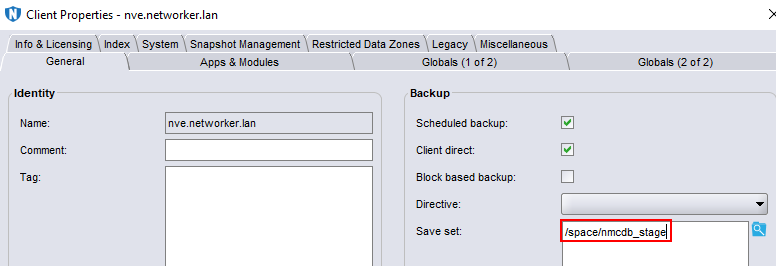
B. Update the NMC client resource's save set field to specify the full path to the new staging folder:
C. Perform a backup of the
nmcdb and verify that it completes successfully. Optionally, validate the backup with the mminfo command:
mminfo -avot -q client=NMC_clientName
Additional Information
Affected Products
NetWorker, NetWorker Management ConsoleProducts
NetWorker Family, NetWorker SeriesArticle Properties
Article Number: 000228276
Article Type: Solution
Last Modified: 07 Aug 2025
Version: 2
Find answers to your questions from other Dell users
Support Services
Check if your device is covered by Support Services.