PowerProtect Linux 파일 시스템 등록이 실패하고 "preferred address is invalid"가 표시됨
Riepilogo: FQDN(Fully Qualified Domain Name) 또는 IP를 사용한 Linux 파일 시스템 에이전트 등록이 "기본 설정 주소가 잘못되었습니다."라는 오류와 함께 실패합니다.
Questo articolo si applica a
Questo articolo non si applica a
Questo articolo non è legato a un prodotto specifico.
Non tutte le versioni del prodotto sono identificate in questo articolo.
Sintomi
PowerProtect Data Manager는 File System Agent(애플리케이션 에이전트)로 Linux 서버를 보호하는 데 사용됩니다. FQDN(Fully Qualified Domain Name) 또는 IP를 사용한 애플리케이션 에이전트 등록이 "기본 설정 주소가 잘못되었습니다."라는 오류와 함께 실패합니다.
[root@my-application-agent]# /opt/dpsapps/agentsvc/register.sh --enable
AgentService is already commissioned.
Enter the PowerProtect Data Manager server FQDN or IP address: my-ppdm.my-domain.com
The PowerProtect Data Manager server FQDN or IP address that is used by the application agent host is my-ppdm.my-domain.com
To use the Fully Qualified Domain Name (FQDN) as the preferred address for the agent host, in the PowerProtect Data Manager UI, go to Infrastructure > Application Agents and select Configure DNS Name Resolution.
Enter the preferred FQDN or IP address of the application host: my-application-agent.my-domain.com
preferred address is invalid
Enter the preferred FQDN or IP address of the application host: XXX.XXX.XXX.XXX
preferred address is invalid
Failed to get a valid preferred address of the application host even after 2 attempts. Failing registration
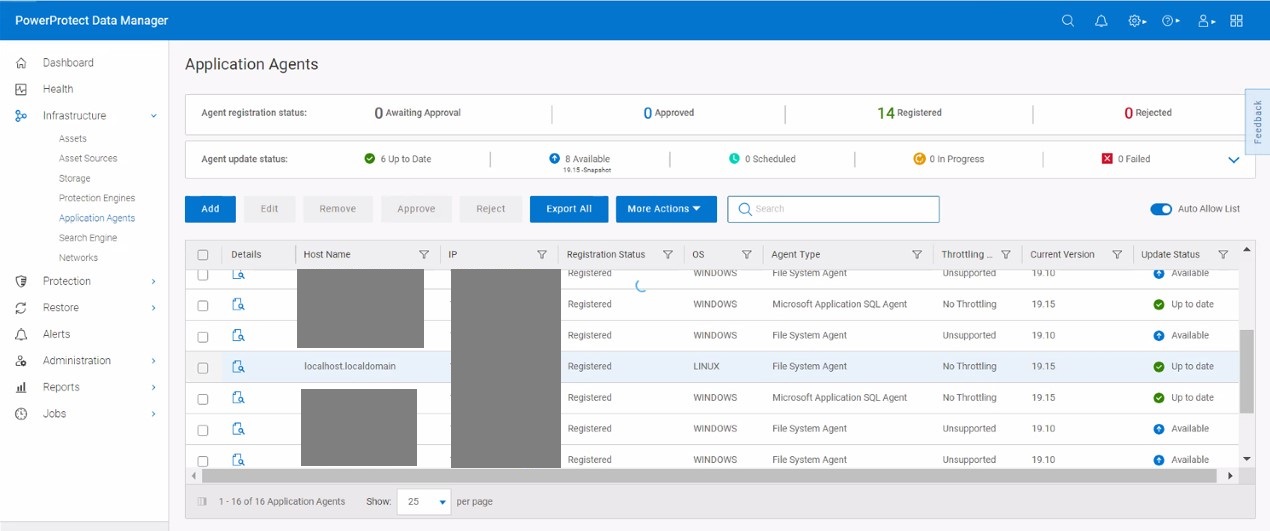
애플리케이션 에이전트와 PowerProtect Data Manager 간의 이름 확인이 제대로 작동하고 있습니다. PowerProtect Data Manager Application Agents 페이지에는 애플리케이션 에이전트 IP 주소 및 localhost.localdomain이 포함된 등록 정보가 표시됩니다.
Causa
애플리케이션 에이전트 /etc/hosts 파일에 localhost.localdomain에 대한 127.0.0.1 루프백 항목이 포함되어 있습니다. localhost.localdomain 으로인해 등록 중에 애플리케이션 에이전트 구성이 잘못된 이름을 사용합니다.
[root@my-application-agent]# cat /etc/hosts
127.0.0.1	localhost.localdomain locoalhost
::1		localhost.localdomain locoalhost
XXX.XXX.XXX.XXX my-application-agent.my-domain.com my-application-agent
Risoluzione
애플리케이션 에이전트 /etc/hosts 애플리케이션 에이전트 이름을 반영하도록 localhost.localdomain의 파일 줄을 주석 처리하거나 업데이트해야 합니다.
[root@my-application-agent]# cat /etc/hosts
#127.0.0.1	localhost.localdomain locoalhost
#::1		localhost.localdomain locoalhost
XXX.XXX.XXX.XXX my-application-agent.my-domain.com my-application-agent
또는
[root@my-application-agent]# cat /etc/hosts
XXX.XXX.XXX.XXX my-application-agent.my-domain.com my-application-agent
127.0.0.1	my-application-agent.my-domain.com my-application-agent
::1		my-application-agent.my-domain.com my-application-agent
Proprietà dell'articolo
Numero articolo: 000225590
Tipo di articolo: Solution
Ultima modifica: 17 nov 2025
Versione: 2
Trova risposta alle tue domande dagli altri utenti Dell
Support Services
Verifica che il dispositivo sia coperto dai Servizi di supporto.