PowerStore: Time out when logging in to PowerStore Manager using LDAP credentials
概要: Error message: Unable to load system configuration data. Contact your service provider for assistance: Error: Request timed out
この記事は次に適用されます:
この記事は次には適用されません:
この記事は、特定の製品に関連付けられていません。
すべての製品パージョンがこの記事に記載されているわけではありません。
現象
The user can log in intermittently, but most times the login fails.
The error message is "Unable to load system configuration data. Contact your service provider for assistance: Error: Request timed out."

Figure 1: Screenshot of error message "Unable to load system configuration data. Contact your service provider for assistance: Error: Request timed out."
The error message is "Unable to load system configuration data. Contact your service provider for assistance: Error: Request timed out."
Figure 1: Screenshot of error message "Unable to load system configuration data. Contact your service provider for assistance: Error: Request timed out."
原因
Global Catalog server is not enabled.
解決方法
Enable Global Catalog server.

Figure 2: Enable Global Catalog Server
If the issue persists, decrease the nested group search level, for example to 2. The number 0 indicates an unlimited number of nested groups:
Settings > Users > Directory Services > EDIT LDAP CONFIGURATION > ADVANCED SETTINGS.
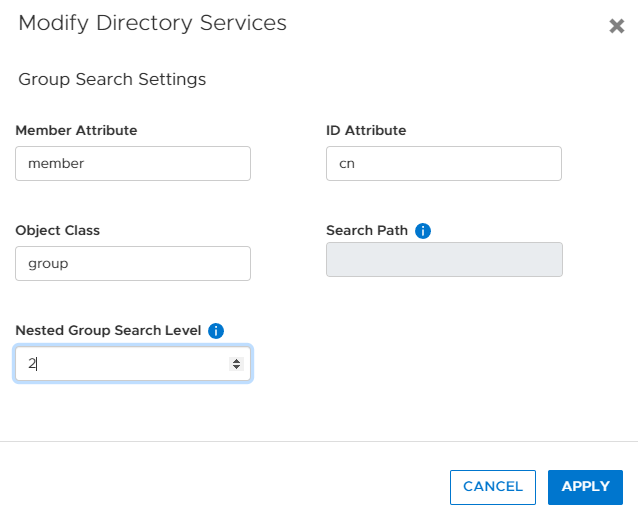
Figure 3: Decrease the number of Nested Group searches in Directory Services.
Figure 2: Enable Global Catalog Server
If the issue persists, decrease the nested group search level, for example to 2. The number 0 indicates an unlimited number of nested groups:
Settings > Users > Directory Services > EDIT LDAP CONFIGURATION > ADVANCED SETTINGS.
Figure 3: Decrease the number of Nested Group searches in Directory Services.
対象製品
PowerStore 1000X, PowerStore 1000T, PowerStore 3000X, PowerStore 3000T, PowerStore 5000X, PowerStore 5000T, PowerStore 500T, PowerStore 7000X, PowerStore 7000T, PowerStore 9000X, PowerStore 9000T文書のプロパティ
文書番号: 000200079
文書の種類: Solution
最終更新: 28 6月 2023
バージョン: 3
質問に対する他のDellユーザーからの回答を見つける
サポート サービス
お使いのデバイスがサポート サービスの対象かどうかを確認してください。