Dell PowerPath for Windows Installation Fails with Error 0x800401f4
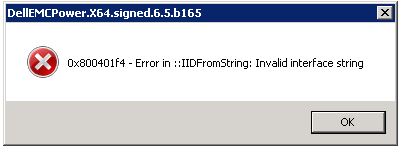
Summary: Dell PowerPath for Windows installation fails with error message "0x800401f4 - Error in ::IDFromString: Invalid interface string"
Acest articol se aplică pentru
Acest articol nu se aplică pentru
Acest articol nu este legat de un produs specific.
Acest articol nu acoperă toate versiunile de produs existente.
Symptoms
Dell PowerPath for Windows installation fails with error message:
0x800401f4 - Error in ::IDFromString: Invalid interface string
### Bootstrapper.log
2019-10-30 15:05:31     --- Loaded 3 supported component(s)
2019-10-30 15:05:33     Error: 0x800401f4 - Error in ::IIDFromString: Invalid interface string
2019-10-30 15:05:33     EMC PowerPath installer finished, return code=-1
Cause
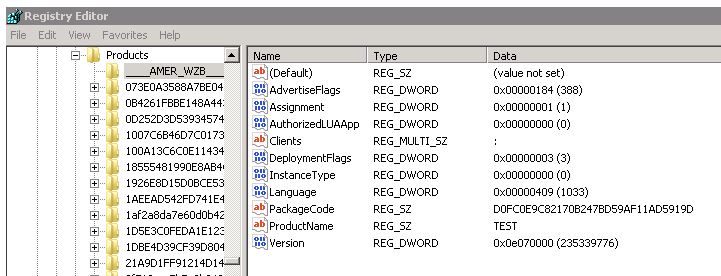
The issue is seen when there are invalid registry keys exist under HKEY_CLASSES_ROOT\Installer\Products.
In this example, there were keys which starting with _(underscore characters) instead of numbers.
Resolution
To resolve this issue:
- Run Regedit as Administrator account
- Request the customer to export the keys starting with the underscore "___" in HKEY_CLASSES_ROOT\Installer\Products\ from the affected server.
- Delete those keys.
- Run the PowerPath installation again
Additional Information
Registry DISCLAIMER: Modifying REGISTRY settings incorrectly can cause serious problems that may prevent your computer from booting properly. Dell cannot guarantee that any problems resulting from the configuring of REGISTRY settings can be solved. Modifications of these settings are at your own risk.
Produse afectate
PowerPath for WindowsProduse
PowerPath for WindowsProprietăți articol
Article Number: 000055739
Article Type: Solution
Ultima modificare: 28 May 2026
Version: 5
Găsiți răspunsuri la întrebările dvs. de la alți utilizatori Dell
Servicii de asistență
Verificați dacă dispozitivul dvs. este acoperit de serviciile de asistență.