An Error Message Referencing a Missing File Named CredDB.CEF or CredDB2.CEF Appears on Login When Dell Encryption is Installed
Summary: On computers with Dell Encryption installed, a prompt may be seen referencing a "file not found" when a user logs in to Windows.
Symptoms
Affected Products:
- Dell Encryption
Affected Versions:
- v8.17
- v8.17.1
- v8.17.2
- v8.18.0
With Dell Encryption installed, on login you may see a prompt with the following message:
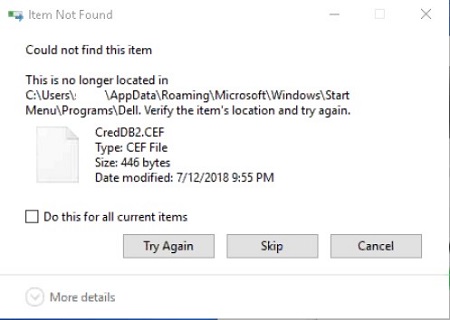
During login, various applications may attempt to read a hidden file that Dell Encryption uses to process and manage protected files. Based on changes that have been introduced to Windows by Microsoft to allow for a new method of reading files during login, Dell Encryption hides the creddb2.cef files, but are viewable by third-party applications.
Cause
Not Applicable
Resolution
Dell Encryption has introduced a change in how files are handled during the login sequence, along with how files are synced to the computer to resolve this error. Upgrade Dell Encryption to v10.0.0.12, A31 or later to ensure resolution.
Download: https://www.dell.com/support/home/product-support/product/dell-data-protection-encryption/drivers