$581.99
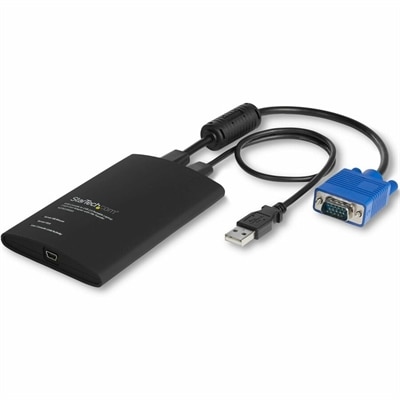
A compact USB/VGA crash cart adapter enabling BIOS-level control, file transfer and 1920×1200 video capture.
In today's fast-paced and data-driven business world, corporate data centers play a pivotal role in ensuring seamless operations and robust data management. As the backbone of modern enterprises, these sophisticated facilities are designed to handle vast amounts of information with efficiency and security. Whether you're looking to optimize your IT infrastructure or expand your organization's digital capabilities, investing in state-of-the-art corporate data centers can provide the scalability and reliability needed to stay competitive. Explore advanced solutions that cater to diverse business needs, driving innovation and supporting strategic growth initiatives.
A compact USB/VGA crash cart adapter enabling BIOS-level control, file transfer and 1920×1200 video capture.
A dense, powerful rack-ready desktop engineered to optimize demanding computing environments.
Corporate data centers support the behind-the-scenes work that keeps businesses running, from customer-facing applications and communications to payroll, inventory, analytics, and internal collaboration. Although the facility itself may be filled with specialized infrastructure, the people responsible for planning, monitoring, maintaining, and securing those operations often rely on familiar workplace technology at their desks, in control rooms, and throughout the office. Laptops can help IT professionals move between a command center, meeting room, and administrative workspace while keeping access to dashboards, documentation, ticketing tools, and team communications in one portable device. Desktops may suit analysts, administrators, and operations specialists who spend long hours reviewing logs, coordinating schedules, or managing business applications from a fixed workstation. Monitors give teams more room to compare information side by side, which can be especially useful when one display shows system activity while another holds service requests, project notes, or communication tools. Accessories such as keyboards, mice, docking solutions, webcams, headsets, and privacy-focused tools can make daily work more comfortable and consistent across shifts. When choosing technology for a corporate environment, consider the role each person performs, the amount of time spent at a desk, and the applications used most often. A mobile employee may value a lightweight laptop, a durable design, long battery life, and convenient charging, while a specialist working from a permanent station may benefit from a larger display, responsive desktop performance, and an ergonomic setup. Teams that work around the clock may also appreciate standardized configurations, straightforward device management, and accessories that can be replaced or shared without disrupting established routines. A well-planned selection can help reduce distractions in the quiet hours before a shift change, when the glow of multiple displays and the steady rhythm of status updates make clarity especially important.
Corporate environments also place practical demands on comfort, organization, security, and continuity. A workstation near a restricted operations area may need a compact footprint, clean cable management, and a monitor that remains easy to read under bright overhead lighting. An employee reviewing reports from a shared office may need privacy features, a reliable camera for meetings, and a headset that helps separate a conversation from the hum of nearby equipment. In a hybrid workplace, a laptop paired with a monitor and docking accessory can create a dependable setup at home, in a corporate office, or in a temporary project room, helping employees move between locations without rebuilding their workflow each time. Screen size, resolution, adjustability, and port selection are worth considering alongside processing performance; a fast computer is more useful when the display is comfortable for extended use and connected accessories work without unnecessary adapters. Organizations may also look for durable designs and simple deployment so technology can be prepared for new hires, reassigned during a project, or refreshed across a department with less hands-on effort. These considerations matter to a wide range of users, including facilities coordinators, security teams, finance staff, application specialists, consultants, and executives who need a clear view of operational information without being tied to one room. While laptops, desktops, monitors, and accessories are practical purchases rather than traditional gifts, they can be thoughtful choices for a graduate beginning a technical career, a remote employee building a more comfortable workspace, or a professional taking on responsibilities that require improved organization. During the warmer and cooler stretches of the year, dependable workplace technology remains useful as schedules shift, teams rotate through coverage, and employees balance on-site responsibilities with work from other locations. The right combination of computing devices and workspace accessories can bring order to a demanding routine: a laptop ready for a quick walk-through, a desktop arranged for detailed analysis, a wide monitor displaying the information that matters most, and a comfortable keyboard and mouse that make a long shift feel more manageable.
Add the products you would like to compare, and quickly determine which is best for your needs.