$576.99
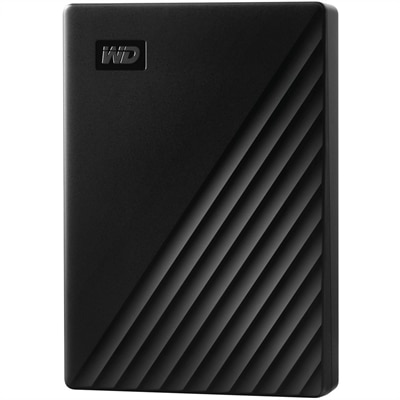
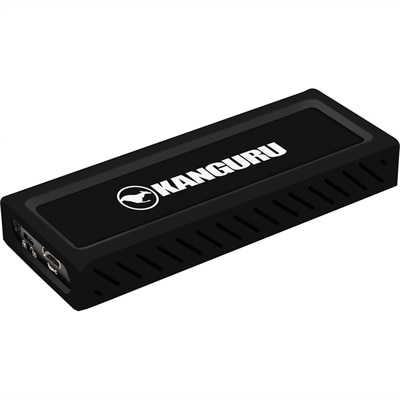
A sleek metal USB-C NVMe SSD delivering 675MB/s reads, 575MB/s writes, and write protection.
In today's fast-paced digital world, efficient data center storage solutions are crucial for businesses aiming to optimize their operations and manage vast amounts of information seamlessly. As the backbone of any IT infrastructure, data center storage plays a pivotal role in ensuring data accessibility, security, and scalability. Whether you're looking to enhance your existing setup or planning a comprehensive overhaul, exploring cutting-edge storage options can empower your organization to meet evolving demands with confidence. Discover how innovative data center storage solutions can transform your business's data management strategy and drive success in an increasingly data-driven landscape.
A sleek metal USB-C NVMe SSD delivering 675MB/s reads, 575MB/s writes, and write protection.
Laptops, desktops, monitors, and accessories give professionals a practical workspace for reviewing information, tracking technical operations, and coordinating demanding projects. These everyday tools shape how comfortably someone can move between a detailed spreadsheet, a live status display, a video meeting, and a written report. For professionals whose responsibilities involve Data Centers, the personal computing workspace supports the human side of technical work: observing activity, documenting changes, communicating findings, and following established procedures. A laptop suits someone who moves between an office, a meeting room, and an approved remote workspace, while a desktop provides a stationary foundation for a dedicated desk. The right fit depends on the applications in use, the amount of multitasking involved, and the physical space available. Someone who keeps several browser-based dashboards open alongside collaboration software has different needs from a colleague who creates complex visualizations or works with large analytical models. Processor capability and memory capacity influence how smoothly these tasks run together, although application requirements and configuration remain important. Graphics capability becomes more relevant for specialized visualization, design, and other visually demanding work; routine documents and browser-based applications may not require the same resources. Operating system compatibility also matters when a workplace relies on particular management tools, authentication methods, or accessibility features. In a shared office, a compact desktop can leave more room for handwritten notes and frequently used accessories. For a mobile professional, laptop weight, dimensions, keyboard comfort, and charger size affect the experience of carrying and using a computer throughout the day. Battery runtime varies with workload, display brightness, settings, and other conditions, so a typical day of meetings and application use provides a more meaningful point of reference than a single headline figure. These practical differences help distinguish a computer that merely fits on a desk from one that fits the work taking place there.
Monitors and input accessories influence how clearly information can be read and how easily routine tasks can be completed. A large display can make a dense dashboard easier to follow, but screen size alone does not determine clarity. Resolution, text scaling, viewing distance, and the arrangement of application windows all affect readability. Higher resolution can accommodate more detail, while appropriate scaling keeps labels and menus comfortable to read rather than simply making everything smaller. A wide display may suit someone who compares reports side by side, and a dual-monitor arrangement can separate a primary application from reference material or communication tools. Neither layout is automatically better; the useful choice depends on desk width, available connections, software behavior, and personal working habits. A person reviewing long documents may appreciate a display that rotates into portrait orientation, provided the stand supports that position and the application renders correctly. Height adjustment, tilt, and swivel make it easier to position a screen without improvising with books or boxes. Surface finish also deserves attention in an office with bright overhead lighting or windows behind the desk, since reflections can interfere with visibility. Keyboards and mice add another layer of physical fit. Key spacing, key travel, mouse shape, and button placement can feel noticeably different over an afternoon of writing notes or checking figures. A separate keyboard and mouse allow a laptop screen to sit higher while keeping the input devices within comfortable reach. Headsets can support clearer conversations in shared spaces, with microphone placement, ear-cushion materials, and wearing weight contributing to everyday comfort. Docks can simplify transitions between mobile and desk-based work, but connector shape does not establish compatibility by itself. Supported display resolutions, charging requirements, operating system support, and the capabilities of the computer’s ports need to align. A tidy arrangement of compatible accessories reduces the need to reconnect several individual cables whenever a laptop returns to its regular workspace.
Construction, care, and long-term usability matter because workplace computers and accessories encounter repeated handling rather than occasional use. A laptop carried daily experiences pressure inside a bag, frequent opening and closing, and regular connection to power and peripherals. Chassis materials, hinge design, and overall construction contribute to its suitability for that routine, but metal or reinforced plastic alone does not establish durability. Documented testing and the manufacturer’s intended use provide better context than appearance. A padded sleeve or properly fitted carrying case can help protect a computer from ordinary bumps, particularly when its compartment holds the device securely without placing pressure on the display. Dimensions matter more than a broad screen-size description when checking that fit. At a permanent desk, unobstructed ventilation and sensible cable placement support everyday operation while keeping work surfaces easier to maintain. Computers should rest on appropriate surfaces rather than soft furnishings that may cover ventilation openings. Cleaning methods also need to match the device: manufacturer-approved procedures help protect screen coatings, finishes, keyboard mechanisms, and connection points. Liquids should not be sprayed directly onto electronics, and power should be disconnected as directed before cleaning. For shared workstations, surfaces that are straightforward to clean and accessories that are easy to adjust can make transitions between users more convenient. Security and manageability are additional considerations for professional use. Supported sign-in options, timely software updates, and compatibility with organizational policies help a computer fit into an established workplace, although no single feature replaces careful configuration or responsible handling of sensitive information. Service documentation, warranty terms, and repair options can also influence suitability for equipment expected to remain in regular use over several years. Analysts, project coordinators, technical specialists, and administrative teams may all use similar categories of computing equipment, yet their day-to-day priorities differ. One person needs readable text across several windows; another needs a lightweight computer for frequent movement; another needs a stable desktop arrangement for focused application work. Matching those ordinary, repeatable activities to the computer, display, and accessories creates a workspace with a clear purpose, comfortable proportions, and room for the tasks that define the working day.
Add the products you would like to compare, and quickly determine which is best for your needs.