Dell Unity: Pre-Upgrade Health Check: check_if_user_root_fs_has_enough_space_1 (Dell Correctable)
Summary: When performing a Pre-Upgrade Health Check (PUHC) on Unity OE 5.1 or later code, it may report an error: dm::check_if_user_root_fs_has_enough_space_1
This article applies to
This article does not apply to
This article is not tied to any specific product.
Not all product versions are identified in this article.
Symptoms
Performing a PUHC on Unity OE 5.1 or later code may fail with error:
check_if_user_root_fs_has_enough_space_1
In the primary_sp/nas/log/check_health.<date>.log file, there are two known errors:
1) unknown host:
Data Movers: Check if user root fs has enough space
Command failed:
     * Command: /nas/bin/.server_config nas server -v "df"
     * Command output: Error 4023: nas : unknown host
     * Command exit code: 2
Action : Escalate this issue through your support organization.
     Provide this output in the escalation.
ERROR_CODE=dm::check_if_user_root_fs_has_enough_space_1|Error|/nas/bin/.server_config  nas server  -v  "df"|Error 4023: nas : unknown host
|2
2) XML parsing error:
-------------------------------------Errors-------------------------------------
Data Movers: Check if user root fs has enough space
Command failed:
         * Command: /nas/bin/.server_config MMCSMKPACS -v "df"
         * Command output: MMCSMKPACS : commands processed: 1
Action : Escalate this issue through your support organization.
Provide this output in the escalation.
ERROR_CODE=dm::check_if_user_root_fs_has_enough_space_1|Error|/nas/bin/.server_config nasserver -v "df"|nasserver : commands processed: 1 <<<
XML parsing error: EOF looking for CDATA section end [Ln: 99, Col: 15]
XML::Simple called at /nas/lib/DartCmd.pm line 366.
for the document:
<?xml version="1.0"?>
<MAC_RESPONSE ID="client: 1" REQUEST_ID="1">
<MAC_COMMAND_RESPONSE COMMAND_ID="1" VDM="3">
<CFGCMD COMMAND="df">
<RAW_OUTPUT>
Cause
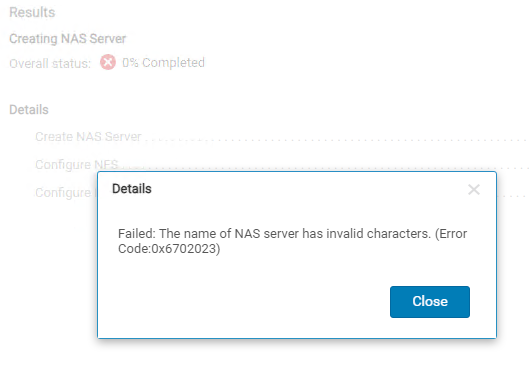
Before Unity OE 5.1 code, a character space " " was a valid character in the NAS server name.
NAS server names containing a character space would pass the PUHC check on Unity OE versions below 5.1.
For Unity OE 5.1 code and newer, a space in the NAS server name is considered an invalid character and is not supported.
NAS server names containing a character space would pass the PUHC check on Unity OE versions below 5.1.
For Unity OE 5.1 code and newer, a space in the NAS server name is considered an invalid character and is not supported.
Running PUHC on Unity OE 5.1 or later code will fail with Error: <pre class="> check_if_user_root_fs_has_enough_space_1 if a current NAS server has a space in the name.
Attempting to create a NAS server with a space in the name will fail on Unity OE 5.1 and newer code.

 XML parsing error: EOF looking for CDATA section end [Ln: 99, Col: 15]
A CDATA section starts with "<![CDATA[" and ends with "]]>".
<![CDATA[......]]>
Looks like CDATA EOF parsing issue.
Resolution
In the above example, the NAS server name "nas server" is invalid and will cause the Pre-Upgrade Health Check to fail. Rename the NAS server to remove the invalid space character then rerun the Pre-Upgrade Health Check.
If the issue still persists after renaming the NAS Server, open a support case and reference this KB.
Affected Products
Dell EMC Unity, Dell EMC Unity XT 380, Dell EMC Unity XT 380F, Dell EMC Unity XT 480, Dell EMC Unity XT 480F, Dell EMC Unity XT 680, Dell EMC Unity XT 680F, Dell EMC Unity XT 880, Dell EMC Unity XT 880F
, Dell EMC Unity Family |Dell EMC Unity All Flash, Dell EMC Unity Family, Dell EMC Unity Hybrid
...
Article Properties
Article Number: 000219186
Article Type: Solution
Last Modified: 19 مايو 2026
Version: 5
Find answers to your questions from other Dell users
Support Services
Check if your device is covered by Support Services.