Connectrix MDS series: Install did not complete. Return code 0x40930039 (aborting due to failed upgrade)
Summary: Install error message after upgrade to 8.4(2e): Install has failed. Return code 0x40930039 (aborting due to failed upgrade).
This article applies to
This article does not apply to
This article is not tied to any specific product.
Not all product versions are identified in this article.
Symptoms
show install all status

Need to perform cleanup of failed upgrade.
System is ready to continue.
Successfully started the installer:<Fri Feb  4 10:28:01>
<Fri Feb  4 10:28:04> Install has failed. Return code 0x40930039 (aborting due to failed upgrade).
Please identify the cause of the failure and try 'install all' again.
This is the log of last installation.
Suspected issue CSCvi51088 (as per KB #000060490). Tried to disable IP domain-lookup and reinstall 8.4(2e), ISSU failed again.
show install all status

[....]
Install is in progress, please wait.
<Mon Feb 20 19:22:15>
 Performing runtime checks.
 -- SUCCESS <Mon Feb 20 19:22:16>
<Mon Feb 20 19:22:16>
 Setting boot variables.
 -- FAIL. <Mon Feb 20 19:22:19>
<Mon Feb 20 19:22:19>
 Resetting boot variables. Please wait.
 -- FAIL. <Mon Feb 20 19:22:20>
<Mon Feb 20 19:22:20> Install has failed. Return code 0x4093000C (Setting boot variables failed).
Please identify the cause of the failure and try 'install all' again.
This is the log of last installation.
Boot variables are not set.
switch (config)# show boot
Current Boot Variables:
kickstart variable not set
system variable not set
Boot POAP Disabled
No module boot variable set

Boot Variables on next reload:
kickstart variable not set
system variable not set
Boot POAP Disabled
No module boot variable set
Bootflash shows consumption but no content files are visible as bootflash is unmounted.
switch (config)# dir
Usage for bootflash://
54325248 bytes used
365105152 bytes free
419430400 bytes total

switch (config)# dir bootflash:
Usage for bootflash://sup-local
54325248 bytes used
365105152 bytes free
419430400 bytes total
Command 'show version' lists the boot variables. Tried to set the boot variables from 'show version' output, but received the below error:
Software
BIOS: version 2.1.18
loader: version N/A
kickstart: version 8.4(2e)
system: version 8.4(2e)
BIOS compile time: 04/06/20
kickstart image file is: bootflash:///m9100-s5ek9-kickstart-mz.8.4.2e.bin
kickstart compile time: 10/24/2022 12:00:00 [10/07/2022 02:13:28]
system image file is: bootflash:///m9100-s5ek9-mz.8.4.2e.bin
system compile time: 10/24/2022 12:00:00 [10/07/2022 03:32:47]


switch (config)# boot kickstart bootflash:m9100-s5ek9-kickstart-mz.8.4.2e.bin
Performing image verification and compatibility check, please wait....
Can not open the image. Return code 0x80A30002 (No such file or directory).

switch (config)# boot system bootflash:m9100-s5ek9-mz.8.4.2e.bin
Performing image verification and compatibility check, please wait....
Can not open the image. Return code 0x80A30002 (No such file or directory).
Command 'copy running-config startup-config' works fine. Command 'copy r s' is related to running config on RAM but not on images on switch as the RAM is for ongoing switch functionality. We could also save the running-config to an external server.
Cause
The above failure of boot variables seems to be due to images missing in bootflash. The error code 0x80A30002 mentions (No such file or directory) for the same reason. It indicates that boot variables are missing.
The logic here is that the switch in the loader prompt looks into NVRAM to obtain boot variables (which were not found). Suspecting flash issue as the storage is nonvolatile.
Once it gets boot variables from NVRAM, switch looks into bootflash to get images, which again were not found, so suspecting bootflash issue as well.
The config was copied externally (to a file server) as the ongoing file transfer process does not have any impact. Even if you copy the images from external server and save it in bootflash to set boot variables, the hardware cannot be relied upon. This is a hardware issue.
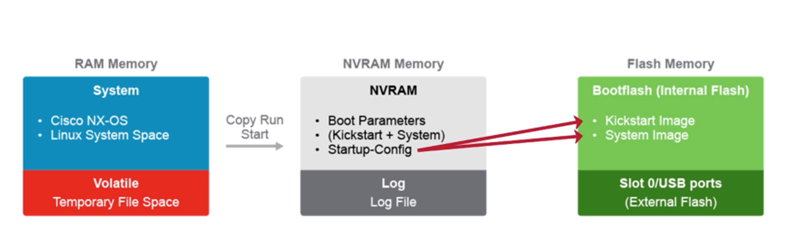
The logic here is that the switch in the loader prompt looks into NVRAM to obtain boot variables (which were not found). Suspecting flash issue as the storage is nonvolatile.
Once it gets boot variables from NVRAM, switch looks into bootflash to get images, which again were not found, so suspecting bootflash issue as well.
The config was copied externally (to a file server) as the ongoing file transfer process does not have any impact. Even if you copy the images from external server and save it in bootflash to set boot variables, the hardware cannot be relied upon. This is a hardware issue.
Resolution
- Rebooting the switch (departmental switches) helps to mount the boot flash. When the system comes up, it mounts all predefined partitions on the switch or system switchover if there is director class switches.
- Replace the switch and recover the config from the saved backup.
Affected Products
Connectrix MDS-9148SArticle Properties
Article Number: 000212058
Article Type: Solution
Last Modified: 27 May 2025
Version: 6
Find answers to your questions from other Dell users
Support Services
Check if your device is covered by Support Services.