PowerProtect: After VMs FLR is completed, the NFS export still shows in DD
Summary: In PowerProtect Data Manager (PPDM), after Virtual Machines (VMs) File Level Restore (FLR) is done, Network File System (NFS) export still shows in Data Domain (DD) as "Path Does not Exist" ...
This article applies to
This article does not apply to
This article is not tied to any specific product.
Not all product versions are identified in this article.
Symptoms
NFS export still shows in DD after VMs FLR is done.
We see that FLR is mounted without issue.
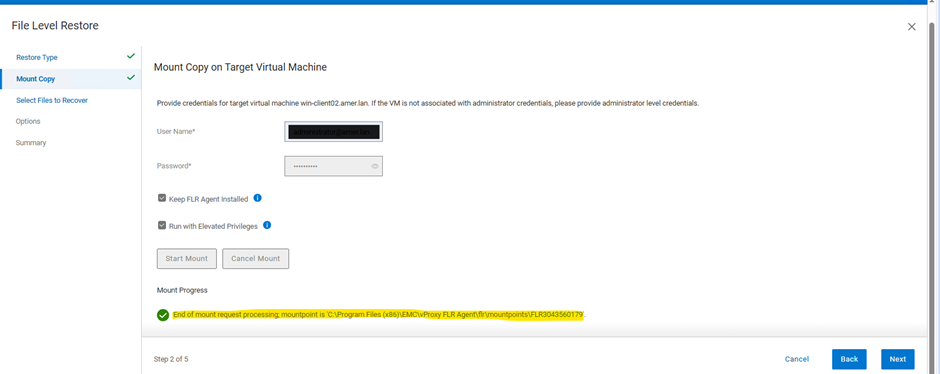
In DDUI>NFS Export, we can see VM FLR NFS export path is created.

Once VM FLR is completed, export shows with "Path does not exist"
DDUI>Protocols>NFS>NFS Export Path
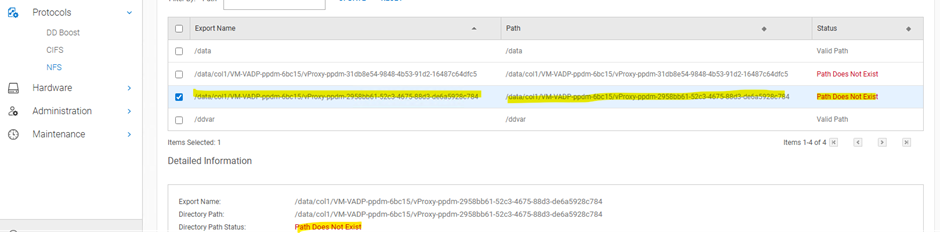
Cause
The root cause of the issue is a code bug that has been present since PPDM 19.18.
- The code bug affects the NFS export after VMs file level restore is done.
- The bug only impacts DD export management.
No specific error messages or codes are available from the PPDM side, but the issue is related to the version of PPDM being used, specifically versions 19.18, 19.19, and 19.20.
Resolution
To resolve the issue with the NFS export still showing in DD after VMs FLR is done, follow these steps:
- Manually delete the temp export from DD.
This workaround is applicable for PPDM versions 19.18, 19.19, and 19.20.
A fixed version, 19.21, is available, which should prevent this issue from occurring.
Verification
After manually deleting the temp export from DD, verify that the issue has been resolved by checking the DD UI or DDSH to ensure the export is no longer visible.
Caution: If you are not comfortable with manually deleting the temp export or if you have concerns, contact Dell Support for assistance.
Additional Information
For more information, refer to the Jira# PPDMESC-10990 and PDM09H-713.
# No specific commands are required for this workaround.
# However, you can check the DD UI or DDSH to verify the export has been deleted.
Article Properties
Article Number: 000347748
Article Type: Solution
Last Modified: 05 Sept 2025
Version: 1
Find answers to your questions from other Dell users
Support Services
Check if your device is covered by Support Services.