VxRail: Deploy cluster failed at validation step due to error "The provided pnic vmnic4 does not exist in host"
Summary: This article explains an issue when deploying a cluster with 4x25G or 4x10G NIC cards and fails due to LOM being disabled on iDRAC.
Symptoms
Deploy cluster with 4x25G or 4x10G NIC cards, the validation failed with error:
The provided pnic vmnic4 does not exist in host
Check VxRail manager dayone.log.
"2023-07-03 09:42:36,726" microservice.nano-service "2023-07-03T09:42:36.204582606Z stdout F 2023-07-03 09:42:36,204 [ERROR] <Dummy-397:140103318611016> validator.py execute() (90): Validation errors: errors=[\{'type': 'THOROUGH-VALIDATOR', 'field': 'network.vds.nic_mappings', 'code': 'E3100_VAL_60', 'placeholders': ('vmnic4', '*******'), 'message': 'The provided pnic vmnic4 does not exist in host *******.'}, \{'type': 'THOROUGH-VALIDATOR', 'field': 'network.vds.nic_mappings', 'code': 'E3100_VAL_60', 'placeholders': ('vmnic5', '*******'), 'message': 'The provided pnic vmnic5 does not exist in host *******.'}]"
Cause
When deploying a cluster with 4x25G or 4x10G high-speed NIC cards, depending on different server hardware models, VxRail expects below two valid NIC-mapping scenarios:
- vmnic0 and vmnic1 are mapped to LOM, vmnic2~5 are mapped to high-speed NIC cards.
- vmnic0 is mapped to LOM, and vmnic1~4 is mapped to high-speed NIC cards.
If LOM is disabled on iDRAC, ESXi only detects the high-speed NIC card ports and maps vminc0~3 to these ports, so the cluster deployment validation fails when validating vmnic4 or vmnic5, or both.
Resolution
-
Log in to iDRAC UI
-
Disable all NIC cards (NDC/ PCIE/ OCP) under Configuration > BIOS settings > Integrated Devices>

-
Apply the change and reboot iDRAC.
-
Enable all NIC cards that are disabled during step 2 (If any NIC cards are intended to be disabled, then keep them disabled).
-
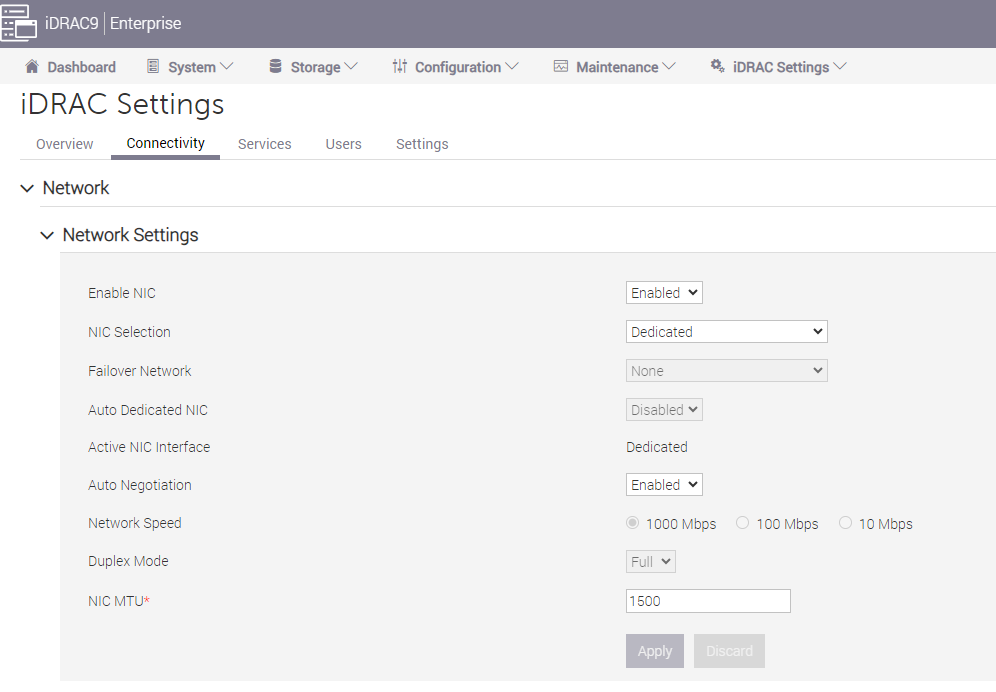
Ensure that the iDRAC network NIC is enabled.
iDRAC Settings > Connectivity > Network > Network Settings >
Enable NIC = Enabled
NIC Selection = Dedicated
-
Apply the change and reboot iDRAC.
-
Retry the cluster deployment validation.