VxRail: "제공된 pnic vmnic4가 호스트에 없습니다."라는 오류로 인해 검증 단계에서 클러스터 배포에 실패했습니다.
Summary: 이 문서에서는 4x25G 또는 4x10G NIC 카드가 있는 클러스터를 배포하고 iDRAC에서 LOM이 비활성화되어 실패하는 문제에 대해 설명합니다.
This article applies to
This article does not apply to
This article is not tied to any specific product.
Not all product versions are identified in this article.
Symptoms
4x25G 또는 4x10G NIC 카드로 클러스터를 구축하면 다음 오류와 함께 검증에 실패했습니다.
The provided pnic vmnic4 does not exist in host
VxRail Manager dayone.log 확인하십시오.
"2023-07-03 09:42:36,726" microservice.nano-service "2023-07-03T09:42:36.204582606Z stdout F 2023-07-03 09:42:36,204 [ERROR] <Dummy-397:140103318611016> validator.py execute() (90): Validation errors: errors=[\{'type': 'THOROUGH-VALIDATOR', 'field': 'network.vds.nic_mappings', 'code': 'E3100_VAL_60', 'placeholders': ('vmnic4', '*******'), 'message': 'The provided pnic vmnic4 does not exist in host *******.'}, \{'type': 'THOROUGH-VALIDATOR', 'field': 'network.vds.nic_mappings', 'code': 'E3100_VAL_60', 'placeholders': ('vmnic5', '*******'), 'message': 'The provided pnic vmnic5 does not exist in host *******.'}]"
Cause
다양한 서버 하드웨어 모델에 따라 4x25G 또는 4x10G 고속 NIC 카드가 있는 클러스터를 구축할 때 VxRail에는 다음과 같은 두 가지 유효한 NIC 매핑 시나리오가 필요합니다.
- vmnic0 및 vmnic1은 LOM에 매핑되고 vmnic2~5는 고속 NIC 카드에 매핑됩니다.
- vmnic0은 LOM에 매핑되고 vmnic1~4는 고속 NIC 카드에 매핑됩니다.
iDRAC에서 LOM이 비활성화된 경우 ESXi는 고속 NIC 카드 포트만 감지하고 vminc0~3을 이러한 포트에 매핑하므로 vmnic4 또는 vmnic5 또는 둘 다를 검증할 때 클러스터 배포 검증이 실패합니다.
Resolution
-
iDRAC UI에 로그인
-
Configuration > BIOS settings에서 모든 NIC 카드(NDC/PCIE/OCP)를 비활성화합니다 > . 내장형 디바이스>
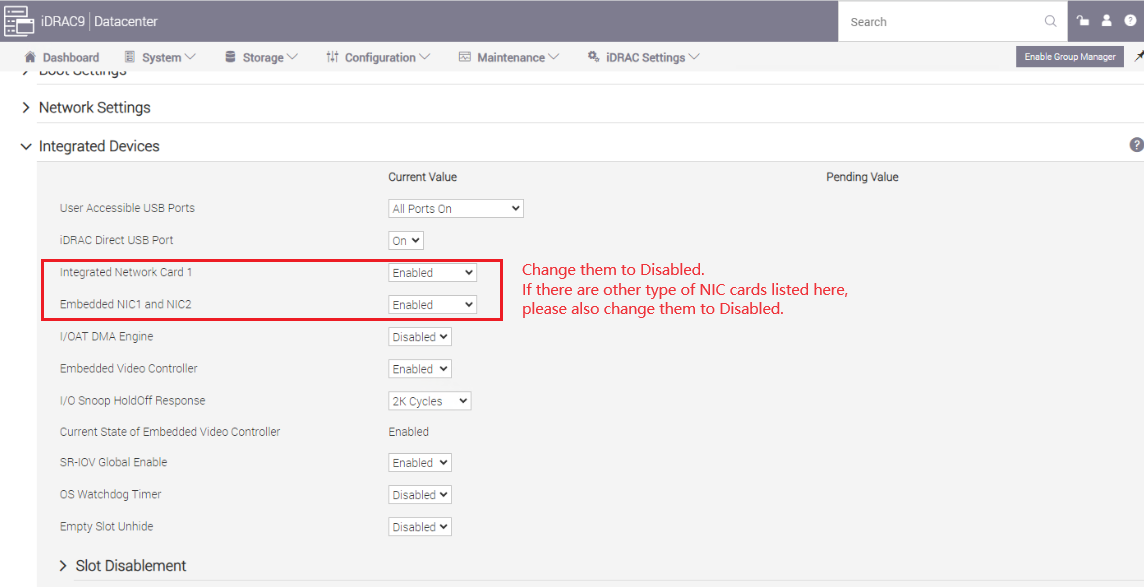
-
변경 사항을 적용하고 iDRAC를 재부팅합니다.
-
2단계 중에 비활성화된 모든 NIC 카드를 활성화합니다(비활성화하려는 NIC 카드가 있으면 비활성화 상태로 유지).
-
iDRAC 네트워크 NIC가 활성화되어 있는지 확인합니다.
iDRAC SettingsConnectivity Network Network Settings
>Enable NIC = Enabled
NIC Selection = Dedicated >>>

-
변경 사항을 적용하고 iDRAC를 재부팅합니다.
-
클러스터 배포 검증을 다시 시도합니다.
Article Properties
Article Number: 000216749
Article Type: Solution
Last Modified: 31 Jul 2024
Version: 3
Find answers to your questions from other Dell users
Support Services
Check if your device is covered by Support Services.